From Twitter

Please wait while my tweets load

If you can't wait - jump to Twitter

See more tweets...

RSS Feed

Please wait while my feed loads

See more posts...

Newsletter

Subscribe to either one of our two newsletters for regular updates and information

Downloads newsletter

This is a weekly newsletter with download news, updates and other information

This is a monthly newsletter with software store information, offers and deals

Rainlendar Lite 2.11.1

Get your life in order with this customisable scheduler

by Mike Williams

Our Rating:
Your Rating:
Login to rate
Based on 0 ratings
License: Freeware
Operating Systems: Linux, Mac OS X, Windows 7 (32 bit), Windows 8, Windows Server, Windows Vista (32 bit), Windows XP
Requirements:


Languages: English
Software Cost: Free
Date Updated: 11 March 2013
Watchlist: Add download to my watchlist
Downloads To Date: 662
Developer: Rainy
RSS News Feed: http://twitter.com/statuses/user_timeline/28787776.rss
Twitter Feed: http://twitter.com/rainlendar
Buy the new TuneUp Utilities 2013 for only $16.95, with lifetime license, saving 58% from MSRP, only from store.downloadcrew.com
Rainlendar Lite (32-bit)
Get your life in order with this customisable scheduler

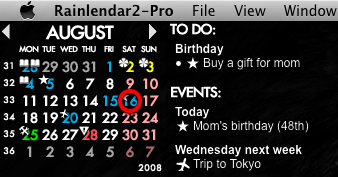
Rainlendar is a highly configurable calendar application which holds upcoming events and urgent tasks, then alerts you in advance so you won't forget anything important.

The program can be set up to display your schedule in just about any way that you'd like. You might choose to view a single month in a calendar, a number of months, the whole year maybe - not a problem. And you can then display as many calendars in a window as you like. It's all very flexible.

A Rainlendar window doesn't have to get in your way, either. By default the Windows version will display a one-month calendar on a transparent background, so you can see your desktop and other applications underneath. It's likely you'll be able to leave the window in a corner of your screen without it interfering with other work.

The program stores its data in standard iCalendar format, so if you currently use another calendar application then you may be able to export its data to Rainlendar. But even if you're starting from scratch, it won't take long to get up to speed - creating new events or tasks is very easy. You're able to specify all the details you need - event location, an associated URL, start and end time, if and when it repeats, more - and optionally add an alarm to remind you.

Please note, this is the free Lite version of Rainlendar. Upgrade to the Pro version and you'll gain additional options to help your Rainlendar setup communicate with the outside world, including support for network shared calendars, Outlook (Windows only), Google Calendar and Remember the Milk. It's yours for 9.95 Euros and you can purchase the program from the Rainlendar site.

Build 2.11.1 brings these changes:

o Fixed a crash bug if another instance of Rainlendar was started.
o "Number of past days the list shows" was not working.
o Reversing the sorting from the event list's context menu could not be done.
o The font effects did not work for custom categories.
o The tool buttons in the manager adjust to the text width.
o It was not possible to remove calendar selection on Mac if "Allow multiple calendars" was enabled.
o Exporting the events in the manager only worked if the list had selection. Now all events are exported if there is no selection.
o The autocompletion works again in the category combobox.
o The traytip does not gain focus anymore when it is shown.
o Double click on the week or day view always created an all day event.
o The reminders were not read correctly from iCloud with CalDAV.
o The status image was not shown in the tray icon on Windows and Mac.
o Executing lua from command line failed on Linux and Mac.
o Creating a exception to a event in week view by dragging deleted the original event from Google calendar.
o Writing events with no duration to iCloud failed.
o Completing an alarm for non-recurring task in the alarm window did not dismiss it.
o Removed hard dependency to the gnome-keyring library on Linux.
o Backup opened incorrect file dialog in Linux.
o The value for "Poll for changes"-setting in Toodledo was not read correctly.

Verdict:

Rainlendar Lite is an easy-to-use, lightweight desktop calendar with some powerful features

Your Comments & Opinion
 
Related Download Articles
 
Calendarscope 6.0

Calendarscope 6.0

Trial Software

Keep your life in order with this capable scheduling tool

Rainlendar Lite (64-bit)

Rainlendar Lite 2.11.1 (64-bit)

Freeware

Get your life in order with this customisable scheduler

WinPIM 2012

WinPIM 2012 v12.60

Trial Software

Get your life in order with this comprehensive personal organiser

Schelandars - Scheduling Calendar

Schelandars - Scheduling Calendar 1.0.2

No Trial Available. Purchase Only

A calendar and scheduling tool that takes a unique approach to time management

Other Download Articles From This Category
Bandizip 3

Bandizip 3.06

Freeware

A free and easy-to-use archiving tool

Directory Opus 10.5 (64-bit)

Directory Opus 10.5.2.0 (64-bit)

Trial Software

Be more productive with your PC using this superb Windows Explorer replacement

Directory Opus 10.5.2

Directory Opus 10.5.2.0

Trial Software

Be more productive with your PC using this superb Windows Explorer replacement

Speccy 1.22

Speccy 1.22

Freeware

Get a comprehensive list of installed system components using this information tool

From Softwarecrew

Please wait while my feed loads

See more posts...

Our Price: $29.99
RRP: $49.99
Saving 40%
Buy Now More Info
Offer Ends In:
 

Spotlight: Free Full Software

Ashampoo Burning Studio 2013 (v11.0.6)

Free Full Commercial Software

Ashampoo Burning Studio 2013 is a compact, simple, but surprisingly feature-packed disc burning suite.

The program makes it easy to create simple data discs and audio CDs, for instance: just drag and drop your files onto the list area and you'll be burning the finished disc in a couple of clicks.

That's just the start, though. Burning Studio 2013 can also create data discs with customised, interactive multi-page menus, perfect if you'd like a more professional way to share and present the disc contents.

A built-in backup tool allows you to create backups which may be encrypted, compressed, and span several CDs, DVDs and Blu-rays.

And there are modules to create VCD or SVCD video projects; burn video DVDs or Blu-ray discs from prepared folders; create, browse or burn disc images (ISO, CUE/ BIN and Ashdisc formats are supported); copy discs, erase them, design and print disc covers, labels and booklets, and more.

The focus throughout is on ease of use, though, and so Ashampoo Burning Studio 2013 remains very straightforward, whatever you're doing. Most disc projects are created via the same simple interface, and for the most part all you have to do is drag and drop the necessary files. But experts will find more advanced options are only a click away, and if you need to then you can set ISO and UDF version, enable Joliet, make a disc bootable and more.

Note the download here will take you to the Downloadcrew Software Store where you can download Burning Studio 2013.

[...]
Value:
Free
Rating: