From Twitter

Please wait while my tweets load

If you can't wait - jump to Twitter

See more tweets...

RSS Feeds

Receive a regular RSS feed from our latest, most popular and recommended downloads

Latest downloads feed

Get a regular RSS from our most latest downloads

Most popular downloads feed

Get a regular RSS from our most popular downloads

Recommended downloads feed

Get a regular RSS from our recommended downloads

Newsletter

Subscribe to either one of our two newsletters for regular updates and information

Downloads newsletter

This is a weekly newsletter with download news, updates and other information

This is a monthly newsletter with software store information, offers and deals

XMedia Recode Portable 3.1.5.8

Batch convert almost any audio or video file from one format to another

by Mike Williams

Our Rating:
Your Rating:
Login to rate
Based on 0 ratings
License: Freeware
Operating Systems: Windows 2000, Windows 7 (32 bit), Windows 7 (64 bit), Windows Server, Windows Vista (32 bit), Windows Vista (64 bit), Windows XP
Requirements:
Languages: English, French, German, Italian, Japanese
Software Cost: Free
Date Updated: 26 April 2013
Watchlist: Add download to my watchlist
Downloads To Date: 1976
Developer: Sebastian Dörfler
RSS News Feed:
Buy the new TuneUp Utilities 2013 for only $16.95, with lifetime license, saving 58% from MSRP, only from store.downloadcrew.com
XMedia Recode Portable
Batch convert almost any audio or video file

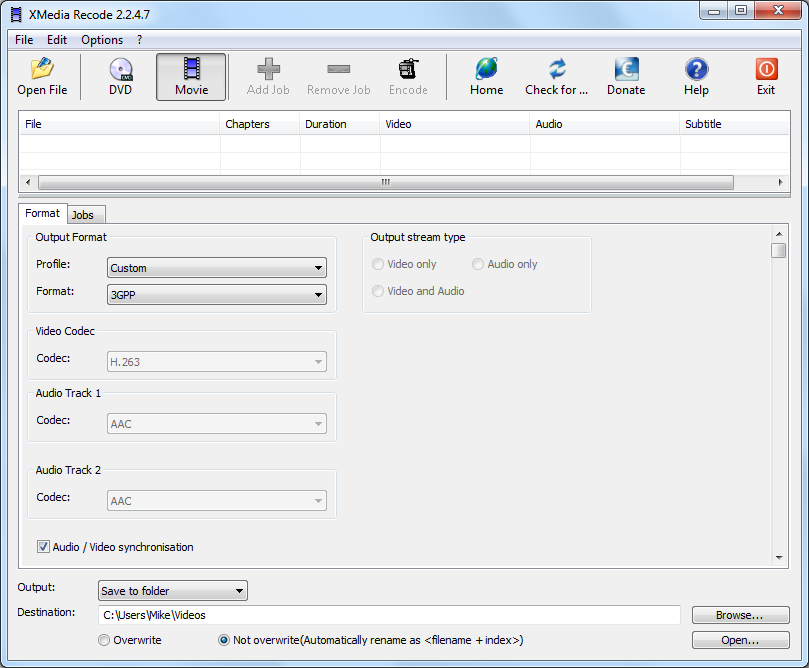
XMedia Recode is an audio and video conversion tool that supports just about every format around: 3GP, 3G2, AAC, AC3, AIFF, AMR, APE, ASF, AVI, AVISynth, AU, DVD (unprotected), DIVX, DTS, E-AC3, FLAC, FLV, H261, H263, H264, M2TS, M1V, M2V, M3U, M3U8, M4A, M4P, M4V, MKA, MKV, MMF, MP2, MP3, MP4, MP4V, MPE, MPEG-1, MPEG-2, MPEG-4, MOV, QT, OGG, OGM, OGV, PVA, REC, RM, RMVB, SVCD, SWF, THP, TS, TRP, TP0, VCD, VOB, WebM, WMA, WMV, WML and WPL.

Compatibility is great, then, and multimedia geeks will also appreciate the fine control they get over the conversion process. You're able to choose the video codec, frame rate, bit rate, GOP length, resolution, aspect ratio and a host of other advanced options. And that's just the start. If you're reducing the size of a video, for instance, XMedia Recode doesn't just apply some random scaling algorithm: you get to decide exactly how it's done, and there are nine options available.

If that all sounds too complicated then there is a simpler approach on offer, fortunately. The program comes with wide selection of profiles that define the best way of carrying out conversions for a particular device or task, and if you choose one of these then every other setting is selected automatically. So if you want to convert a video to play on some Apple device, for instance, you'd choose the Apple profile, then your particular hardware (the iPad is supported), click Add Job > Encode and then watch as your file is created.

XMedia Recode is an incredibly powerful program, then, but it does have one small problem. While the author claims support for five different languages, it's only partly translated from the original German, and the Help appears to be only available in German. This shouldn't be a major issue as it's generally obvious how everything will work, but if you have problems and don't speak the language then it may take some trial and error to figure out any solution.

Verdict:

XMedia Recode is a powerful, effective and highly configurable file conversion tool. The lack of help in anything other than German could be an occasional problem, though

Your Comments & Opinion
 
Related Download Articles
 
XMedia Recode

XMedia Recode 3.1.5.8

Freeware

Batch convert almost any audio or video file from one format to another

SUPER 2012.54

SUPER 2012.54

Freeware

Convert almost any audio or video file to a new format with this powerful free utility

MediaEspresso 6

CyberLink MediaEspresso 6

Trial Software

Convert video, music or images files into formats suitable for the iPad, iPod, games consoles, mobile phones and many other devices

Nero Move It

Nero Move It

Trial Software

Convert and transfer multimedia files from your PC to MP3 players, mobile phones, digital cameras and more

Other Download Articles From This Category
Pale Moon 20.1 Portable

Pale Moon 20.1 Portable

Freeware

Speed-optimized portable version of Firefox designed for the best possible performance

Pale Moon x64 20.1 Portable

Pale Moon x64 20.1 Portable

Freeware

Speed-optimized 64-bit version of Firefox portable designed for the best possible performance

Chrome Portable 27

Google Chrome Portable 27

Open Source

The latest stable Chrome portable includes a web site loading optimization and other improvements

Gramps Portable

Gramps Portable 3.4.5

Open Source

Comprehensive and flexible genealogy research tool

From Softwarecrew

Please wait while my feed loads

See more posts...

Our Price: $34.95
RRP: $39.95
Saving 13%
Buy Now More Info
 

Spotlight: Free Full Software

Ashampoo Burning Studio 2013 (v11.0.6)

Free Full Commercial Software

Ashampoo Burning Studio 2013 is a compact, simple, but surprisingly feature-packed disc burning suite.

The program makes it easy to create simple data discs and audio CDs, for instance: just drag and drop your files onto the list area and you'll be burning the finished disc in a couple of clicks.

That's just the start, though. Burning Studio 2013 can also create data discs with customised, interactive multi-page menus, perfect if you'd like a more professional way to share and present the disc contents.

A built-in backup tool allows you to create backups which may be encrypted, compressed, and span several CDs, DVDs and Blu-rays.

And there are modules to create VCD or SVCD video projects; burn video DVDs or Blu-ray discs from prepared folders; create, browse or burn disc images (ISO, CUE/ BIN and Ashdisc formats are supported); copy discs, erase them, design and print disc covers, labels and booklets, and more.

The focus throughout is on ease of use, though, and so Ashampoo Burning Studio 2013 remains very straightforward, whatever you're doing. Most disc projects are created via the same simple interface, and for the most part all you have to do is drag and drop the necessary files. But experts will find more advanced options are only a click away, and if you need to then you can set ISO and UDF version, enable Joliet, make a disc bootable and more.

Note the download here will take you to the Downloadcrew Software Store where you can download Burning Studio 2013.

[...]
Value:
Free
Rating: