From Twitter

Please wait while my tweets load

If you can't wait - jump to Twitter

See more tweets...

RSS Feed

Please wait while my feed loads

See more posts...

Newsletter

Subscribe to either one of our two newsletters for regular updates and information

Downloads newsletter

This is a weekly newsletter with download news, updates and other information

This is a monthly newsletter with software store information, offers and deals

File Governor 1.2

Easily unlock locked files or folders

by Mike Williams

Our Rating:
Your Rating:
Login to rate
Based on 1 ratings
License: Freeware
Operating Systems: Windows 2000, Windows 7 (32 bit), Windows 7 (64 bit), Windows Server, Windows Vista (32 bit), Windows Vista (64 bit), Windows XP
Requirements:


Languages: English
Software Cost: Free
Date Updated: 16 May 2011
Watchlist: Add download to my watchlist
Downloads To Date: 906
Developer: NoVirusThanks
RSS News Feed: http://twitter.com/statuses/user_timeline/62780238.rss
Twitter Feed: http://twitter.com/novirusthanks
Buy TuneUp Utilities 2012 for only $18.99, with lifetime license, saving 62% from MSRP, only from store.downloadcrew.com
File Governor 1.2
Easily unlock locked files or folders

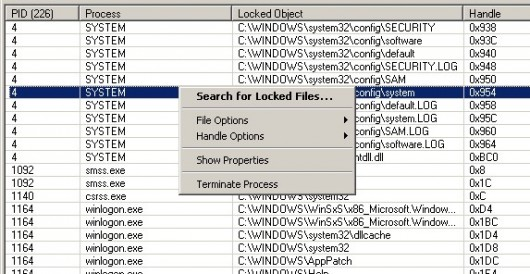
NoVirusThanks File Governor is a handy portable tool that will unlock locked files in just a click or two, allowing you to carry out normal operations on them: renames, deletes, whatever you want to do.

If you want to delete a particular file on your desktop, say, but Windows tells you "Access denied" when you try, then File Governor may be able to help. The program can search for locked files in a particular folder. It will tell you which process is accessing the file, giving you a chance to close it down manually. And if that doesn't work out, then the right-click menu provides options to unlock, delete, copy or rename the file.

File Governor makes it very easy to unlock files, then, but keep in mind that this isn't necessarily a good thing. If an application (or Windows component) has a legitimate reason to access this file, and you forcibly unlock it anyway, then you may cause all kinds of problems, perhaps even crashing your PC.

The program remains a useful way to discover exactly which process has locked a file, though. And it could help you fight malware, if (for instance) you've discovered a malicious file, but you're unable to delete it because it's locked. So on balance File Governor is worth having, but just be sure to use it only as a last resort.

Verdict:

File Governor provides a simple way to unlock the files and folders of your choice. This can be dangerous, though - beginners beware

Your Comments & Opinion
 
Related Download Articles
 
File Extension Monitor 1.4.0.0

File Extension Monitor 1.4.0.0

Freeware

Track which files are being created on your PC, and by what processes

Websites Cop 2.2

Websites Cop 2.2

Freeware

Detect hacked pages on your website, and automatically repair them with the original files

Handle Tracer 1.2.0.0

Handle Tracer 1.2.0.0

Freeware

List, search for and manipulate open handles on Windows PCs

Hijack Hunter 1.8.4.1

Hijack Hunter 1.8.4.1

Freeware

Spot even previously unknown malware early - and restore hijacked Windows settings

Other Download Articles From This Category
Cloudfogger for Android

Cloudfogger for Android 1.1.1339

Freeware

Access your Cloudfogger-encrypted files through your Android device

Cloudfogger for Windows

Cloudfogger 1.1.1349

Freeware

Add an extra layer of protection to your cloud-based backups 

McAfee Avert Stinger

McAfee Avert Stinger 10.2.0.644

Freeware

Seek out and destroy the most common malware with a click

Anvi Smart Defender 1.0.1

Anvi Smart Defender 1.0.1

Freeware

Protect, speed up and optimise your PC

From Softwarecrew

Please wait while my feed loads

See more posts...

Our Price: $14.95
RRP: $49.95
Saving 70%
Buy Now More Info
Offer Ends In:
 

Spotlight: Free Full Software

Giveaway: WinISO Standard 6.1.0

Free Full Commercial Software

WinISO is a very comprehensive tool which provides everything you need to create, edit and convert disc images.

If you've an image file already, for instance (ISO, CUE/ BIN, NRG, MDF, CCD, IMG and DVD formats are supported) then you can open it in a click or two, browse the image contents, and extract the files you need with a quick drag and drop.

It's just as easy to create new ISO9660, UDF, even HFS+ images. Just choose the option you need, then either manually build up your preferred file and folder structure; drag and drop your files and folders from Explorer onto the program; or create an image directly from a CD, DVD or Blu-ray disc.

Of course you can edit images, too. Is an ISO file too large for your needs, say? Open it up, locate and remove any surplus files to free up a little space.

WinISO program has full support for reading and creating bootable image files. A simple conversion tool makes it easy to convert disc images into the format you need. And the program can even mount ISO files as Explorer files, or burn images to disc when you're ready to save them.

Please note, this trial version of WinISO Standard will not save files greater than 500MB in size.

Giveaway: on Wednesday, we're giving you the full current version of WinISO Standard 6 worth $29.95. The download link here will take you to Downloadcrew Giveaway.

[...]
Time Remaining: