From Twitter

Please wait while my tweets load

If you can't wait - jump to Twitter

See more tweets...

RSS Feeds

Receive a regular RSS feed from our latest, most popular and recommended downloads

Latest downloads feed

Get a regular RSS from our most latest downloads

Most popular downloads feed

Get a regular RSS from our most popular downloads

Recommended downloads feed

Get a regular RSS from our recommended downloads

Newsletter

Subscribe to either one of our two newsletters for regular updates and information

Downloads newsletter

This is a weekly newsletter with download news, updates and other information

This is a monthly newsletter with software store information, offers and deals

Office Tab Free Edition 7.0.0 (32-bit)

Manage multiple documents from a single window with this essential free add-in 

by Nick Peers

Our Rating:
Your Rating:
Login to rate
Based on 1 ratings
License: Free, for personal-use only
Operating Systems: Windows 7 (32 bit), Windows 7 (64 bit), Windows Server, Windows Vista (32 bit), Windows Vista (64 bit), Windows XP
Requirements:

Microsoft Office 2003, 2007 or 2010 (32-bit version) 

Languages: English
Software Cost: Free
Date Updated: 24 May 2011
Watchlist: Add download to my watchlist
Downloads To Date: 2125
Developer: Detong Technology
RSS News Feed:
Twitter Feed: http://twitter.com/#!/ExtendOffice
Facebook: http://www.facebook.com/ExtendOffice
Buy TuneUp Utilities 2012 for only $18.99, with lifetime license, saving 62% from MSRP, only from store.downloadcrew.com
Office Tab Free Edition
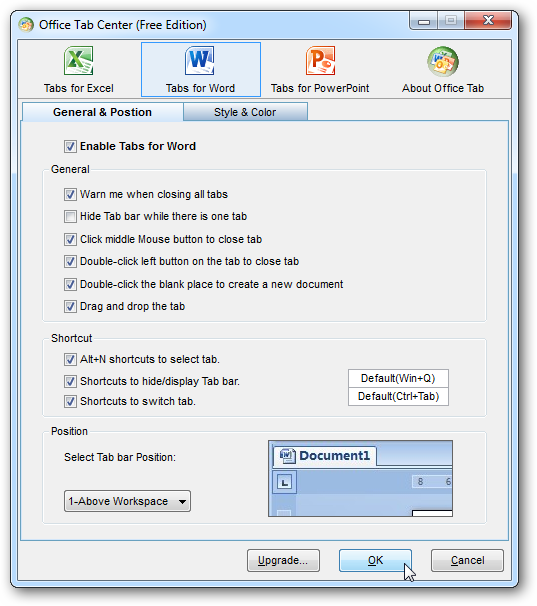
Office Tab Free Edition is almost infinitely customisable when it comes to setting up your tabs.

If you’re the kind of person who finds themselves switching between multiple Word, Excel or PowerPoint documents, you’ll probably find the fact Office insists on opening every single document in its own window quite tiresome. Windows 7’s new Taskbar is a definite improvement on previous versions, but it’s still a fiddly process having to roll the mouse over a program icon, wait for the preview windows to appear and then locate the right one before clicking it.

It’s a problem that plagues most office applications – only Lotus Symphony has found a workable solution, opening all documents in their own tabs within a single program window.

Thankfully there’s a free add-on that can do something similar in Office, and this is it. Office Tabs, as the name suggests, basically adds a tab bar below the menu bar (Office 2003) or ribbon (Office 2007-2010) – once installed, all documents are opened within the same window, accessible through tabs, making it much easier to switch between them.

On its own this feature is enough to recommend Office Tabs, but it doesn’t stop there. The tabs themselves are customisable to the nth degree: choose where to place them (top, bottom, left or right), change their shape and appearance, enable drag-and-drop reordering, add keyboard shortcuts… You name it, it’s here.

There are some other useful features too, such as being able to create a new document simply by double-clicking the empty portion of the tab bar. Right-click a tab and you’ll see lots more potentially useful options too, but be warned: many of them are marked with an asterisk, and that’s because their functionality isn’t available in this Free Edition.
If you’d like to be able to rename a file simply by right-clicking its tab, or add the option to save and close all open documents with a single click, you’ll need to upgrade to the Professional edition for the princely sum of $25. You’ll also find there’s an Enterprise Edition available too for $10 more – this extends Office Tab’s functionality to Microsoft Project and Visio too.

This is the 32-bit edition, and works with 32-bit versions of Microsoft Office only.

Verdict:

An essential add-in for anyone who finds themselves working with multiple Word, Excel or PowerPoint documents on a regular basis. 

Your Comments & Opinion
 

Problem with Word

Posted by: Paulo Andrade, 23 January 2012 11:43

When closing completely Word... Word still «eating» 50% of CPU/processor... :(

Problem with Excel 2007

Posted by: Paulo Andrade, 22 January 2012 19:08

When closing Excel 2007 ... Windows says something like «Excel will close because it has somes problem - Windows will look for a solution...»

Related Download Articles
 
Microsoft Office Home and Student 2010

Microsoft Office Home and Student 2010

Trial Software

Get all the core Office essentials in this low-cost package

Microsoft Office 2010 Professional Plus

Microsoft Office Professional 2010

Trial Software

Microsoft's Office franchise takes another step forward with this solid and worthwhile upgrade

Office 2010 Trial Extender

Office 2010 Trial Extender 1.0.0.5

Freeware

Extend your Office 2010 trial from 30 to 180 days

Office Tab Free Edition

Office Tab Free Edition 7.0.0 (64-bit)

Free, for personal-use only

Manage multiple documents from a single window with this essential free add-in 

Other Download Articles From This Category
CintaNotes

CintaNotes 1.6.2

Freeware

Put your thoughts and notes in order with this freebie organiser 

CodeTwo Sync for iCloud

CodeTwo Sync for iCloud 1.1.1.1

Freeware

Synchronize your Outlook folders with folders in iCloud

Task Coach

Task Coach 1.3.14

Freeware

Lightweight 'To Do' list manager, PIM and task organiser

doPDF 7.3

doPDF 7.3.381

Freeware

Produce a PDF document from just about any Windows application

From Softwarecrew

Please wait while my feed loads

See more posts...

Our Price: $18.99
RRP: $49.95
Saving 62%
Buy Now More Info
Offer Ends In:
 

Spotlight: Free Full Software

Giveaway: WinISO Standard 6.1.0

Free Full Commercial Software

WinISO is a very comprehensive tool which provides everything you need to create, edit and convert disc images.

If you've an image file already, for instance (ISO, CUE/ BIN, NRG, MDF, CCD, IMG and DVD formats are supported) then you can open it in a click or two, browse the image contents, and extract the files you need with a quick drag and drop.

It's just as easy to create new ISO9660, UDF, even HFS+ images. Just choose the option you need, then either manually build up your preferred file and folder structure; drag and drop your files and folders from Explorer onto the program; or create an image directly from a CD, DVD or Blu-ray disc.

Of course you can edit images, too. Is an ISO file too large for your needs, say? Open it up, locate and remove any surplus files to free up a little space.

WinISO program has full support for reading and creating bootable image files. A simple conversion tool makes it easy to convert disc images into the format you need. And the program can even mount ISO files as Explorer files, or burn images to disc when you're ready to save them.

Please note, this trial version of WinISO Standard will not save files greater than 500MB in size.

Giveaway: on Wednesday, we're giving you the full current version of WinISO Standard 6 worth $29.95. The download link here will take you to Downloadcrew Giveaway.

[...]
Time Remaining: