


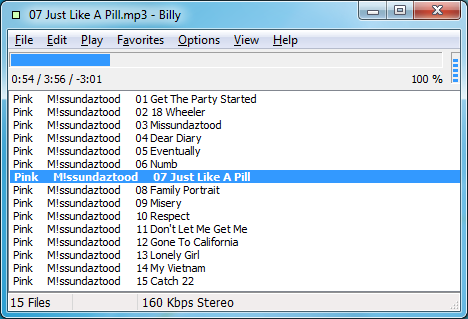
Billy is an easy-to-use and extremely lightweight music player.
There's no big library manager here, for instance. No cover art support, no equalizer, no visualisations - nothing bulky at all. Instead you simply point Billy as a folder of music files (FLAC, MP3, WAV and OGG formats are supported), and it'll treat the contents as your playlist, and begin playing them at a click: easy.
If you need to control playback at any point, there's no need to reach for your mouse, either. You can pause the program, move to the next or previous tracks, queue a file or stop playback entirely with keyboard shortcuts.
Your preferred files can then be played in a variety of ways: you can repeat an individual file or the entire list, shuffle playback or more. And if you like a particular list, it can be saved under the Favourites menu for easy access later.
And even though Billy is extremely lightweight, and makes minimal demands on your RAM and CPU, the program does have a few surprising features included. Select a group of files in the list, for instance, right-click one and select "File Info", and you'll access the Renamer, which allows you to clean up your library by globally searching and replacing the text of your choice (so you could, say, replace underscores with spaces).
What's more, Billy is extremely compatible, and should run on any version of Windows from 95 upwards, so it could be perfect if you're looking for a simple media player to work on an ancient PC.
Verdict:
It's not exactly packed with features, but Billy is compact, lightweight and easy to use, and the program runs well even on very old PCs
Your Comments & Opinion
Clementine is a no-frills music and Internet radio player for Linux, Windows or MacOS.
Get more from your music with this powerful, highly configurable audio player
A free and surprisingly powerful music player with a well-designed interface
Convert just about any audio file into your preferred format
Easily convert audio files between the WAV, MP3, FLAC, OGG and APE formats
A tiny but surprisingly capable music player
Convert your CD collection into MP3, FLAC, OGG and WAV
A fast and simple CD ripper to help convert your music
Capture screenshots quickly and easily with this powerful, but resource-friendly, tool
An outstanding audio editor
An outstanding audio editor
An outstanding audio editor
Create stylish web albums from your favourite digital photos