


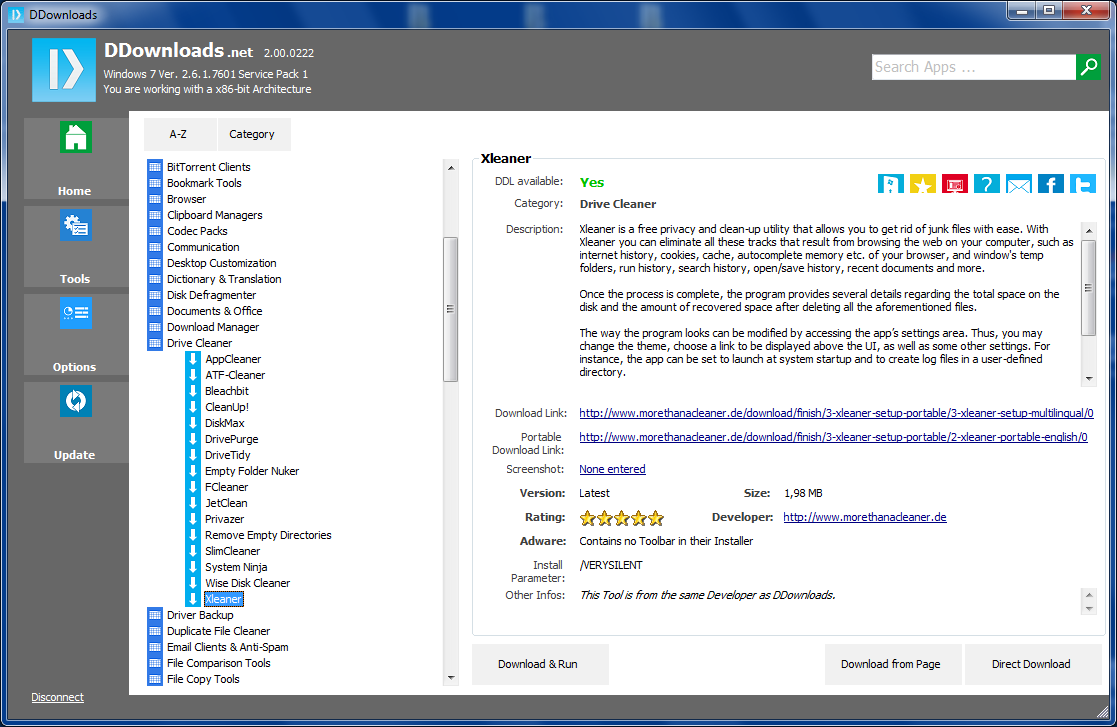
DDownloads is a simple tool which makes it easier to locate and download a host of essential free applications for your PC.
Suppose you've just bought a new PC, for instance. Instead of going online to download the various essentials you'll need, just click "Get Apps" here, choose the Windows Starter Kit category, and DDownloads will provide links for Adobe Reader, Flash Player, Java, Windows Essentials Codec Pack, VLC Media Player, and more. And just clicking one of these, then selecting "Direct Download" is all it takes to fetch a copy (although you can click "Direct Download from Page" as an alternative: this opens the download page in your browser, handy if you need more options or control).
Your PC is set up already? You'll still need to find software in particular categories, though, just occasionally, and again DDownloads can help. Clicking "Malware Removal", for instance, provides links to directly download Malwarebytes' Anti-Malware, Spybot S&D, Threatfire, Spyware Terminator and many more. And there are plenty of other categories here: "Backup apps", "Browsers", "Email Clients", "Video Tools", with (as we write) 1,143 applications covered.
While this can be very useful, DDownloads is quite limited in scope. It's not an applications manager, for instance - it can't look at your installed software and tell you whether any of your programs have free updates available. You still have to decide for yourself that you want to download something before DDownloads is able to help.
And the Category system isn't particularly well organized, with plenty of overlaps, and many programs not always appearing where you'd expect. "Drive Cleaner" seemed like the obvious category for CCleaner, for instance, but it wasn't there: PC Maintenance is the place to look.
Similarly, you might expect OpenOffice and LibreOffice to be in the "Productivity" section, but no: they're in Documents and Office. You'll figure this out soon enough - and there's a manual search tool to help - but it can be a little irritating. Especially as for some reason the categories weren't even displayed in alphabetical order on our test PC.
There are problems here, then. But DDownloads does provide an easy way to find and download some excellent free applications, and if (for instance) you need to equip a new PC in a hurry then it could save you a great deal of time and hassle.
Version 3.0 brings:
- revamped user interface
- Search Engine is even simpler and better (can be extendend on Category, License search etc.)
- Signature Updater comes as a Standalone .EXE which makes the App itself lighter
- App Results are presented in a much clearer HTML view
- Database itself has much more tables (Sub Category, Price, Date Installed etc.)
- Database can be directly extended with further Apps. Existing Apps can be edited, deleted etc.
- New Database functions are added such as Restore, Compact, Repair etc.
- App results can be printed
- 50 % faster start/initialization
Verdict:
DDownloads provides a simple way to directly download hundreds of great applications, directly from the developer's site
Your Comments & Opinion
More powerful replacement for Windows' built in program removal tool
Install Windows software on your Mac
Comprehensive replacement for Windows' Task Manager
Store your software licenses in a secure, searchable vault
Easily find, install and update free software for your PC
Remove unwanted files and applications from your Mac
Uninstall Mac apps and associated files using drag and drop
Keep your desktop in order with this icon organisation tool
Manage your files and folders with this dual pane tabbed Explorer replacement
Create, format, merge, resize, move and otherwise organise your drive partitions with this free tool
A configurable system monitor
A configurable system monitor