


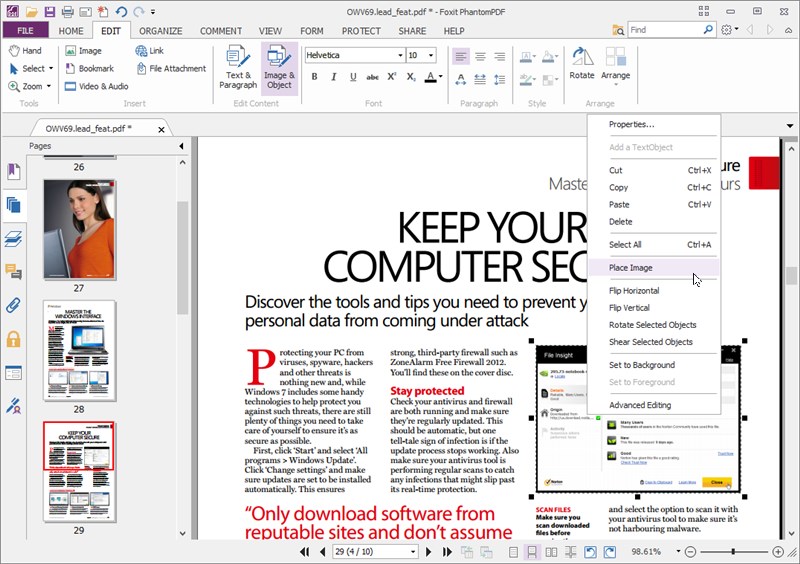
These days you get an awful lot for free from PDF viewers – both Foxit PDF Reader and Nitro Reader now sport powerful tools for creating PDFs as well as viewing them – but there’s still a market for commercial tools like Foxit PDF Editor.
The suite provides everything you need to convert, rearrange and edit PDFs as well as create them – whether using the program’s built-in support for dozens of documents, Office plug-ins or simply the virtual PDF print driver it includes as a catch-all for more obscure documents too.
Foxit PDF Editor's conversion tools make it easy to turn PDFs into Office documents, RTF, HTML, plain text and image formats. There’s built-in OCR for creating searchable and selectable PDF documents and basic tools for editing text, images and page order.
Business-friendly tools include form design on top of the usual support for filling in and saving form data. Documents can also be secured using encryption and permission controls.
Foxit PDF Editor also includes all the functionality found in the free Foxit Reader program, so you can highlight and annotate pages, add stamps and even insert handwritten signatures via a scanned image or by using the freehand tool supplied.
Verdict:
An easy-to-use, compact, fast and very powerful PDF authoring suite
Your Comments & Opinion
View, edit and annotate PDF files with this compact, fast and feature-packed tool
Powerful PDF creation, editing and management tool
Create, convert and edit PDF files with this powerful authoring tool
Create, convert and edit PDF files with this powerful authoring tool
Check out the latest version of Apache's free office suite
Check out the latest version of Apache's free office suite
Check out the latest version of Apache's free office suite
Powerful PDF creation, editing and management tool
Prevent the onset of eye strain and RSI with this effective free tool