


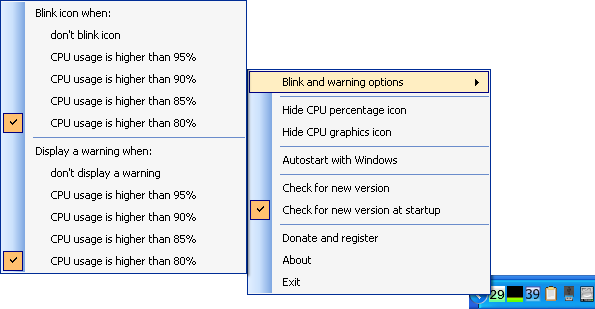


My CPU Monitor is a flexible tool which makes it easy to keep an eye on your processor load.
By default the program displays two icons in your system tray; one shows the current percentage CPU usage, the second just indicates processor load graphically (so a small green line means low usage, moving up to a yellow bar for medium, red for high).
You don't need two icons? Not a problem: you can disable either of them from the program's right-click menu.
And, conveniently, My CPU Monitor can also be configured to blink its icon or display a warning message when your CPU usage is above one of four predefined limits (80%, 85%, 90% or 95%).
Version 1.50:
- updated internal modules
- various code and bug fix
Verdict:
My CPU Monitor is a versatile way to track and display your processor usage
Your Comments & Opinion
Monitor the temperature of your processor's cores
Get more control over CPU speed/ power use
Monitor the temperature and status of your hardware
Monitor your CPU/ RAM usage, free up RAM and set process priorities with a single tool
Monitor your CPU/ RAM usage, free up RAM and set process priorities with a single tool
Monitor the temperature of your processor
Keep your desktop in order with this icon organisation tool
Manage your files and folders with this dual pane tabbed Explorer replacement
Create, format, merge, resize, move and otherwise organise your drive partitions with this free tool
A configurable system monitor
A configurable system monitor