From Twitter

Please wait while my tweets load

If you can't wait - jump to Twitter

See more tweets...

RSS Feed

Please wait while my feed loads

See more posts...

Newsletter

Subscribe to either one of our two newsletters for regular updates and information

Downloads newsletter

This is a weekly newsletter with download news, updates and other information

This is a monthly newsletter with software store information, offers and deals

VMware Workstation 9.0.2

Host and run a virtual operating system on your computer

by Mark Wilson

Our Rating:
Your Rating:
Login to rate
Based on 0 ratings
License: Trial Software
Operating Systems: Windows 7 (32 bit), Windows 7 (64 bit), Windows 8, Windows Vista (32 bit), Windows Vista (64 bit), Windows XP
Requirements:


Languages: English
Software Cost: $189 (Windows)
Date Updated: 08 March 2013
Watchlist: Add download to my watchlist
Downloads To Date: 40190
Developer: VMware
RSS News Feed: http://blogs.vmware.com/workstation/rss.xml
Twitter Feed: http://twitter.com/vmw_workstation
Buy the new TuneUp Utilities 2013 for only $16.95, with lifetime license, saving 58% from MSRP, only from store.downloadcrew.com
VMware Workstation 9.0.2
Create and host a virtual operating system on your computer

A few years ago running virtualisation tools was a bit of a disaster, particularly when the virtual operating system had to emulate the CPU, graphics card and shared memory with your system. On a single-core machine, this resulted in severe slow-down. Using Windows on a PowerPC Mac was just not feasible apart from testing software.

These days running a virtual version an operating system is practical. There’s no reason why you couldn’t run and test Windows 7 on your XP machine or vice-versa, using an old copy of Windows XP on your Windows 7 machine, to test software before you install on your primary operating system.

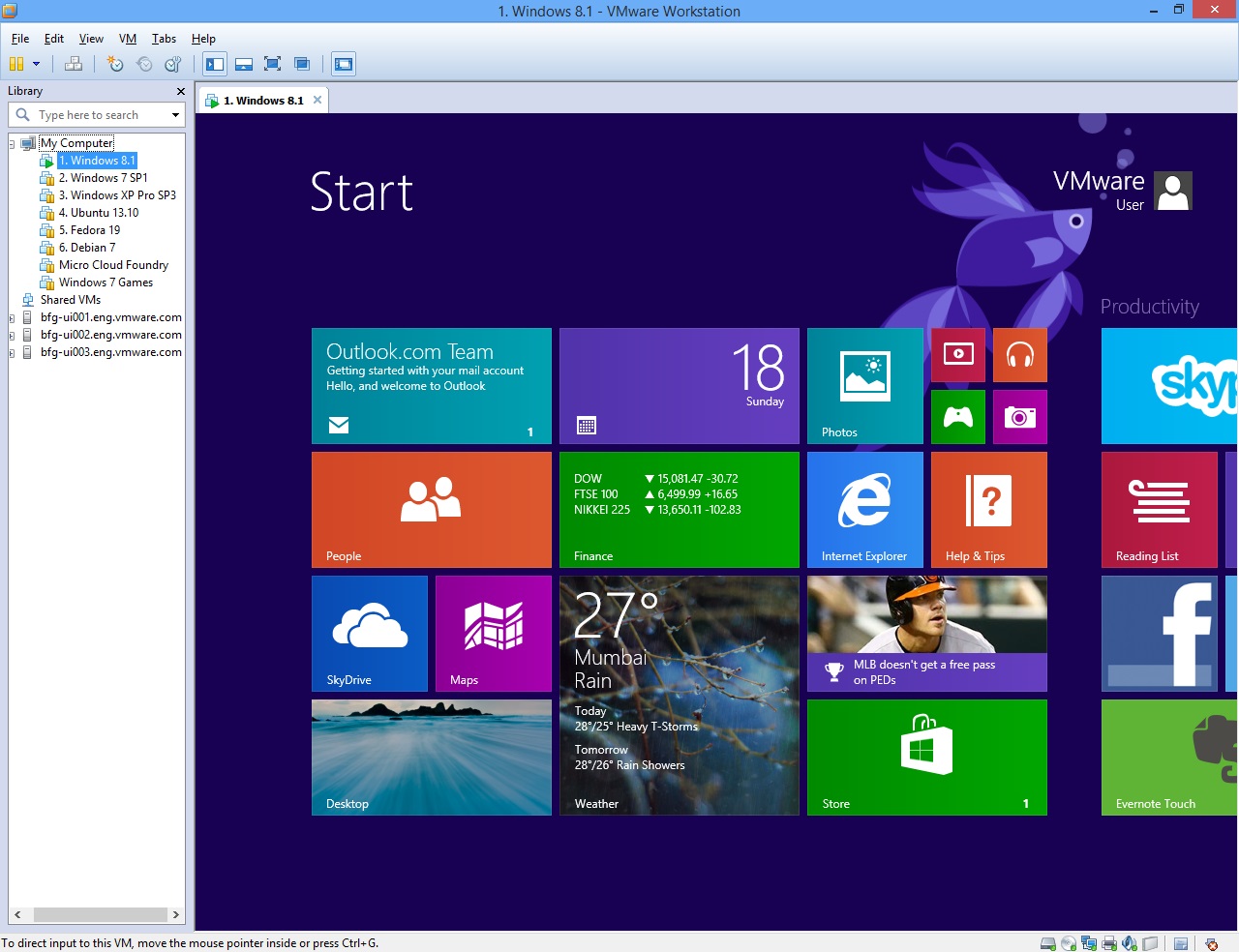
VMware Workstation is one of the best virtual managers and will enable you to install and user more than one operating system. You can run Windows 7 and XP side-by-side or a Linux install on top of Windows and so on. Best of all, as VMware Workstation supports multi-core processors, this means that you can assign two CPU cores to your host and the remaining two to your virtual PC and you’ll find it runs very smoothly.

Using a virtual operating system is ideal for testing new software. Any install on the virtual PC remains secure and locked within that environment. You can even take a snapshot of the virtual OS so you can quickly go back to a previous state if the installed software fails to perform as expected.

VMware Workstation 8 ships with support for sharing your workstation with other users in your organisation, a brand new user-interface, 64-bit support with up to 64GB of RAM, HD audio support, USB 3 support and much more. Read the Release Notes for more detailed information.

Note that VMware only allow you to download trial versions of software from their website if you have a VMware account. It also requires a trial serial code.

VMware Workstation 9.0.2 is a minor update. See the Release Notes for more information.

Verdict:

One of the best, if not the best, virtualisation managers, which will enable you to create your own virtual operating system as well as host on your computer

Your Comments & Opinion
 

Releas note link to VM ware incorrect

Posted by: Brett Dalton, 30 January 2012 06:55

THe link given in the article is to the 8.0 release notes. The correct link is below

http://www.vmware.com/support/ws80/doc/releasenotes_workstation_802.html

www.downloadcrew.com reply:

Hi Brett, thanks, updated. That's primarily as the article was written for 8.0 and links to the original 8.0 major release notes. Updated for 8.2.

Related Download Articles
 
VMware Fusion 5

VMware Fusion 5.0

Trial Software

Run a virtual operating system on your Mac

VMware Player 5.0.2

VMware Player 5.0.2

Freeware

Test virtual operating systems

Paragon Partition Manager 10 for Virtual Machines

Paragon Partition Manager 10 for Virtual Machines

Freeware

Back up, partition, defrag, repair and optimise your virtual disks

Paragon Virtualization Manager 2010 Personal

Paragon Virtualization Manager 2010 Personal

Trial Software

Easily create a virtual machine from a Windows-based PC

Other Download Articles From This Category
LibreOffice Productivity Suite 4.0.4

LibreOffice Productivity Suite 4.0.4

Freeware

Create all of your office documents in this impressive free suite

Office Mobile for Office 365 1.0

Office Mobile for Office 365 1.0

Freeware

View and edit Word, Excel and PowerPoint files on your iPhone/ iPad

DeskTask for Outlook

DeskTask for Outlook 1.3

Freeware

View your Outlook calendar and tasks on your desktop

EssentialPIM Free 5.55

EssentialPIM Free 5.55

Free, for personal-use only

Powerful and versatile personal information manager which makes it easy to manage notes, appointments, contacts and much more

From Softwarecrew

Please wait while my feed loads

See more posts...


Spotlight: Free Full Software

Ashampoo Burning Studio 2013 (v11.0.6)

Free Full Commercial Software

Ashampoo Burning Studio 2013 is a compact, simple, but surprisingly feature-packed disc burning suite.

The program makes it easy to create simple data discs and audio CDs, for instance: just drag and drop your files onto the list area and you'll be burning the finished disc in a couple of clicks.

That's just the start, though. Burning Studio 2013 can also create data discs with customised, interactive multi-page menus, perfect if you'd like a more professional way to share and present the disc contents.

A built-in backup tool allows you to create backups which may be encrypted, compressed, and span several CDs, DVDs and Blu-rays.

And there are modules to create VCD or SVCD video projects; burn video DVDs or Blu-ray discs from prepared folders; create, browse or burn disc images (ISO, CUE/ BIN and Ashdisc formats are supported); copy discs, erase them, design and print disc covers, labels and booklets, and more.

The focus throughout is on ease of use, though, and so Ashampoo Burning Studio 2013 remains very straightforward, whatever you're doing. Most disc projects are created via the same simple interface, and for the most part all you have to do is drag and drop the necessary files. But experts will find more advanced options are only a click away, and if you need to then you can set ISO and UDF version, enable Joliet, make a disc bootable and more.

Note the download here will take you to the Downloadcrew Software Store where you can download Burning Studio 2013.

[...]
Value:
Free
Rating: