From Twitter

Please wait while my tweets load

If you can't wait - jump to Twitter

See more tweets...

RSS Feed

Please wait while my feed loads

See more posts...

Newsletter

Subscribe to either one of our two newsletters for regular updates and information

Downloads newsletter

This is a weekly newsletter with download news, updates and other information

This is a monthly newsletter with software store information, offers and deals

Recuva 1.46

Quickly scan a drive or memory card for lost and delete files, then recover the data

by Mark Wilson

Our Rating:
Your Rating:
Login to rate
Based on 3 ratings
License: Freeware
Operating Systems: Windows 2000, Windows 7 (32 bit), Windows 7 (64 bit), Windows 8, Windows Vista (32 bit), Windows Vista (64 bit), Windows XP
Requirements:


Languages: English, German, French, Spanish, Italian & more
Software Cost: Free
Date Updated: 03 April 2013
Watchlist: Add download to my watchlist
Downloads To Date: 6058
Developer: Piriform
RSS News Feed: http://feeds2.feedburner.com/piriform
Buy the new TuneUp Utilities 2013 for only $16.95, with lifetime license, saving 58% from MSRP, only from store.downloadcrew.com
Recuva 1.46
Scan your drive for lost or deleted files and then recovery to your computer

Head abroad for a long holiday and you many take a handful of digital memory cards for your digital camera and, perhaps your laptop. Problem is, when various members of of your family are taking photos and then moving them to the computer, it’s too easy to delete the files thinking that they are already on your machine.

Windows doesn’t ship with a decent file recovery application, which means that you need a third-party tool to recover files you’ve deleted from your trash can. As it’s always worth keeping file recovery software installed on your computer, but it’s a tool you may rarely use, commercial file recovery software may be out of the question.

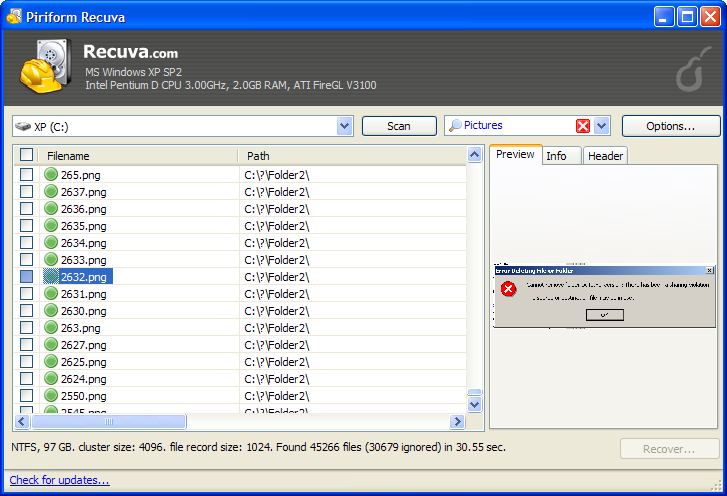
Recuva is regarded as one of the best free file recovery tools. You can use it to scan your internal hard drive, any external drive and memory cards such as those in your digital camera. Just select the drive you want scan, run the process and locate the files you want to recover back to your computer.

It does it’s job well. You could even use Recuva to scan and recover data from a formatted drive, particularly if it’s had a quick format. You can also use it to recover deleted emails from clients such as Microsoft Outlook.

Recuva 1.46 adds/fixes:

- Improved Deep Scan for exFAT and FAT.
- Added folder scan to Windows Explorer context menus.
- Added new file extensions to filters.
- Improved accuracy of scan statistics.
- Improved usability of folder browser.
- Improved uninstallation of menu items.
- Fixed minor bug in secure overwrite on exFAT file systems.
- Minor improvements to the recovery wizard.
- Minor GUI improvements.

Verdict:

Excellent free recovery application that will enable you to quickly and easily recover deleted files

Your Comments & Opinion
 
Related Download Articles
 
CCleaner 4.01

CCleaner 4.01

Freeware

Give your system a speed boost by cleansing and optimising your PC

Recuva Portable

Recuva Portable 1.46

Freeware

Quickly scan a drive or memory card for lost and delete files, then recover the data

Prey 0.6.0

Prey 0.6.0

Freeware

Track and recover your lost or stolen laptop with this free tool

Disk Drill

Disk Drill 1.4

Freeware

A powerful tool to protect drives and recover data

Other Download Articles From This Category
Evernote for Mac 5.1.1

Evernote for Mac 5.1.1

Freeware

Collect, store & share your notes and media through your computers

Evernote 4.6.6

Evernote 4.6.6

Freeware

Collect, store & share your notes and media through your computers

Dropbox Experimental Edition 2.1.16

Dropbox Experimental Edition v2.1.16

Freeware

Backup, synchronise & share important files

Auslogics BitReplica 1.5.1.15

Auslogics BitReplica 1.5.1.15

Trial Software

Protect your PC's most important files with this free, easy-to-use backup tool

From Softwarecrew

Please wait while my feed loads

See more posts...

Our Price: $24.99
RRP: $49.99
Saving 50%
Buy Now More Info
Offer Ends In:
 

Spotlight: Free Full Software

Ashampoo Burning Studio 2013 (v11.0.6)

Free Full Commercial Software

Ashampoo Burning Studio 2013 is a compact, simple, but surprisingly feature-packed disc burning suite.

The program makes it easy to create simple data discs and audio CDs, for instance: just drag and drop your files onto the list area and you'll be burning the finished disc in a couple of clicks.

That's just the start, though. Burning Studio 2013 can also create data discs with customised, interactive multi-page menus, perfect if you'd like a more professional way to share and present the disc contents.

A built-in backup tool allows you to create backups which may be encrypted, compressed, and span several CDs, DVDs and Blu-rays.

And there are modules to create VCD or SVCD video projects; burn video DVDs or Blu-ray discs from prepared folders; create, browse or burn disc images (ISO, CUE/ BIN and Ashdisc formats are supported); copy discs, erase them, design and print disc covers, labels and booklets, and more.

The focus throughout is on ease of use, though, and so Ashampoo Burning Studio 2013 remains very straightforward, whatever you're doing. Most disc projects are created via the same simple interface, and for the most part all you have to do is drag and drop the necessary files. But experts will find more advanced options are only a click away, and if you need to then you can set ISO and UDF version, enable Joliet, make a disc bootable and more.

Note the download here will take you to the Downloadcrew Software Store where you can download Burning Studio 2013.

[...]
Value:
Free
Rating: