


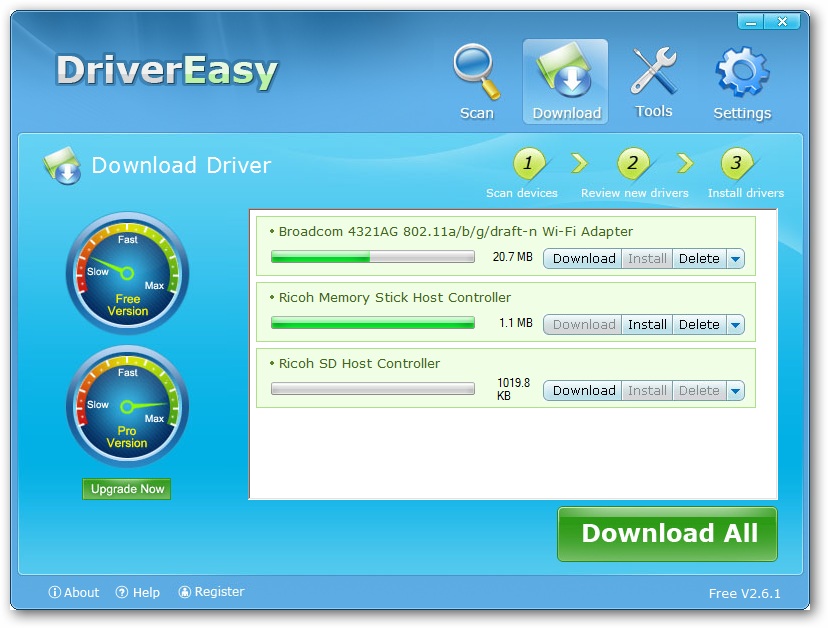
Driver-updating and backup tools are increasingly commonplace, but finding a decent freebie can be a difficult task. What we like about DriverEasy is its no-fuss approach to both identifying unknown hardware in your PC and providing quick and easy driver updates. Launch the program, let it scan your computer for outdated, missing and unknown hardware and then click one button to start the download process – there’s no downloading individual drivers separately from various third-party websites; instead you just sit back and let the program do the hard work for you. Once complete, just install each driver one at a time by clicking each Install button.
It’s simple, no-fuss and can be a life-saver – we’d been running without core drivers for two years on our test HP laptop because no Windows 7 64-bit drivers exist for the nForce 520 chipset. Along comes DriverEasy and within minutes had identified a compatible 64-bit Vista driver, which installed quickly and easily, and with no compatibility issues.
That’s the good news: the bad news is that the free version of DriverEasy is more of a feature-limited demo than a completely free tool. The backup, restore and uninstall options don’t work in the free version, and download speeds are hobbled too, which can make larger driver downloads like those for your graphics card something to be done in the background while you get on with other things.
Version 5.0.5.5083 (see complete version history):
* The “i” icon is clickable to show the driver information( In previous version you can click the device name next to the “i” icon to show the same driver information).
* The notification for unplugged device will always show up( In previous version it only shows up when you choose at least one unplugged device ).
– Remove the 3 color driver status indicator due to Symantec’s (aka Norton) false positive. The indicator is designed to help us easily identify driver status(up-to-date, out-of-date within 30 days and out-of-date). Please do not ask us why, we have tried to explain(several times), please ask Symantec, since their engineers consider the driver status indicator as a performance indicator.
– Fixed a date conversion bug, which cause 0.32% of drivers showing incorrect Driver Date
Verdict:
Despite the annoying restrictions, the program’s ability to identify unknown hardware as well as simplify the driver update process makes it well worth looking at in detail.
Your Comments & Opinion
Quickly locate the latest drivers for your hardware
Back up, restore and update your drivers with this handy maintenance tool
Ensure your hardware drivers are up to date with this automated tool
Improve your PCs performance and stability by keeping your drivers up-to-date
Automatically keep all of your drivers up to date for the best performance and security
Update/ backup/ restore your PCs drivers
Easy-to-use cloning software to simplify hard drive upgrades and backups
Quickly identify any driver updates available for your PC
Ditch the ZIP format and move your archives to the more impressive 7Z
Ditch the ZIP format and move your archives to the more impressive 7Z
A notepad/ to-do tool with cloud sync
Transform your desktop with this customisation tool
Monitor your PC's temperature, voltages, CPU frequency and more with this powerful stability checker