From Twitter

Please wait while my tweets load

If you can't wait - jump to Twitter

See more tweets...

RSS Feed

Please wait while my feed loads

See more posts...

Newsletter

Subscribe to either one of our two newsletters for regular updates and information

Downloads newsletter

This is a weekly newsletter with download news, updates and other information

This is a monthly newsletter with software store information, offers and deals

Downloadcrew UpdateScanner 2.0.0.2 Beta

Check whether your installed software needs updates, plus keep one eye on the latest software news

by Nick Peers

Our Rating:
Your Rating:
Login to rate
Based on 14 ratings
Login
License: Freeware
Operating Systems: Windows 7 (32 bit), Windows 7 (64 bit), Windows Vista (32 bit), Windows Vista (64 bit), Windows XP
Requirements:

Microsoft .NET Framework 3.5

Languages: English
Software Cost: Free
Date Updated: 14 February 2012
Watchlist: Add download to my watchlist
Downloads To Date: 2160
Developer: Creativemark
RSS News Feed: http://www.downloadcrew.com/feeds/rss/latest.php
Twitter Feed: http://twitter.com/downloadcrew
Facebook: http://www.facebook.com/downloadcrew
Buy TuneUp Utilities 2012 for only $18.99, with lifetime license, saving 62% from MSRP, only from store.downloadcrew.com
Downloadcrew UpdateScanner 2.0.0.2
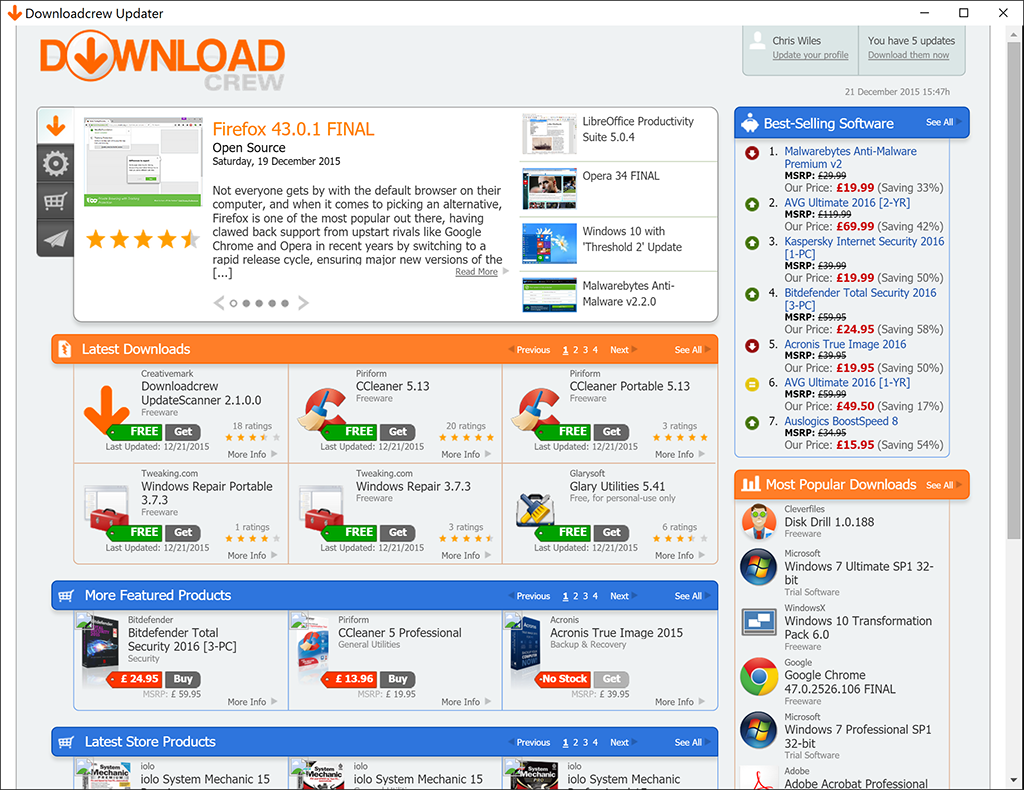
Downloadcrew UpdateScanner is your one-stop shop for software, news and our latest giveaway

The speed at which some programs update can be frightening. While some may alert you every time an update becomes available, quickly and (relatively) effortlessly installing the new version for you, others remain stubbornly outdated. Who knows what bug fixes, performance improvements and new features you might be missing out on?

You can, of course, stay up to date by regularly trawling this very site for your favourite software, but why put yourself through all that hassle when this app exists to make the task of updating your software that much easier?

The Downloadcrew UpdateScanner – as its name implies – will scan all of the software installed on your PC and compare it with our database. If there’s an updated version of your software on the site, you’ll be alerted to the fact.

You can either review updates manually, click “Download them now” to view them all in a single, convenient window or report unrecognised applications to us for further investigation. You can then update the ones that interest you and, hey presto, job done.

The app will then continue to monitor your system, alerting you to new updates as well as free software giveaways on the site, so you’ll never miss out on a full, free commercial app giveaway again.

You’ll need a free Downloadcrew account to use the service – click here to register.

Version 2 of the UpdateScanner features an "App Store" (name change forthcoming), alerting you to the latest and most popular downloads on the site, news and tips from sister site Softwarecrew and a selection of great savings to be made on software purchases.

Note that this is a Beta of Downloadcrew UpdateScanner v2 and is still a little rough around the edges. We're releasing this for Downloadcrew members only, to offer feedback.

Important: note that the UpdateScanner does not support betas and unreleased versions. If you install an alpha, beta or newer version than we have on Downloadcrew, then you'll receive a notification than the installed version is newer than the latest version! Also, if a developer gives their software an obscure version number (Paragon Software products are good examples), then these are also unsupported.

Build 2.0.0.2 is a minor maintenance release which includes these improvements/fixes:

- Now limited to a single instance
- Added an option not to minimize on startup
- Added an option to quit when closing the main window
- Fixed a minor alignment issue in main window

Verdict:

This is official Downloadcrew software that is designed to scan your installed software, examine against our database and inform you whether there are updates to your applications

Your Comments & Opinion
« Previous 1 2 3 Next »

Thanks for replying.

Posted by: DOOOMKULTUS, 25 January 2012 19:03

I think you didn't explain the sorting issue. the Updates available should be shown 1st or in a separate tab for easy review.

As for mismatches due to internal name issue.
How about, using "file hashes" as identifiers?

I don't know if its been done in others apps but it could be implemented with certain tweaking or testing.
There are many types of hashes and they are quite unique and using a combination of meta-info and hashes, your accuracy would improve i think.

Hope you give it a thought and all the best, will keep checking on the software, though i usually visit the site regularly enough anyway.

www.downloadcrew.com reply:

The internal name has to be exactly matched, by name, to the product in our database. As an example, very occasionally a developer might even add the version number to the internal name and that changes every time they update their software, meaning we have to drop in the name in to the database. Massive logistical issues.

Ideally all developers would work to the same standards. As an example:

1) The meta name for their software should be plain and straightforward (such as "Ashampoo Burning Studio"

2) The meta name should not contain numbers or versions

3) If there are separate 32-bit and 64-bit builds, this would be reflected in the relevant name. Taking the above as an example "Ashampoo Burning Studio 64bit", which would enable us to separate versions based on their meta data.

4) All software would have a unique meta name (some do not!)

5) Very important: don't change the meta name of your product!

6) If you choose to use, say, "Google Chrome" for your internal name, don't use the same name for your beta and dev versions (although, bizarrely, Chrome Canary has it's own separate meta internal name)! Firefox builds have their own name, enabling us to match them up separately.


We've got some more ideas for the Update Scanner. We've been busy with another project this week, but will be back developing it from next week.

The developer has just informed me that, unless we get the version numbers matched in the DB to the product, it will not be matched correctly. For instance, if we add "17.1.0" to Comodo Dragon and the version internally is "17.1.0.0" ours will be flagged as newer. What a massive logistical quest this is!

Love the product but the POP-Ad is too Much!

Posted by: Jeremy Benisek, 24 January 2012 21:13

I love this product and used it for a few days before I notices it added a POP-UP Ad. I'm testing this in small offices to help keep all software updated and the POP-Ad is too much. The conf room PC is always outdated so I added this update scanner it worked great until we were in a Conf and this Ad pop's up in front of everyone. Doesnt' look very good. I don't mind the Ad in program just don't POP-UP Ads or reminders please.

www.downloadcrew.com reply:

Jeremy, there are no pop-up ads in the application at all. The Update Scanner only opens a single window and it doesn't use your web browser, so it's impossible that it can generate pop-up adverts.

Pop-up adverts can only occur from you web browser, not from a Windows application.

Can you send us a screengrab please?

How to sort "Updates Available"?

Posted by: DOOOMKULTUS, 24 January 2012 06:27

I scanned my PC, It said 145 scanned, Found updates for 25 and listed 112 as Unknown.

Now on clicking the "Download them now" from App Store, i am taken to the website where all my Installed Applications are shown.

Am i supposed to go through 145 apps to find out which one is up for updating?

Also even common applications like, Adobe Shockwave player, Cyberduck, Filehippo, Freemake Audio Converter, Last.fm, GoogleTalk, GomPlayer, etc etc are getting listed with "from:UNKNOWN"

This "Downloadcrew UpdateScanner" is not ready for Beta, its has too much work to done.

www.downloadcrew.com reply:

Hi DOOOMKULTUS,

Thanks for the feedback. Let me address some of the issues you mention.

We have to manually match the "internal name" (the meta name of the application) with our database. This isn't always easy, can change regularly and is often the same name used for the 32-bit and 64-bit version of an application. Take Freemake Audio Converter as an example. Just looked at our database and the internal name used to be "Freemake Audio Converter version 1.0.0". It's now "Freemake Audio Converter version". That's why it wasn't showing as supported, as the developer changed the internal name. We've updated the database and it should now be supported.

Without feedback on unsupported applications - by reporting it as unsupported via Downloadcrew - there's no easy way of manually checking every internal name with the database. As I said, if the developer changes their internal name, the database link is lost. We rely on users to report this, but get few reports.

Applications such as Filehippo are, clearly, not supported by Downloadcrew as that's a rival application. We wouldn't expect our users to complain to Filehippo that they aren't supporting the Downloadcrew Update Scanner :) GOM Player has just been updated, Cyberduck should now be supported (again, another that changed their internal name), but GoogleTalk isn't even on Downloadcrew - we don't review everything.

So, it's easy to comment there's much work to do, but we require users to report - via the website - unsupported applications, then we can either link up or add to a blacklist so you don't see them as unsupported.

Not sure if you've noticed but the Filehippo checker doesn't support or list many applications. They add a lot of products to their blacklist.

User based blacklist

Posted by: Jeremy Benisek, 19 January 2012 17:53

Could you add an option so I can select Blacklist on this computer or Blacklist on all computers. You could use these settings with the Reporting tools. For Example on some system Java must be a really old version to work with the older Cisco Pix 501 firewalls GUI. I would want to blacklist this update for java on those computers but not report to have black listed in the database.
Thank You

www.downloadcrew.com reply:

Jeremy, we'll look in to it, yes. We're busy working on a short-term project for a media partner, but we'll be back on Downloadcrew UpdateScanner from the end of next week.

Related Download Articles
 
AppFresh

AppFresh 0.9.877

Freeware

Keep OS X and your installed software up to date

Driver Detective

Driver Detective 8.0.1

Trial Software

Quickly locate the latest drivers for your hardware

Driver Magician 3.68

Driver Magician 3.68

Trial Software

Back up, restore and update your drivers with this handy maintenance tool

Uniblue DriverScanner 2012

Uniblue DriverScanner 2012 v4.0.4.1

Function Limited Demo

Improve your PCs performance and stability by keeping your drivers up-to-date

Other Download Articles From This Category
SUMo

SUMo 3.1.0.154

Freeware

Quickly discover which of your favourite programs have updates available

Toolwiz FlipBook 1.4.0.0

Toolwiz FlipBook 1.4.0.0

Freeware

Easily turn any text file into a stand-alone 3D ebook

Auslogics Disk Defrag 3.4.3.0

Auslogics Disk Defrag 3.4.3.0

Free, for personal-use only

Keep your hard drive in top condition with this powerful disk defragmentation tool

Auslogics BoostSpeed 5.3.0.0

Auslogics BoostSpeed 5.3.0.0

Trial Software

Clean, optimise, tune and tweak your PC to deliver its best possible performance

From Softwarecrew

Please wait while my feed loads

See more posts...


Spotlight: Free Full Software

Giveaway: WinISO Standard 6.1.0

Free Full Commercial Software

WinISO is a very comprehensive tool which provides everything you need to create, edit and convert disc images.

If you've an image file already, for instance (ISO, CUE/ BIN, NRG, MDF, CCD, IMG and DVD formats are supported) then you can open it in a click or two, browse the image contents, and extract the files you need with a quick drag and drop.

It's just as easy to create new ISO9660, UDF, even HFS+ images. Just choose the option you need, then either manually build up your preferred file and folder structure; drag and drop your files and folders from Explorer onto the program; or create an image directly from a CD, DVD or Blu-ray disc.

Of course you can edit images, too. Is an ISO file too large for your needs, say? Open it up, locate and remove any surplus files to free up a little space.

WinISO program has full support for reading and creating bootable image files. A simple conversion tool makes it easy to convert disc images into the format you need. And the program can even mount ISO files as Explorer files, or burn images to disc when you're ready to save them.

Please note, this trial version of WinISO Standard will not save files greater than 500MB in size.

Giveaway: on Wednesday, we're giving you the full current version of WinISO Standard 6 worth $29.95. The download link here will take you to Downloadcrew Giveaway.

[...]
Time Remaining: