


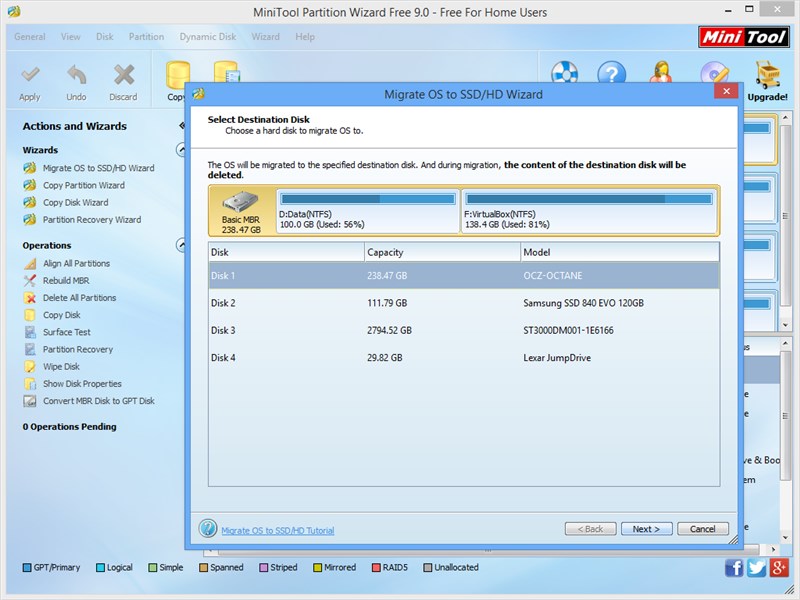
Was it so long ago that partitioning your hard drive involved either losing all the data on it, or investing a hefty sum in specialist partition software? These days, you can resize partitions without data loss within Windows itself, so what’s the need for a specialist tool?
Take one look at MiniTool Partition Wizard and you’ll see your answer: first, it makes partitioning much simpler and friendlier than the Windows tool. Second, it’s much more flexible than Windows’ rather basic tool.
First, you’re not restricted by any fragmented or unmovable files on your drive when it comes to resizing an existing partition. You can also easily resize, move, extend and split partitions, allowing you to revamp your drive just about any way you please without having to rip it all up and start again.
You’ll find other handy tools too – copy partitions and entire disks to another drive (great when upgrading your drive due to a lack of space), plus switch partitions from primary to logical to bypass the partition table limits (you can also convert in the other direction too). You can even align a partition for better performance if it’s required.
You can also hide partitions, change their serial number and perform all the key tasks – assigning drive letters or deleting partitions – offered by Windows own Disk Management tool. There’s even a tool for wiping a partition securely, allowing you more thoroughly delete the data from it.
A lot of this functionality can be found in other free partition tools too, but Partition Wizard keeps adding new features to its free version to keep it ahead of the opposition – you can now convert back from NTFS to FAT, plus convert drives between GPT and MBR. It’s even possible to copy dynamic disk volumes too.
And before you come up for air, you’ll even find Partition Wizard is capable of recovering lost and accidentally deleted partitions too – perfect for cleaning up after another tool’s mistakes, or giving you a fall-back option should Partition Wizard itself fail to perform the tasks at hand.
This is the free bootable CD version, which downloads as an ISO file you subsequently burn to disc. It gives you access to all the Home Edition functions (via the same user-friendly interface) even if Windows refuses to boot.
For most people, the free version has all the functionality you’ll ever need, but there are a number of paid-for editions too with additional features such as merging partitions or changing a drive’s cluster size without data loss.
What's new in version 9.0:
+ Migrate OS to SSD/HD in One Step
+ Perfectly Support Storage Spaces
+ UI Optimization
+ Bootable Edition Support Boot from UEFI
Verdict:
A fabulous and powerful partitioning tool, accessible from outside Windows thanks to this handy bootable CD version.
Your Comments & Opinion
Quickly create, delete, resize and even copy a partition using this drive tool
Partition the parts of your PC that Windows’ own tools can’t reach.
An advanced partitioning tool that places you firmly in control of your hard drives
A powerful boot manager that makes it easy to work with multiple operating systems
A straightforward partition manager
Monitor your PC's temperature, voltages, CPU frequency and more with this powerful stability checker
Ramp up your PC's performance with this very configurable defrag tool
A very, very, very fast way to find the files and folders hogging your hard drive space
Tidy up your system after using the avast! uninstaller
Are your drivers up-to-date? Here's how to find out