From Twitter

Please wait while my tweets load

If you can't wait - jump to Twitter

See more tweets...

RSS Feed

Please wait while my feed loads

See more posts...

Newsletter

Subscribe to either one of our two newsletters for regular updates and information

Downloads newsletter

This is a weekly newsletter with download news, updates and other information

This is a monthly newsletter with software store information, offers and deals

CDBurnerXP 4.4.1.3099

Quickly burn just about any disc from your PC, all for free

by Chris Wiles

Our Rating:
Your Rating:
Login to rate
Based on 0 ratings
License: Freeware
Operating Systems: Windows 2000, Windows 7 (32 bit), Windows 7 (64 bit), Windows Vista (32 bit), Windows Vista (64 bit), Windows XP
Requirements:


Languages: English, Swedish
Software Cost: Free
Date Updated: 01 May 2012
Watchlist: Add download to my watchlist
Downloads To Date: 4169
Developer: Canneverbe Limited
RSS News Feed: http://cdburnerxp.se/rss/news.xml
Buy TuneUp Utilities 2012 for only $18.99, with lifetime license, saving 62% from MSRP, only from store.downloadcrew.com
CDBurnerXP 4.4.1
Free burning suite that will enable you to create any kind of disc

Go out and look for a disc burning tool and you’ll be swamped with ‘production suites’ that enable you to produce everything you need to finalise your disc, whether it’s a simple audio CD or a fully-fledged authored DVD. These suites aren’t cheap and are only ideal if you want to mix your video, photos and audio tracks in to a master production to impress the rest of your family.

For a number of other people, however, they just want to get their files on to a data disc or quickly burn their favourite tracks to an audio CD. For these simple tasks, they don’t need a media production suite. Indeed, you can burn basic data discs from Windows and create an audio CD from within iTunes.

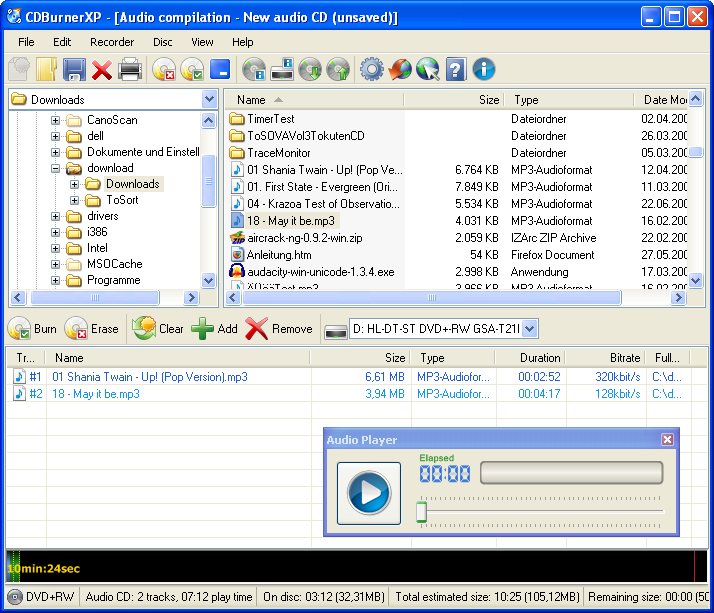
The other option is a free disc burning tool and there are few better than the rather fantastic CDBurnerXP. This isn’t a new application, it’s been around for a while. This is a good thing though as it’s enabled the developers to fine-tune the application so it does all the basics, flawlessly.

In addition to creating data and audio CDs, you can also handle just about any blank disc including a Blu-ray, as long as you have a drive that can burn these discs. You can create bootable discs, open and create ISO distributions, as well as creating an advanced gapless audio CD which is essential if you have tracks you want to blend from one to the other.

Build 4.4.1 is a upgrade that brings these changes:

- Added column "File name" to track list
- Added "Send to" integration to installer
- Georgian installer translation (and translation updates)
- Estonian installer translation
- Improved support for right to left languages
- Fixed tree view being out of sync after rename (UDF)
- Fixed: Required hard disk space is not properly checked when copying

Verdict:

Disc burning tool that will enable you to create any disc from a basic data through to a Blu-ray master

Your Comments & Opinion
 
Related Download Articles
 
Cyberlink Media Suite 8

Cyberlink Media Suite 8 Ultra

Trial Software

Money saving bundle of Cyberlink products to help you get more from your burner and media files.

FinalBurner Free

FinalBurner Free 2.24

Freeware

Create data, audio and video discs with ease

Ashampoo Burning Studio 11

Ashampoo Burning Studio 11.0.4

Trial Software

Quickly burn CDs, DVDs and Blu-ray discs with this fast, powerful yet easy-to-use mastering tool

CDBurnerXP

CDBurnerXP Portable 4.3.7

Freeware

Take this free portable disc burning suite on the road

Other Download Articles From This Category
DVDStyler v2.2

DVDStyler v2.2

Open Source

Quickly burn professional-looking video DVDs with the minimum of hassle

ISO Workshop 2.6

ISO Workshop 2.6

Freeware

Simplify the task of working with image-based formats including ISO

Joboshare DVD Creator 3.3.0

Joboshare DVD Creator 3.3.0

Function Limited Demo

Easily create professional video DVDs

BurnAware 4 Professional

BurnAware Professional 4.9

Trial Software

Commercial disc burning tool which can cater for all your CD and DVD creation needs

From Softwarecrew

Please wait while my feed loads

See more posts...


Spotlight: Free Full Software

Giveaway: WinISO Standard 6.1.0

Free Full Commercial Software

WinISO is a very comprehensive tool which provides everything you need to create, edit and convert disc images.

If you've an image file already, for instance (ISO, CUE/ BIN, NRG, MDF, CCD, IMG and DVD formats are supported) then you can open it in a click or two, browse the image contents, and extract the files you need with a quick drag and drop.

It's just as easy to create new ISO9660, UDF, even HFS+ images. Just choose the option you need, then either manually build up your preferred file and folder structure; drag and drop your files and folders from Explorer onto the program; or create an image directly from a CD, DVD or Blu-ray disc.

Of course you can edit images, too. Is an ISO file too large for your needs, say? Open it up, locate and remove any surplus files to free up a little space.

WinISO program has full support for reading and creating bootable image files. A simple conversion tool makes it easy to convert disc images into the format you need. And the program can even mount ISO files as Explorer files, or burn images to disc when you're ready to save them.

Please note, this trial version of WinISO Standard will not save files greater than 500MB in size.

Giveaway: on Wednesday, we're giving you the full current version of WinISO Standard 6 worth $29.95. The download link here will take you to Downloadcrew Giveaway.

[...]
Time Remaining: