From Twitter

Please wait while my tweets load

If you can't wait - jump to Twitter

See more tweets...

RSS Feed

Please wait while my feed loads

See more posts...

Newsletter

Subscribe to either one of our two newsletters for regular updates and information

Downloads newsletter

This is a weekly newsletter with download news, updates and other information

This is a monthly newsletter with software store information, offers and deals

Doxillion Document Converter (beta)

Convert your documents to and from HTML, PDF, DOC and DOCX formats. Maybe.

by Mike Williams

Our Rating:
Your Rating:
Login to rate
Based on 0 ratings
License: Freeware
Operating Systems: Windows 2000, Windows 7 (32 bit), Windows 7 (64 bit), Windows Vista (32 bit), Windows Vista (64 bit), Windows XP
Requirements:


Languages: English
Software Cost: Free
Date Updated: 24 March 2011
Watchlist: Add download to my watchlist
Downloads To Date: 384
Developer: NCH Software
RSS News Feed: http://feeds.feedburner.com/nchsoftware
Twitter Feed: http://twitter.com/nchsoftware
Facebook: http://www.facebook.com/pages/NCH-Software/152728918073006
Buy the new TuneUp Utilities 2013 for only $16.95, with lifetime license, saving 58% from MSRP, only from store.downloadcrew.com
Doxillion Document Converter (beta)
Convert your documents to and from HTML, PDF, DOC and DOCX formats. Maybe.

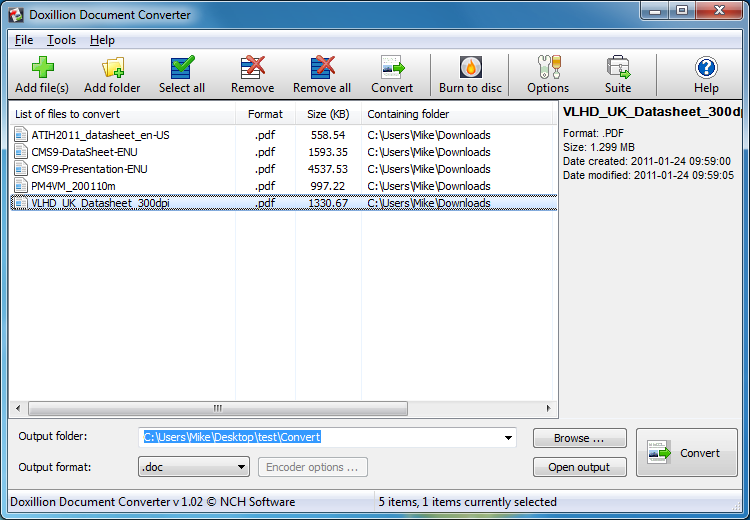
Doxillion Document Converter is a straightforward tool that will quickly convert files between many common formats (HTML, PDF, DOC, DOCX, RTF, and TXT, with the ability to read - but not write - WPD files).

This sounded great, especially for a (currently) free tool, but did it work? Well, not always as you might hope. We pointed the program at a set of PDFs (it can run batch conversions of entire folders, when necessary) and it crashed. We tried again with single PDFs and it either extracted just the title page, or, more normally, completed the document but left out all the images.

Not a great start, then, even by beta standards, but when we tried simpler documents the results were significantly better, with the program quickly and accurately converting a series of plain text DOC, DOCX and RTF files to PDF.

And so while we wouldn't recommend Doxillion Document Converter for use with lengthy or complex documents, if, say, you just want to convert some text-only DOCX files to HTML or PDF, then it's definitely worth giving the program a try.

Verdict:

Doxillion looks good, is easy to use, and quickly converted simple text-only documents between its supported formats. Try the program with more complex documents, though, and the results are currently very poor.

Your Comments & Opinion
 
Related Download Articles
 
PDFCreator 1.7.0

PDFCreator 1.7.0

Freeware

Quickly create industry-standard PDF files from any printable document

doPDF 7.3.391

doPDF 7.3.391

Freeware

Produce a PDF document from just about any Windows application

pdfFactory 4.81

pdfFactory 4.81

Trial Software

Convert almost any documents to PDF format in a click

AVS Document Converter 2.2.4

AVS Document Converter 2.2.4

Function Limited Demo

Easily convert your documents between many common formats

Other Download Articles From This Category
ConsoleHoster 3.8

ConsoleHoster 3.8

Open Source

Run multiple command line windows from a single tabbed interface

USB Drive Letter Manager

USB Drive Letter Manager 4.7.3.0

Free, for personal-use only

Take control over the drive letters assigned to your USB devices

USB Drive Letter Manager 4.7 (64-bit)

USB Drive Letter Manager 4.7.3.0 (64-bit)

Free, for personal-use only

Take control over the drive letters assigned to your USB devices

John's Background Switcher 4.7

John's Background Switcher 4.7.0.22

Freeware

Locate great new desktop backgrounds, and switch them automatically with this powerful free utility

From Softwarecrew

Please wait while my feed loads

See more posts...

Our Price: $95.99
RRP: $119.99
Saving 20%
Buy Now More Info
 

Spotlight: Free Full Software

Ashampoo Burning Studio 2013 (v11.0.6)

Free Full Commercial Software

Ashampoo Burning Studio 2013 is a compact, simple, but surprisingly feature-packed disc burning suite.

The program makes it easy to create simple data discs and audio CDs, for instance: just drag and drop your files onto the list area and you'll be burning the finished disc in a couple of clicks.

That's just the start, though. Burning Studio 2013 can also create data discs with customised, interactive multi-page menus, perfect if you'd like a more professional way to share and present the disc contents.

A built-in backup tool allows you to create backups which may be encrypted, compressed, and span several CDs, DVDs and Blu-rays.

And there are modules to create VCD or SVCD video projects; burn video DVDs or Blu-ray discs from prepared folders; create, browse or burn disc images (ISO, CUE/ BIN and Ashdisc formats are supported); copy discs, erase them, design and print disc covers, labels and booklets, and more.

The focus throughout is on ease of use, though, and so Ashampoo Burning Studio 2013 remains very straightforward, whatever you're doing. Most disc projects are created via the same simple interface, and for the most part all you have to do is drag and drop the necessary files. But experts will find more advanced options are only a click away, and if you need to then you can set ISO and UDF version, enable Joliet, make a disc bootable and more.

Note the download here will take you to the Downloadcrew Software Store where you can download Burning Studio 2013.

[...]
Value:
Free
Rating: