From Twitter

Please wait while my tweets load

If you can't wait - jump to Twitter

See more tweets...

RSS Feed

Please wait while my feed loads

See more posts...

Newsletter

Subscribe to either one of our two newsletters for regular updates and information

Downloads newsletter

This is a weekly newsletter with download news, updates and other information

This is a monthly newsletter with software store information, offers and deals

Skype Voice Changer 1.2

Change the sound of your voice in Skype conversations

by Mark Wilson

Our Rating:
Your Rating:
Login to rate
Based on 0 ratings
License: Freeware
Operating Systems: Windows 7 (32 bit), Windows 7 (64 bit), Windows Vista (32 bit), Windows Vista (64 bit), Windows XP
Requirements:


Languages: English
Software Cost: Free
Date Updated: 08 March 2012
Watchlist: Add download to my watchlist
Downloads To Date: 9424
Developer: Mark Heath
RSS News Feed: http://mark-dot-net.blogspot.com/
Buy TuneUp Utilities 2012 for only $18.99, with lifetime license, saving 62% from MSRP, only from store.downloadcrew.com
Skype Voice Changer
Have fun with Skype using Skype Voice Changer

Skype is a great communication tool for both business and personal use, making it quick, easy and –most importantly of all – free to keep in touch with friends and colleagues around the world. The program can be used to conduct text-based IM style chat, but it can also be used as a telephone replacement thanks to its support for VoIP.

This in itself is useful enough, but even a useful tool can be used for fun. And this is where Skype Voice Changer comes into play. As the name suggests, the application makes it possible to change the sound of your voice during Skype conversations by applying a number of effects to it.

After launching the program, click the Connect To Skype button in the upper left hand corner of the window, switch to Skype and you will need to grant the application access. Once this has been done, you are free to start exploring the voice changing options it has to offer.

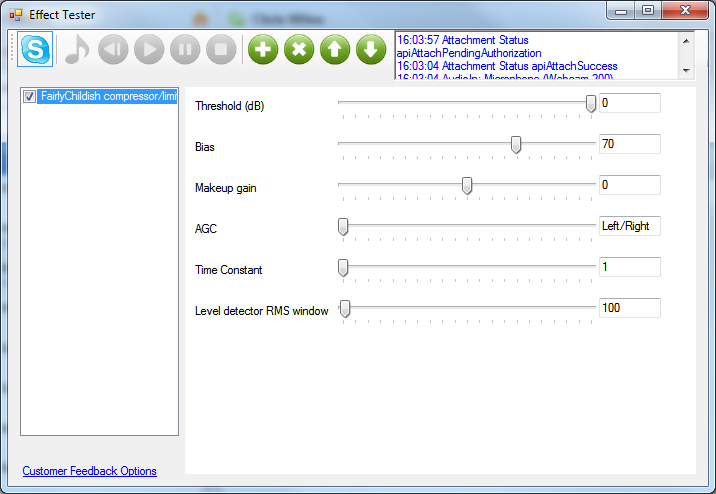
There are a number of preset effects that can be used, and each of these can be customised in a variety of ways. As you would expect, voice effects are applied in real time, so you can conduct as conversation as normal changing your voice as the mood takes you.

Verdict:

Ultimately pointless, but lots of fun, Skype Voice Changer is technologically impressive and an interesting tool for VoIP users.

Your Comments & Opinion
 
Related Download Articles
 
Pidgin enables you to chat to users across multiple networks

Pidgin Portable 2.10.3

Freeware

Chat to users across multiple networks using this messenger tool

Trillian

Trillian 1.2.40

Freeware

 A single app for all your chat and social networking needs

Vonage Mobile - Free International Calls & Texts

Vonage Mobile - Free International Calls & Texts 1.0.0

Freeware

Keep in touch with friends, family and colleagues for free

Camfrog Video Chat for iPad

Camfrog Video Chat for iPad 2.2

Freeware

A video chat room client for iPad

Other Download Articles From This Category
PicPick

PicPick 3.1.5

Shareware

Capture, edit and upload images in a flash with this powerful screen capture program

jAlbum 10.7.2

jAlbum 10.7.2

Free, for personal-use only

Create stylish web albums from your favourite digital photos

Apple QuickTime 7.7.2

Apple QuickTime 7.7.2

Freeware

High quality video player which can be used for online and offline viewing

K-Lite Codec Pack Standard

K-Lite Codec Pack Standard 8.8.0

Freeware

All the codecs you need to play virtually any video or audio you may encounter

From Softwarecrew

Please wait while my feed loads

See more posts...

Our Price: $9.99
RRP: $39.99
Saving 75%
Buy Now More Info
Offer Ends In:
 

Spotlight: Free Full Software

Giveaway: WinISO Standard 6.1.0

Free Full Commercial Software

WinISO is a very comprehensive tool which provides everything you need to create, edit and convert disc images.

If you've an image file already, for instance (ISO, CUE/ BIN, NRG, MDF, CCD, IMG and DVD formats are supported) then you can open it in a click or two, browse the image contents, and extract the files you need with a quick drag and drop.

It's just as easy to create new ISO9660, UDF, even HFS+ images. Just choose the option you need, then either manually build up your preferred file and folder structure; drag and drop your files and folders from Explorer onto the program; or create an image directly from a CD, DVD or Blu-ray disc.

Of course you can edit images, too. Is an ISO file too large for your needs, say? Open it up, locate and remove any surplus files to free up a little space.

WinISO program has full support for reading and creating bootable image files. A simple conversion tool makes it easy to convert disc images into the format you need. And the program can even mount ISO files as Explorer files, or burn images to disc when you're ready to save them.

Please note, this trial version of WinISO Standard will not save files greater than 500MB in size.

Giveaway: on Wednesday, we're giving you the full current version of WinISO Standard 6 worth $29.95. The download link here will take you to Downloadcrew Giveaway.

[...]
Time Remaining: