From Twitter

Please wait while my tweets load

If you can't wait - jump to Twitter

See more tweets...

RSS Feed

Please wait while my feed loads

See more posts...

Newsletter

Subscribe to either one of our two newsletters for regular updates and information

Downloads newsletter

This is a weekly newsletter with download news, updates and other information

This is a monthly newsletter with software store information, offers and deals

PointerStick 1.0

Add a virtual pointer to your screen to help with presentations

by Mike Williams

Our Rating:
Your Rating:
Login to rate
Based on 0 ratings
License: Freeware
Operating Systems: Windows 2000, Windows 7 (32 bit), Windows 7 (64 bit), Windows Server, Windows Vista (32 bit), Windows Vista (64 bit), Windows XP
Requirements:


Languages: English, German
Software Cost: Free
Date Updated: 18 November 2011
Watchlist: Add download to my watchlist
Downloads To Date: 463
Developer: SoftwareOK
RSS News Feed: http://www.softwareok.com/rss/news_en.xml
Buy TuneUp Utilities 2012 for only $18.99, with lifetime license, saving 62% from MSRP, only from store.downloadcrew.com
PointerStick 1.0
Add a virtual pointer to your screen to help with presentations

PointerStick is a tiny tool which adds a virtual pointer to your screen, perfect for highlighting specific areas during a presentation.

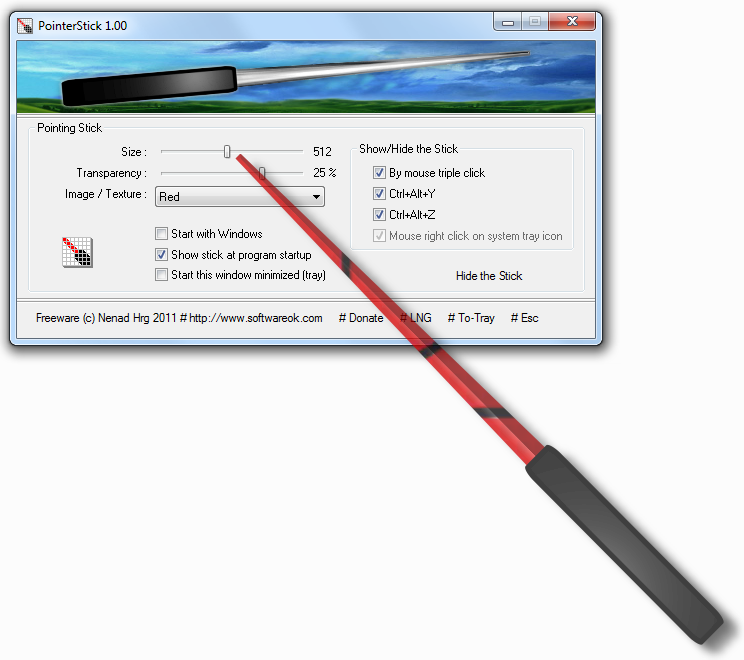
Just run the program and (by default) a very large pointer appears. Just move your mouse cursor as usual, and the pointer stick adjusts position to point at the same thing; anyone watching, even from a distance, will clearly get the message.

Of course a pointer stick of this size may get in the way sometimes, but fortunately this is easily fixed. Just triple-click the mouse, press Ctrl+Alt+Y or Ctrl+Alt+Z and you're able to toggle the stick on and off, which means it need only be displayed when you really need it.

If this still isn't quite good enough, though, clicking the program's system tray icon reveals a handy configuration console, where you can set the stick size, colour and style, transparency and more.

And perhaps most conveniently of all, PointerStick is portable, so this isn't something you have to install; just copy it to a folder sometimes and run it when necessary. (Don't worry about system resources, either. On our test system it typically consumed under 3MB when running on the background.)

Verdict:

A well-thought-out tool which can be a great help during formal presentations, or any time when you need to show something on your PC in detail to several people

Your Comments & Opinion
 
Related Download Articles
 
Mobile Mouse on iPad

Mobile Mouse for iPad

No Trial Available. Purchase Only

Control your PC or Mac remotely via your iPad

Mobile Mouse Lite on Android

Mobile Mouse Lite for Android 1.0

Freeware

Control your PC remotely via your Android mobile or tablet

Mobile Mouse Server on iPhone

Mobile Mouse Lite for iPhone 2.6.2

Freeware

Control your PC remotely via your iPhone or iPod touch

Mobile Mouse Server on Windows

Mobile Mouse Server 2.6.4

Freeware

Turn your mobile device into a wireless mouse, keyboard and remote for your computer 

Other Download Articles From This Category
CintaNotes

CintaNotes 1.6.2

Freeware

Put your thoughts and notes in order with this freebie organiser 

CodeTwo Sync for iCloud

CodeTwo Sync for iCloud 1.1.1.1

Freeware

Synchronize your Outlook folders with folders in iCloud

Task Coach

Task Coach 1.3.14

Freeware

Lightweight 'To Do' list manager, PIM and task organiser

doPDF 7.3

doPDF 7.3.381

Freeware

Produce a PDF document from just about any Windows application

From Softwarecrew

Please wait while my feed loads

See more posts...

Our Price: $14.95
RRP: $29.95
Saving 50%
Buy Now More Info
Offer Ends In:
 

Spotlight: Free Full Software

Giveaway: WinISO Standard 6.1.0

Free Full Commercial Software

WinISO is a very comprehensive tool which provides everything you need to create, edit and convert disc images.

If you've an image file already, for instance (ISO, CUE/ BIN, NRG, MDF, CCD, IMG and DVD formats are supported) then you can open it in a click or two, browse the image contents, and extract the files you need with a quick drag and drop.

It's just as easy to create new ISO9660, UDF, even HFS+ images. Just choose the option you need, then either manually build up your preferred file and folder structure; drag and drop your files and folders from Explorer onto the program; or create an image directly from a CD, DVD or Blu-ray disc.

Of course you can edit images, too. Is an ISO file too large for your needs, say? Open it up, locate and remove any surplus files to free up a little space.

WinISO program has full support for reading and creating bootable image files. A simple conversion tool makes it easy to convert disc images into the format you need. And the program can even mount ISO files as Explorer files, or burn images to disc when you're ready to save them.

Please note, this trial version of WinISO Standard will not save files greater than 500MB in size.

Giveaway: on Wednesday, we're giving you the full current version of WinISO Standard 6 worth $29.95. The download link here will take you to Downloadcrew Giveaway.

[...]
Time Remaining: