From Twitter

Please wait while my tweets load

If you can't wait - jump to Twitter

See more tweets...

RSS Feed

Please wait while my feed loads

See more posts...

Newsletter

Subscribe to either one of our two newsletters for regular updates and information

Downloads newsletter

This is a weekly newsletter with download news, updates and other information

This is a monthly newsletter with software store information, offers and deals

UltraSearch 1.70

Locate files and folders in a flash with this ultra-speedy search tool

by Mike Williams

Our Rating:
Your Rating:
Login to rate
Based on 0 ratings
License: Freeware
Operating Systems: Windows 7 (32 bit), Windows 7 (64 bit), Windows 8, Windows Server, Windows Vista (32 bit), Windows Vista (64 bit), Windows XP
Requirements:


Languages: English, German
Software Cost: Free
Date Updated: 09 October 2012
Watchlist: Add download to my watchlist
Downloads To Date: 2175
Developer: JAM Software
RSS News Feed: http://www.jam-software.com/company/news.rss
Buy the new TuneUp Utilities 2013 for only $16.95, with lifetime license, saving 58% from MSRP, only from store.downloadcrew.com
UltraSearch 1.70
Locate files and folders in a flash with this ultra-speedy search tool

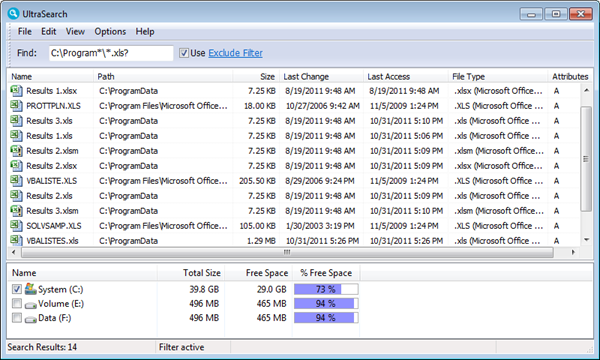
UltraSearch is an easy-to-use free search tool which can locate files and folders almost instantly.

The program achieves its high performance by directly accessing the NTFS Master File Table (MFT), which holds details on every file and folder on your PC. And so it's able to return results immediately, typically in around a second or two, without having to waste time or resources building an index: just enter a keyword and watch the results appear.

But the disadvantage, of course, is that the MFT only indexes file and folder names. So you can't search for JPEG metadata, emails or other file content - it's strictly names only.

In addition, the program only works on NTFS-based drives. You probably won't be able to use it to check the contents of, say, your USB flash drives, as they're likely to use a FAT-based file system.

UltraSearch is still useful for its extreme speed, though. And if you know you're going to spend a while searching only for particular file names, then its inability to show anything else is a plus, as it'll help you zoom in immediately to access the files and folders you need.

What's more, version 1.7 takes the program even further, with its new ability to detect NTFS hardlinks, and direct support for regular expressions.

Verdict:

While it's not a replacement for Windows Search, UltraSearch can be a useful addition, as the program makes it very quick and easy to search for files and folders by name.

Your Comments & Opinion
 
Related Download Articles
 
Copernic Desktop Search

Copernic Desktop Search Home 3.7.0

Freeware

Index the contents of your hard drive to make files searches as fast as lightning

Everything 1.2.1.371

Everything 1.2.1.371

Freeware

Instantly locate the files you need on any NTFS drive

Quick Search 1.0.0.166

Quick Search 1.0.0.166

Freeware

Locate the files you need in a flash with this ultra-speedy search tool

MailStore Home 4.1 Portable

MailStore Home 4.1 Portable

Freeware

Easily archive emails from multiple email clients and accounts

Other Download Articles From This Category
Intel Processor ID Utility 4.70

Intel Processor ID Utility 4.70

Freeware

Instantly identify your Intel CPU's model, speed and capabilities

Registry Key Jumper 1.0

Registry Key Jumper 1.0

Freeware

A quick and easy way to view any Registry key

Process Tamer 2.11.01

Process Tamer 2.11.01

Freeware

Optimise CPU usage by automatically adjusting process priorities

PaperScan Free 1.8.0.8

PaperScan Free 1.8.0.8

Freeware

Clean up your scanned documents with this easy-to-use tool

From Softwarecrew

Please wait while my feed loads

See more posts...

Our Price: $23.99
RRP: $59.99
Saving 60%
Buy Now More Info
 

Spotlight: Free Full Software

Ashampoo Burning Studio 2013 (v11.0.6)

Free Full Commercial Software

Ashampoo Burning Studio 2013 is a compact, simple, but surprisingly feature-packed disc burning suite.

The program makes it easy to create simple data discs and audio CDs, for instance: just drag and drop your files onto the list area and you'll be burning the finished disc in a couple of clicks.

That's just the start, though. Burning Studio 2013 can also create data discs with customised, interactive multi-page menus, perfect if you'd like a more professional way to share and present the disc contents.

A built-in backup tool allows you to create backups which may be encrypted, compressed, and span several CDs, DVDs and Blu-rays.

And there are modules to create VCD or SVCD video projects; burn video DVDs or Blu-ray discs from prepared folders; create, browse or burn disc images (ISO, CUE/ BIN and Ashdisc formats are supported); copy discs, erase them, design and print disc covers, labels and booklets, and more.

The focus throughout is on ease of use, though, and so Ashampoo Burning Studio 2013 remains very straightforward, whatever you're doing. Most disc projects are created via the same simple interface, and for the most part all you have to do is drag and drop the necessary files. But experts will find more advanced options are only a click away, and if you need to then you can set ISO and UDF version, enable Joliet, make a disc bootable and more.

Note the download here will take you to the Downloadcrew Software Store where you can download Burning Studio 2013.

[...]
Value:
Free
Rating: