From Twitter

Please wait while my tweets load

If you can't wait - jump to Twitter

See more tweets...

RSS Feeds

Receive a regular RSS feed from our latest, most popular and recommended downloads

Latest downloads feed

Get a regular RSS from our most latest downloads

Most popular downloads feed

Get a regular RSS from our most popular downloads

Recommended downloads feed

Get a regular RSS from our recommended downloads

Newsletter

Subscribe to either one of our two newsletters for regular updates and information

Downloads newsletter

This is a weekly newsletter with download news, updates and other information

This is a monthly newsletter with software store information, offers and deals

Carroll 1.12

Implement a different screen resolution for each user of your computer

by Mark Wilson

Our Rating:
Your Rating:
Login to rate
Based on 0 ratings
License: Freeware
Operating Systems: Windows 7 (32 bit), Windows 7 (64 bit), Windows 8, Windows Vista (32 bit), Windows Vista (64 bit), Windows XP
Requirements:


Languages: English
Software Cost: Free
Date Updated: 09 February 2012
Watchlist: Add download to my watchlist
Downloads To Date: 60
Developer: the sz development
RSS News Feed:
Buy TuneUp Utilities 2012 for only $18.99, with lifetime license, saving 62% from MSRP, only from store.downloadcrew.com
Carroll
Use a different resolution for each user with Carroll

When more than one person uses a computer, it is often the case that there will be disagreements about the settings that are in place. The easiest way to get around this problem is to set up individual user accounts for everyone – this not only enables everyone to store their file separately, but also means that each user can configure their own desktop settings such as the background they would like to use.

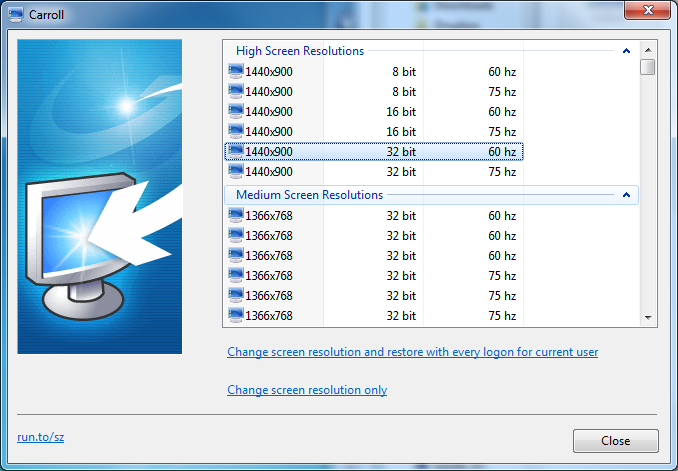
One setting that has to be the same for all users, however, is screen resolution. Different tasks may require the use of different screen resolutions, or users may just have differing preferences. While there is nothing to stop you from manually changing resolution through the Control Panel each time you log into your account, Carroll can take care of this for you automatically.

This small, free utility run automatically with Windows when you log into your user account and you can choose the resolution at which your display should be running. All other users are free to do exactly the same so everyone is able to use the settings they feel most comfortable with. This sounds great in theory, but Carroll is slightly flawed.

The vast majority of monitors currently in use are TFT screens, and these all have a native resolution. While it is possible to use different resolutions on a panel that has been designed for a 1440 x 900 resolution, things are not going to look good. The app is a nice ideal, but in reality is a somewhat impractical and a little outdated.

Verdict:

A nice idea, but one that is ultimately flawed, Carroll is likely to result in little more than a blurry display for most users.

Your Comments & Opinion
 
Related Download Articles
 
Mikogo

Mikogo 4.4

Trial Software

A remote desktop sharing and meeting tool for online businesses

ScreenSlider

ScreenSlider 1.0

No Trial Available. Purchase Only

Turn your Android device into an extra monitor for your PC

UltraMon 3

UltraMon 3.1.0 (64-bit)

Trial Software

Make the most of your multi-monitor setup with this handy utility

DisplayFusion Pro 3.1.7

DisplayFusion Pro 3.1.7

Trial Software

Make the most of your multi-monitor setup using this handy utility

Other Download Articles From This Category
HyperSnap

HyperSnap 7.16.01

Trial Software

Take and edit screen grabs from just about any Windows application

SUMo

SUMo 3.1.1

Freeware

Quickly discover which of your favourite programs have updates available

Toolwiz Care 2.0

Toolwiz Care 2.0.0.2600

Free, for personal-use only

Clean and optimise your system with this powerful suite

PNotes

PNotes 9.0.107

Freeware

Get yourself organised by recording reminders for all your most important tasks on virtual sticky notes

From Softwarecrew

Please wait while my feed loads

See more posts...


Spotlight: Free Full Software

Giveaway: WinISO Standard 6.1.0

Free Full Commercial Software

WinISO is a very comprehensive tool which provides everything you need to create, edit and convert disc images.

If you've an image file already, for instance (ISO, CUE/ BIN, NRG, MDF, CCD, IMG and DVD formats are supported) then you can open it in a click or two, browse the image contents, and extract the files you need with a quick drag and drop.

It's just as easy to create new ISO9660, UDF, even HFS+ images. Just choose the option you need, then either manually build up your preferred file and folder structure; drag and drop your files and folders from Explorer onto the program; or create an image directly from a CD, DVD or Blu-ray disc.

Of course you can edit images, too. Is an ISO file too large for your needs, say? Open it up, locate and remove any surplus files to free up a little space.

WinISO program has full support for reading and creating bootable image files. A simple conversion tool makes it easy to convert disc images into the format you need. And the program can even mount ISO files as Explorer files, or burn images to disc when you're ready to save them.

Please note, this trial version of WinISO Standard will not save files greater than 500MB in size.

Giveaway: on Wednesday, we're giving you the full current version of WinISO Standard 6 worth $29.95. The download link here will take you to Downloadcrew Giveaway.

[...]
Time Remaining: