From Twitter

Please wait while my tweets load

If you can't wait - jump to Twitter

See more tweets...

RSS Feed

Please wait while my feed loads

See more posts...

Newsletter

Subscribe to either one of our two newsletters for regular updates and information

Downloads newsletter

This is a weekly newsletter with download news, updates and other information

This is a monthly newsletter with software store information, offers and deals

ZoomIt 4.2

Zoom in and out and draw on your screen with this handy portable presentation tool

by Mike Williams

Our Rating:
Your Rating:
Login to rate
Based on 0 ratings
License: Freeware
Operating Systems: Windows 7 (32 bit), Windows 7 (64 bit), Windows Server, Windows Vista (32 bit), Windows Vista (64 bit), Windows XP
Requirements:


Languages: English
Software Cost: Free
Date Updated: 10 February 2012
Watchlist: Add download to my watchlist
Downloads To Date: 293
Developer: Windows Sysinternals
RSS News Feed: http://blogs.technet.com/sysinternals/rss.xml
Buy TuneUp Utilities 2012 for only $18.99, with lifetime license, saving 62% from MSRP, only from store.downloadcrew.com
ZoomIt 4.2
Zoom in and out and draw on your screen with this handy portable presentation tool

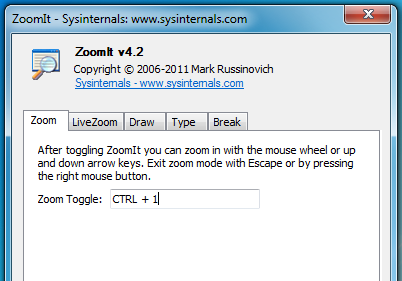
ZoomIt is a compact and convenient screen zoom and annotation tool for presentations (although it has other applications, too).

At its simplest you can just use the program as a very easy way to zoom in and out on your screen. Simply press the configurable hotkey, then use the mouse wheel or up and down arrow keys to change the zoom factor, and move the mouse to focus on the area you need.

As with most zoom tools, this only works on a static image of the screen; if it's showing a clock, for instance, this will have paused at the moment you initialised the zoom. If you're running Windows Vista or later, though, you can alternatively launch a Live Zoom where the view continues to update. So if you zoom in on an analogue clock, then the hands will keep turning.

Sometimes you may want to annotate a screen for the benefit of your audience, and that's easy, too. Switch to Draw mode and you can begin to draw freehand on the current screen; there are also options to draw straight lines, rectangles, ellipses or arrows, and you can change the pen width and colour, as well as copy the image to the clipboard (or save it as a file) when you're done.

And if you press "t" then you can enter typing mode, where you're able to add text captions to the current screen, using the mouse wheel or up and down arrow keys to set the font size (and any drawing colour you've set previously will also apply to any text).

There's a surprisingly amount of functionality here, then, yet despite all this the program uses only a tiny amount of system resources, just a fraction over 2MB on our test PC. So even if you won't use all its presentation tools, ZoomIt could be handy as a simple screen magnifier.

Verdict:

ZoomIt is a super-lightweight presentation tool which comes packed with essential features.

Your Comments & Opinion
 
Related Download Articles
 
PointerStick 1.0

PointerStick 1.0

Freeware

Add a virtual pointer to your screen to help with presentations

iSpring Free

iSpring Free 6.0

Free, for personal-use only

Quickly convert PowerPoint presentations to internet-ready Flash format

Google Docs for Android

Google Docs for Android 1.0.10

Freeware

Access your Google Docs directly from your Android-powered device 

Sysinternals Updater 1.0.1

Sysinternals Updater 1.0.1

Freeware

Download and update all the latest Sysinternals utilities at a click

Other Download Articles From This Category
HyperSnap

HyperSnap 7.16.01

Trial Software

Take and edit screen grabs from just about any Windows application

SUMo

SUMo 3.1.1

Freeware

Quickly discover which of your favourite programs have updates available

Toolwiz Care 2.0

Toolwiz Care 2.0.0.2600

Free, for personal-use only

Clean and optimise your system with this powerful suite

PNotes

PNotes 9.0.107

Freeware

Get yourself organised by recording reminders for all your most important tasks on virtual sticky notes

From Softwarecrew

Please wait while my feed loads

See more posts...

Our Price: $29.95
RRP: $59.95
Saving 50%
Buy Now More Info
Offer Ends In:
 

Spotlight: Free Full Software

Giveaway: WinISO Standard 6.1.0

Free Full Commercial Software

WinISO is a very comprehensive tool which provides everything you need to create, edit and convert disc images.

If you've an image file already, for instance (ISO, CUE/ BIN, NRG, MDF, CCD, IMG and DVD formats are supported) then you can open it in a click or two, browse the image contents, and extract the files you need with a quick drag and drop.

It's just as easy to create new ISO9660, UDF, even HFS+ images. Just choose the option you need, then either manually build up your preferred file and folder structure; drag and drop your files and folders from Explorer onto the program; or create an image directly from a CD, DVD or Blu-ray disc.

Of course you can edit images, too. Is an ISO file too large for your needs, say? Open it up, locate and remove any surplus files to free up a little space.

WinISO program has full support for reading and creating bootable image files. A simple conversion tool makes it easy to convert disc images into the format you need. And the program can even mount ISO files as Explorer files, or burn images to disc when you're ready to save them.

Please note, this trial version of WinISO Standard will not save files greater than 500MB in size.

Giveaway: on Wednesday, we're giving you the full current version of WinISO Standard 6 worth $29.95. The download link here will take you to Downloadcrew Giveaway.

[...]
Time Remaining: