


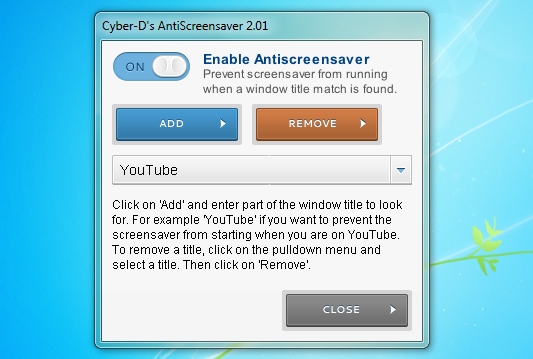
Cyber-D's AntiScreensaver is a tool which will stop the screensaver from launching if you've viewing a certain website or running a particular program.
You might be tired of the screensaver firing when you're watching a video with VLC Media Player, for instance. But all you have to do is launch AntiScreensaver, click Add, and enter the text VLC. AntiScreensaver will simulate a keypress every 60 seconds just as long you're running an application with "VLC" in the title, so keeping the screensaver at bay.
You're not restricted to entering application names, of course. Add the text YouTube and the program will block the screensaver whenever you've got YouTube open in a browser window. Add other websites, file names or other text to suit your needs.
And an "off" button in the AntiScreensaver window means you can leave the program to work most of the time, then easily disable it whenever appropriate.
Verdict:
A simple and effective way to take more control over your screensaver
Your Comments & Opinion
Temporarily prevent Windows from hibernating, sleeping, shutting down or restarting
Organise, import, view, enhance and share your digital photos with this comprehensive management tool
A versatile music visualizer
A powerful music visualiser/ screensaver
Set your PC for maximum Christmas cheer
Temporarily stop your PC sleeping
A warming fireplace screensaver to brighten up your desktop
A notepad/ to-do tool with cloud sync
Monitor your PC's temperature, voltages, CPU frequency and more with this powerful stability checker
Browse epub, mobi, fb2, cbr, cbz eBooks
Record, edit and share videos of your desktop
Powerful PDF processing toolkit