From Twitter

Please wait while my tweets load

If you can't wait - jump to Twitter

See more tweets...

RSS Feeds

Receive a regular RSS feed from our latest, most popular and recommended downloads

Latest downloads feed

Get a regular RSS from our most latest downloads

Most popular downloads feed

Get a regular RSS from our most popular downloads

Recommended downloads feed

Get a regular RSS from our recommended downloads

Newsletter

Subscribe to either one of our two newsletters for regular updates and information

Downloads newsletter

This is a weekly newsletter with download news, updates and other information

This is a monthly newsletter with software store information, offers and deals

OneTab for Chrome 1.3

Rein in Chrome's spiralling memory demands with this essential add-on

by Nick Peers

Our Rating:
Your Rating:
Login to rate
Based on 0 ratings
License: Freeware
Operating Systems: Linux, Mac OS X, Windows 7 (32 bit), Windows 7 (64 bit), Windows 8, Windows Vista (32 bit), Windows Vista (64 bit), Windows XP
Requirements:
Languages: English
Software Cost: Free
Date Updated: 12 March 2013
Watchlist: Add download to my watchlist
Downloads To Date: 795
Developer: OneTab
RSS News Feed:
Buy the new TuneUp Utilities 2013 for only $16.95, with lifetime license, saving 58% from MSRP, only from store.downloadcrew.com
OneTab for Chrome 1.3
Manage all your tabs from one window, reducing memory usage in the process.

If you’ve ever tried running Chrome on a low-memory system – and by low-memory we mean anything under 4GB – then you’ll have probably noticed how it’s not wise to have too many tabs open at once. That’s because each tab effectively runs as its own process, consuming hundreds of megabytes at once.

Now the obvious solution to this problem is to simply minimise the number of tabs you have open, but that might not be practical for all kinds of reasons. This is where OneTab comes in, offering you a quick and convenient way to manage all those tabs from a single window, reducing your memory usage by up to 95 per cent and helping to speed up your PC or Mac in the process.

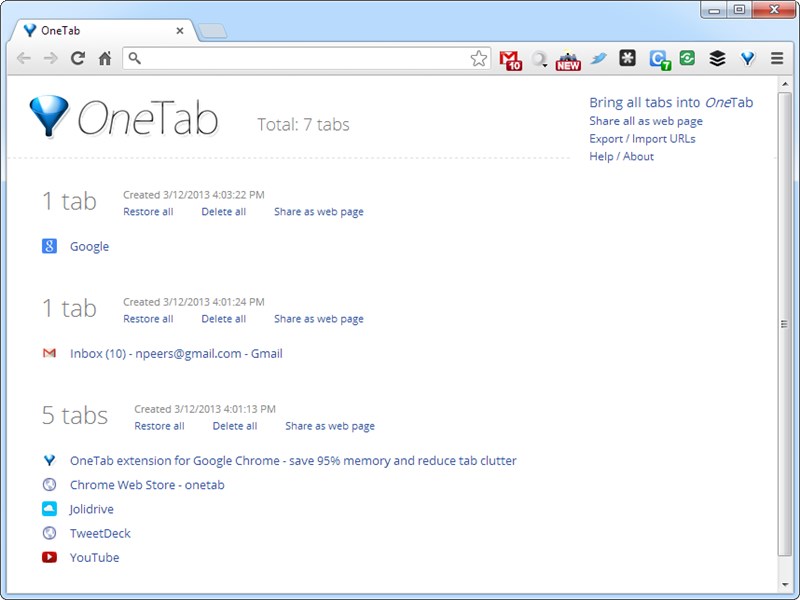
It’s incredibly simple to use: start browsing and as you open more and more tabs, just click the One Tab button on your taskbar and the tabs are rolled into one single tab, reducing your memory consumption in the process. Users have also reported CPU consumption is cut when tabs containing running scripts are minimised too – a win-win for all concerned.

You can then restore individual tabs by clicking them in the list, or opt to restore or delete all the tabs from One Tab’s history. Unless you opt to delete the tabs completely, they’ll always remain in the list – even after shutting down and restarting Chrome. You can even opt to share your tab collection as a web page for others to access, or export the URLs for importing on to another computer.

The concept is breathtakingly simple, the execution brilliant and it’s frankly an essential add-on for any Chrome user, particularly if you’re running an older, under-powered Mac or PC. A Firefox version is also in development.

Your Comments & Opinion
 
Related Download Articles
 
Sandcat Browser 3.0 Beta 2

Sandcat Browser 3.0 Beta 2

Freeware

A portable Chromium-based browser with some useful security and developer-oriented tools

Ghostery for Safari

Ghostery for Safari 1.3

Freeware

Discover the web sites that track you and then take back control

Springpad for Google Chrome

Springpad for Google Chrome 2.0.1101

Freeware

A massively versatile information manager for mobile devices and the web

Other Download Articles From This Category
Pale Moon x64 20.1

Pale Moon x64 20.1

Freeware

Speed-optimized 64-bit version of Firefox designed for the best possible performance

Pale Moon 20.1

Pale Moon 20.1

Freeware

Speed-optimized version of Firefox designed for the best possible performance

Mailbox 1.3

Mailbox 1.3.0

Freeware

An app to help you power through your Gmail inbox with ease

Connectify Lite 5

Connectify Lite 5.0.1

Freeware

Turn your laptop into a wireless hotspot to share a web connection

From Softwarecrew

Please wait while my feed loads

See more posts...


Spotlight: Free Full Software

Ashampoo Burning Studio 2013 (v11.0.6)

Free Full Commercial Software

Ashampoo Burning Studio 2013 is a compact, simple, but surprisingly feature-packed disc burning suite.

The program makes it easy to create simple data discs and audio CDs, for instance: just drag and drop your files onto the list area and you'll be burning the finished disc in a couple of clicks.

That's just the start, though. Burning Studio 2013 can also create data discs with customised, interactive multi-page menus, perfect if you'd like a more professional way to share and present the disc contents.

A built-in backup tool allows you to create backups which may be encrypted, compressed, and span several CDs, DVDs and Blu-rays.

And there are modules to create VCD or SVCD video projects; burn video DVDs or Blu-ray discs from prepared folders; create, browse or burn disc images (ISO, CUE/ BIN and Ashdisc formats are supported); copy discs, erase them, design and print disc covers, labels and booklets, and more.

The focus throughout is on ease of use, though, and so Ashampoo Burning Studio 2013 remains very straightforward, whatever you're doing. Most disc projects are created via the same simple interface, and for the most part all you have to do is drag and drop the necessary files. But experts will find more advanced options are only a click away, and if you need to then you can set ISO and UDF version, enable Joliet, make a disc bootable and more.

Note the download here will take you to the Downloadcrew Software Store where you can download Burning Studio 2013.

[...]
Value:
Free
Rating: