From Twitter

Please wait while my tweets load

If you can't wait - jump to Twitter

See more tweets...

RSS Feed

Please wait while my feed loads

See more posts...

Newsletter

Subscribe to either one of our two newsletters for regular updates and information

Downloads newsletter

This is a weekly newsletter with download news, updates and other information

This is a monthly newsletter with software store information, offers and deals

SugarSync 4.0.0

Keep your files synchronized between your computer and iOS devices

by Mark Wilson

Our Rating:
Your Rating:
Login to rate
Based on 0 ratings
License: Freeware
Operating Systems: iPad, iPhone
Requirements:


Languages: English
Software Cost: Free
Date Updated: 16 April 2013
Watchlist: Add download to my watchlist
Downloads To Date: 333
Developer: SugarSync, Inc.
RSS News Feed: https://www.sugarsync.com/blog/
Twitter Feed: http://twitter.com/Sugarsync
Facebook: http://www.facebook.com/SugarSync
Buy the new TuneUp Utilities 2013 for only $16.95, with lifetime license, saving 58% from MSRP, only from store.downloadcrew.com
SugarSync 4
Quickly backup or synchronise files across your computers

Nowadays we not only have to think about working with multiple computer – such as a home PC and one in the office, or even multiple personal computers – but also multiple devices such as phones and tablets. The process of manually keeping files synchronized and updated between multiple devices can quickly turn into an almost impossible task, but SugarSync is a free app that is on hand to help make things a great deal easier.

The app is available for iOS, Android, Windows and OS X and in a matter of minutes you can specify which of your folder would like to keep in sync. There is special treatment for photo and video files, and the app can be configured so that the moment your take a photo or shoot a video it will be immediately uploaded to your online storage. This is great not only because it means that the files can be accessed from other computers, but also because it serves as a backup.

The mobile version of the app acts much like a remote access tool as it can be used to move, delete and rename files you have stored on your computers and if you’re a music fans you’ll be pleased to discover that the app makes it possible to stream music from your online account. There are also a number of sharing options, so if you would like to make some of your files available to other people you can do so by taking advantage of Twitter, Facebook and email sharing from within the app.

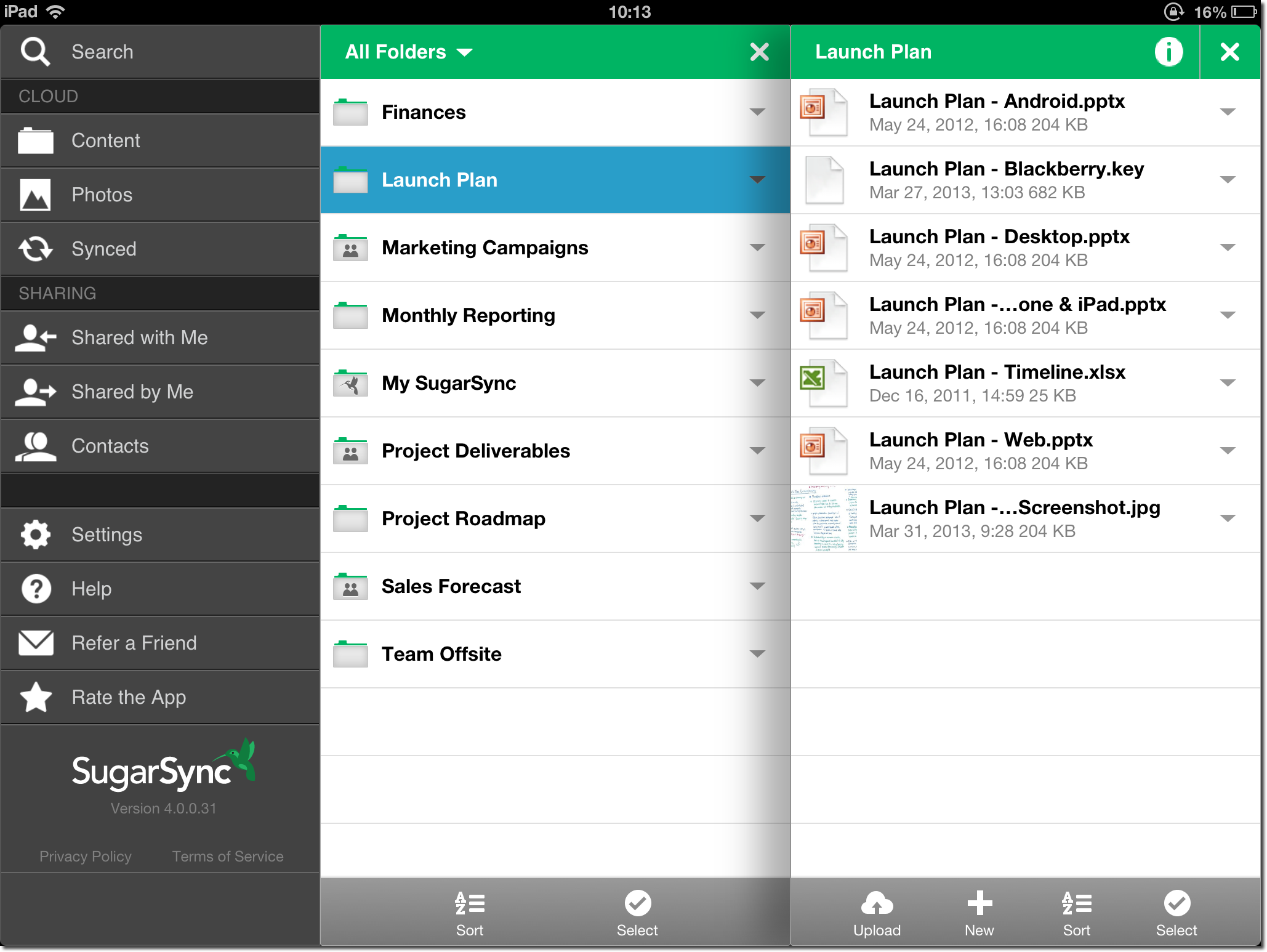
The latest version of the app has been completely redesigned to take full advantage of the new third generation iPad. You’ll immediately notice the new interface which has a distinctly more professional look and feel to it and the GUI has been rearranged so it is now easier than ever to access frequently used options just as photo and video backup. The way information is displayed has completely changed so that it is now possible to see more folder details at once, eliminating the need to keep switching back and forth between the folders you are working with. You can now see the content of multiple folders at the same time thanks to a new pseudo-3D view. There’s also great support for gestures which mean that it is now possible to not only drag and drop but also swipe between views and folders quickly.

SugarSync is an app that is comparable to the likes of Dropbox, but the way it handles automatic upload of photos and videos is very handy. The fact that there is client software available for so many platforms will be welcomed by many people who find that they are working with different devices on a daily basis and still need to be able to access the same files. When you sign up for an account you will automatically receive 5GB of storage space free of charge, but if you should find that this is not enough you do have the option of buying more space.

SugarSync 4.0.0 is a major upgrade, with these changes:

• Major re-design - Quick access to your Synced content. Easy to Share new content, or access content shared by other people.
• Powerful new features - Search and Open In
• Cloud Search - Search for files across all your computers right from your iOS app
• Open In - Save documents, photos, or videos from other apps into your SugarSync app. You can even select the folder to which you want to save the file to.
• Device Filter - View all the folders you have in SugarSync, or only folders syncing to your current computer.
• Coming Soon! - Folder Labels - If you label a folder on any computer or web you will see the label appear in the SugarSync app on your iPhone/iPad as well.

Verdict:

An indispensible sync tool that will soon make you wonder how you ever lived without it

Your Comments & Opinion
 
Related Download Articles
 
Dropbox 2.0.26

Dropbox 2.0.26 FINAL

Freeware

Backup, synchronise & share important files

Pocket (Formerly Read It Later)

Pocket (formerly Read It Later) for Firefox 3.0.1

Freeware

Bookmark sites, videos and images to view at a later date

SugarSync

SugarSync for Android 4.0.1

Freeware

Keep your files synchronized between your computer and iOS devices

Acronis True Image

Acronis True Image for Android 0.6

Freeware

Access your backed up data on your mobile device

Other Download Articles From This Category
Macrium Reflect - Free 5.2

Macrium Reflect - Free 5.2.6249

Free, for personal-use only

Quickly create accurate, reliable backup images of your hard drive

CloudMe 1.6.8

CloudMe 1.6.8

Freeware

A cloud storage/ sync service with 3GB free

GoodSync for Windows

GoodSync for Windows 9.5.0.5

Freeware

Keep files synchronised between drives, computers and servers

Free Word and Excel Password Recovery Wizard

Free Word and Excel Password Recovery Wizard 2.1.12

Freeware

Recover shorter passwords from older Excel and Word documents for free 

From Softwarecrew

Please wait while my feed loads

See more posts...


Spotlight: Free Full Software

Ashampoo Burning Studio 2013 (v11.0.6)

Free Full Commercial Software

Ashampoo Burning Studio 2013 is a compact, simple, but surprisingly feature-packed disc burning suite.

The program makes it easy to create simple data discs and audio CDs, for instance: just drag and drop your files onto the list area and you'll be burning the finished disc in a couple of clicks.

That's just the start, though. Burning Studio 2013 can also create data discs with customised, interactive multi-page menus, perfect if you'd like a more professional way to share and present the disc contents.

A built-in backup tool allows you to create backups which may be encrypted, compressed, and span several CDs, DVDs and Blu-rays.

And there are modules to create VCD or SVCD video projects; burn video DVDs or Blu-ray discs from prepared folders; create, browse or burn disc images (ISO, CUE/ BIN and Ashdisc formats are supported); copy discs, erase them, design and print disc covers, labels and booklets, and more.

The focus throughout is on ease of use, though, and so Ashampoo Burning Studio 2013 remains very straightforward, whatever you're doing. Most disc projects are created via the same simple interface, and for the most part all you have to do is drag and drop the necessary files. But experts will find more advanced options are only a click away, and if you need to then you can set ISO and UDF version, enable Joliet, make a disc bootable and more.

Note the download here will take you to the Downloadcrew Software Store where you can download Burning Studio 2013.

[...]
Value:
Free
Rating: