From Twitter

Please wait while my tweets load

If you can't wait - jump to Twitter

See more tweets...

RSS Feed

Please wait while my feed loads

See more posts...

Newsletter

Subscribe to either one of our two newsletters for regular updates and information

Downloads newsletter

This is a weekly newsletter with download news, updates and other information

This is a monthly newsletter with software store information, offers and deals

Speccy 1.16

Get a comprehensive list of installed system components using this information tool

by Chris Wiles

Our Rating:
Your Rating:
Login to rate
Based on 0 ratings
License: Freeware
Operating Systems: Windows 2000, Windows 7 (32 bit), Windows 7 (64 bit), Windows Vista (32 bit), Windows Vista (64 bit), Windows XP
Requirements:


Languages: English
Software Cost: Free
Date Updated: 02 March 2012
Watchlist: Add download to my watchlist
Downloads To Date: 1691
Developer: Piriform
RSS News Feed: http://feeds2.feedburner.com/piriform
Buy TuneUp Utilities 2012 for only $18.99, with lifetime license, saving 62% from MSRP, only from store.downloadcrew.com
Speccy 1.16
Speccy enables you to obtain a comprehensive list of your system's installed components

Finding comprehensive information about your computer isn’t always easy. When you choose your PC, online, and customise the components, how do you know if you’ve received everything you’ve ordered? It would be really easy for an unscrupulous PC manufacturer to drop in cheaper versions of the components you expected to ship with your new computer.

You can get some of this information from within Windows. Simply right-click on ‘My Computer’, go to Properties and check the Device Manager. This gives a fairly comprehensive list of components, but is primarily designed to inform you if there’s a problem with the hardware, particularly if a device driver isn’t installed correctly.

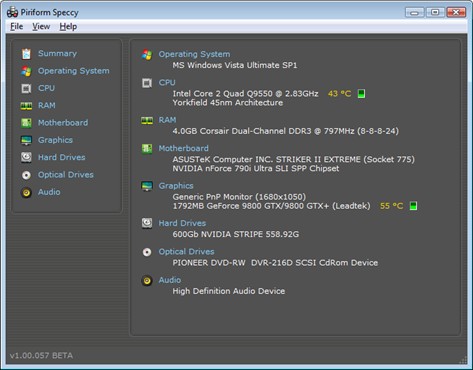
Speccy is a new system information tool for your PC which you can use to scan the installed components and see a comprehensive list of what is installed, the manufacturer, the slots in use and much more. This is ideal if you want to check the type of memory installed in your computer, how many slots are still available and so on.

Indeed, Speccy is an excellent tool to use when you plan on selling your computer and want to detail a comprehensive list of the installed components. You can use it to back up your claims when a potential purchaser visits your to buy the machine.

Speccy 1.16 contains the following new features and improvements:

-Added Windows 8 beta support.
- Rearchitecting data loading order.
- Improved exception handling for CPU and GFX sections.
- Improved detection of Admin Shares.
- Improved bug data collection and reporting.
- Fixed minor GUI issues.

Verdict:

This comprehensive system analysis tool will scan your installed components and give you a list of the parts that make up your PC

Your Comments & Opinion
 
Related Download Articles
 
CCleaner 3.18

CCleaner 3.18

Freeware

Give your system a speed boost by cleansing and optimising your PC

Recuva 1.42

Recuva 1.42

Freeware

Quickly scan a drive or memory card for lost and delete files, then recover the data

Speccy Portable

Speccy Portable 1.16

Freeware

Get a comprehensive list of installed system components using this information tool

Windows Inspection Tool Set 3.0.25

Windows Inspection Tool Set 3.0.25 (32-bit)

Open Source

Track exactly what's happening on your PC with this interesting monitoring suite

Other Download Articles From This Category
SUMo

SUMo 3.1.0.154

Freeware

Quickly discover which of your favourite programs have updates available

Toolwiz FlipBook 1.4.0.0

Toolwiz FlipBook 1.4.0.0

Freeware

Easily turn any text file into a stand-alone 3D ebook

Auslogics Disk Defrag 3.4.3.0

Auslogics Disk Defrag 3.4.3.0

Free, for personal-use only

Keep your hard drive in top condition with this powerful disk defragmentation tool

Auslogics BoostSpeed 5.3.0.0

Auslogics BoostSpeed 5.3.0.0

Trial Software

Clean, optimise, tune and tweak your PC to deliver its best possible performance

From Softwarecrew

Please wait while my feed loads

See more posts...

Our Price: $9.95
RRP: $19.95
Saving 50%
Buy Now More Info
Offer Ends In:
 

Spotlight: Free Full Software

Giveaway: WinISO Standard 6.1.0

Free Full Commercial Software

WinISO is a very comprehensive tool which provides everything you need to create, edit and convert disc images.

If you've an image file already, for instance (ISO, CUE/ BIN, NRG, MDF, CCD, IMG and DVD formats are supported) then you can open it in a click or two, browse the image contents, and extract the files you need with a quick drag and drop.

It's just as easy to create new ISO9660, UDF, even HFS+ images. Just choose the option you need, then either manually build up your preferred file and folder structure; drag and drop your files and folders from Explorer onto the program; or create an image directly from a CD, DVD or Blu-ray disc.

Of course you can edit images, too. Is an ISO file too large for your needs, say? Open it up, locate and remove any surplus files to free up a little space.

WinISO program has full support for reading and creating bootable image files. A simple conversion tool makes it easy to convert disc images into the format you need. And the program can even mount ISO files as Explorer files, or burn images to disc when you're ready to save them.

Please note, this trial version of WinISO Standard will not save files greater than 500MB in size.

Giveaway: on Wednesday, we're giving you the full current version of WinISO Standard 6 worth $29.95. The download link here will take you to Downloadcrew Giveaway.

[...]
Time Remaining: