


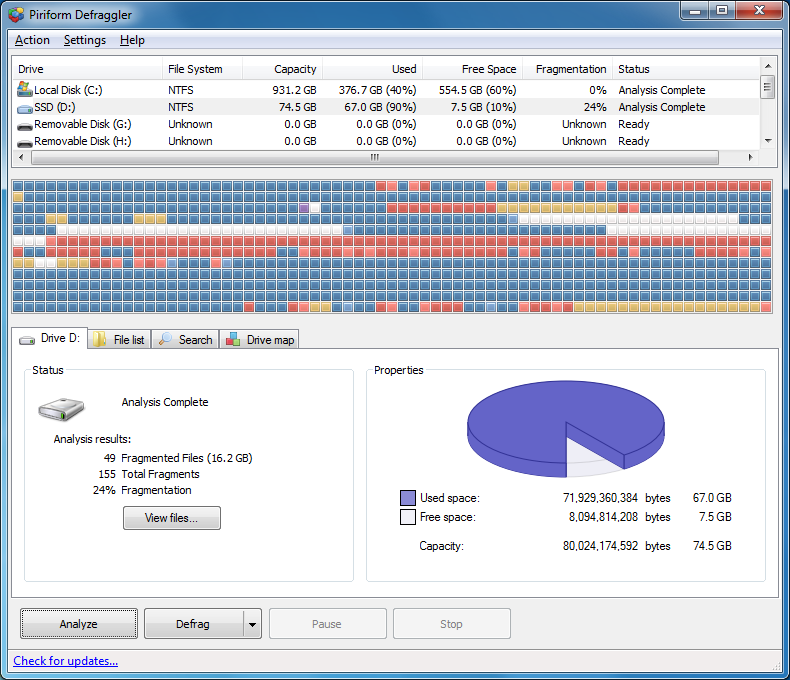
Use your computer for some time, writing files to and from the hard drive and the drive will become fragmented. The larger the drive, the worse the fragmentation. When fragmented, the drive will take longer to scan the the contents, meaning that your computer takes far longer to boot, applications seem to take an age to open and you may hear more drive access normal.
Bad fragmentation can also reduce the life-span of your hard drive as it means that the drive has to do more work locating and loading the files. Fragmentation happens when the drive stops saving files in a logical order. Run a defragmentation analysis and you may see files located in different positions on your drive.
To solve this problem, you need a drive defragmentation tool and there are few better than the free Defraggler, from the same developers who brought you CCleaner and Recuva. Defraggler is designed as a once-only defragmentation tool, so you’ll run the application from time to time to keep your drive in shape. Other commercial defragmentation tools can run on your computer, in the background, keeping your drive defragmented on the fly. However, as long as you plan on defragmenting your drive every three months or so, Defraggler will be all you need.
In addition to defragmenting an entire drive or drive partition, you can also defragment files if you find that only small section of files are stored illogically. This saves time as defragmenting a 500GB drive can take hours.
Defraggler v2.22 adds (see version history for more):
- Fixed a bug that caused a scheduled defrag to fail silently
- Improved SSD detection for newer SSD devices
- Improved SSD detection for laptops
- Added new Privacy menu Installer
- /L (list) switch now highlights SSDs
- Added a warning when attempting to defrag SSDs
- Added switch for forcing defragmentation of SSDs
- Fixed text cutoff on the 'Defrag' button in Dutch
- Added a warning when attempting to defrag SSDs
- Fixed text bleeds in the installer for German and other languages
Verdict:
Defraggler is a straightforward and very configurable defrag tool.
Your Comments & Opinion
Keep your hard drive in top condition with this powerful disk defragmentation tool
Use this disk defragmentation tool to keep your system optimised
Improve your PCs performance with this highly configurable defrag tool
Automatically defragment your hard drive to ensure it's always running at peak performance
Secure, repair and optimise your computer with this all-in-one PC toolkit
Comprehensive suite of PC speedup, maintenance and management tools
Mount disk images in Explorer, and create RAM disks with this versatile tool
A free tune-up utility to maintain the performance of Windows
Keep the contents of folders synchronised for backup purposes
Keep the contents of folders synchronised for backup purposes