From Twitter

Please wait while my tweets load

If you can't wait - jump to Twitter

See more tweets...

RSS Feed

Please wait while my feed loads

See more posts...

Newsletter

Subscribe to either one of our two newsletters for regular updates and information

Downloads newsletter

This is a weekly newsletter with download news, updates and other information

This is a monthly newsletter with software store information, offers and deals

HTC Home Apis Portable 3.0

Monitor the time and the weather on your Windows desktop

by Mike Williams

Our Rating:
Your Rating:
Login to rate
Based on 0 ratings
License: Open Source
Operating Systems: Windows 7 (32 bit), Windows 7 (64 bit), Windows Vista (32 bit), Windows Vista (64 bit)
Requirements:


Languages: English
Software Cost: Free
Date Updated: 20 May 2011
Watchlist: Add download to my watchlist
Downloads To Date: 417
Developer: Stealth
RSS News Feed: http://stealthapps.wordpress.com/feed/
Facebook: https://www.facebook.com/htchome
Buy TuneUp Utilities 2012 for only $18.99, with lifetime license, saving 62% from MSRP, only from store.downloadcrew.com
HTC Home Apis Portable 3.0
Monitor the time and the weather on your Windows desktop

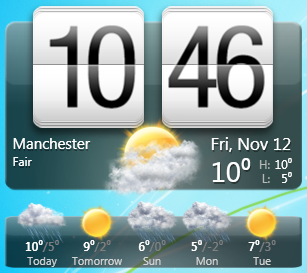
HTC Home is a free, open-source Windows applet that displays a clock and weather forecast on your desktop.

Despite the name, the program has nothing to do with HTC, the company; the author simply wanted to reproduce the time and weather applet on HTC Communicators.

He's done a good job, though, and the display looks fabulous. It's large, packed with information (day, date, current temperature for your location, weather predictions for the next four days), and you even get animations appropriate to the current conditions. So on a grey day, for instance, you might have animated clouds passing in front of the clock display.

Distracting? Maybe, but fortunately you can disable the animations, if you prefer. And the program's settings box allows you to customise just about every other aspect of its operations: the weather location you want to monitor, the applet's position and size, your preferred time format (12 or 24 hour), the applet fonts and more.

Of course all this power comes at a price, and HTC Home uses more RAM and CPU time than the simpler competition. If you need a clock and weather applet that looks great, though, and you can spare the system resources, then this could still be an excellent choice.

Verdict:

Resource use is a little high, but that's hardly surprising for one of the best-looking weather applets around

Your Comments & Opinion
 
Related Download Articles
 
YoWindow

YoWindow 3.0.85

Shareware

Screensaver that shows exactly what your local weather is (and will be) doing

DS Clock 2.6.2 (64-bit)

DS Clock 2.6.2 (64-bit)

Freeware

A configurable clock for your desktop

Horloger V1.0 Final

Horloger 1.0 FINAL

Freeware

A seriously sexy clock for your Windows desktop

HTC Home Apis 3.0

HTC Home Apis 3.0.621

Open Source

Monitor the time and the weather on your Windows desktop

Other Download Articles From This Category
NirLauncher 1.15.01

NirLauncher 1.15.01

Freeware

Get all the very latest NirSoft tools in a single, easy-to-use package

PhraseExpress 8

PhraseExpress Portable 8.0.151

Free, for personal-use only

Cut down on repetitive typing - and typos - with this versatile keyboard macro tool

CintaNotes

CintaNotes Portable 1.6.2

Freeware

Put your thoughts and notes in order with this freebie organiser 

AkelPad Portable

AkelPad Portable 4.7.5

Freeware

A speedy, light-weight text editor that can be extended with plugins

From Softwarecrew

Please wait while my feed loads

See more posts...

Our Price: $69.95
RRP: $99.95
Saving 30%
Buy Now More Info
Offer Ends In:
 

Spotlight: Free Full Software

Giveaway: WinISO Standard 6.1.0

Free Full Commercial Software

WinISO is a very comprehensive tool which provides everything you need to create, edit and convert disc images.

If you've an image file already, for instance (ISO, CUE/ BIN, NRG, MDF, CCD, IMG and DVD formats are supported) then you can open it in a click or two, browse the image contents, and extract the files you need with a quick drag and drop.

It's just as easy to create new ISO9660, UDF, even HFS+ images. Just choose the option you need, then either manually build up your preferred file and folder structure; drag and drop your files and folders from Explorer onto the program; or create an image directly from a CD, DVD or Blu-ray disc.

Of course you can edit images, too. Is an ISO file too large for your needs, say? Open it up, locate and remove any surplus files to free up a little space.

WinISO program has full support for reading and creating bootable image files. A simple conversion tool makes it easy to convert disc images into the format you need. And the program can even mount ISO files as Explorer files, or burn images to disc when you're ready to save them.

Please note, this trial version of WinISO Standard will not save files greater than 500MB in size.

Giveaway: on Wednesday, we're giving you the full current version of WinISO Standard 6 worth $29.95. The download link here will take you to Downloadcrew Giveaway.

[...]
Time Remaining: