From Twitter

Please wait while my tweets load

If you can't wait - jump to Twitter

See more tweets...

RSS Feeds

Receive a regular RSS feed from our latest, most popular and recommended downloads

Latest downloads feed

Get a regular RSS from our most latest downloads

Most popular downloads feed

Get a regular RSS from our most popular downloads

Recommended downloads feed

Get a regular RSS from our recommended downloads

Newsletter

Subscribe to either one of our two newsletters for regular updates and information

Downloads newsletter

This is a weekly newsletter with download news, updates and other information

This is a monthly newsletter with software store information, offers and deals

GIMPshop 2.6.11

Get the raw power of GIMP wrapped up in a more user-friendly interface 

by Nick Peers

Our Rating:
Your Rating:
Login to rate
Based on 2 ratings
License: Open Source
Operating Systems: Linux, Mac OS X, Windows 2000, Windows 7 (32 bit), Windows 7 (64 bit), Windows Vista (32 bit), Windows Vista (64 bit), Windows XP
Requirements:


Languages: English
Software Cost: Free
Date Updated: 20 January 2012
Watchlist: Add download to my watchlist
Downloads To Date: 2850
Developer: GIMPshop
RSS News Feed:
Buy TuneUp Utilities 2012 for only $18.99, with lifetime license, saving 62% from MSRP, only from store.downloadcrew.com
GIMPshop for Windows
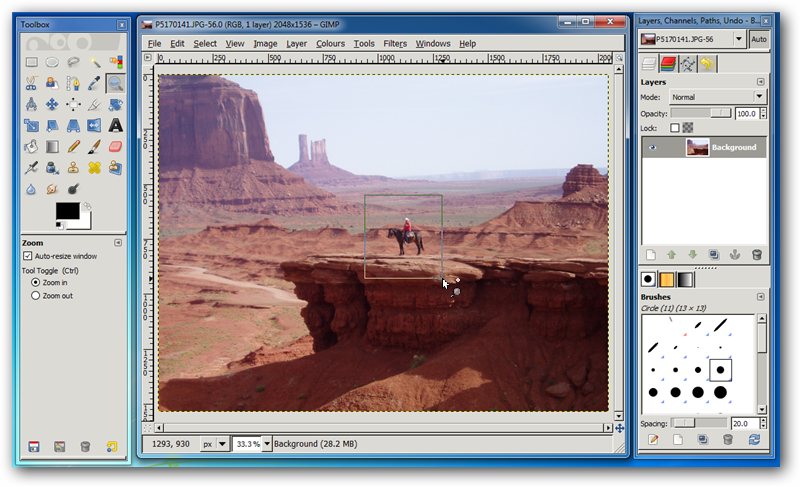
GIMPshop lets you revisit GIMP with a user interface you might find more intuitive to use.

One of the most popular and powerful free image editing apps is GIMP. Unfortunately, its user interface doesn’t follow the usual pattern of other applications, consisting of a number of floating panels rather than a single, unified program window. It’s very much an interface you’ll either love or hate.

The reasoning behind GIMPshop is that you like the power of the GIMP, but you want it wrapped up in a more familiar user interface. It basically takes advantage of GIMP’s open-source technology to produce a version of GIMP that will appeal more to Photoshop users who want to try the app without having to learn a whole new interface.

GIMPshop achieves these by modifying the program’s menu structure to more closely match Photoshop. It also tweaks the terminology used to match what you’ll find in Adobe’s flagship application and finally uses a plug-in called “Deweirdifier” to combine GIMP’s many floating windows in a manner that more closely resembles what you’ll find in other Windows graphics applications.

Consequently you end up with an interface that is more intuitive to use from the off, while retaining all the raw power, features and extendibility of The GIMP itself – while there’s naturally no support for Photoshop plug-ins, GIMPshop works perfectly with GIMP’s own extensive plugin, filter and brush collections.

Note: the Windows version of the program is installed using the InstallIQ wrapper. This tool will offer to install additional programs in addition to GIMPshop – up to five different apps in fact. After clicking Accept at the first screen to install GIMPshop, keep clicking Decline to avoid installing other, potentially unwanted, applications. 

Verdict:

If you’ve previously been put off by the GIMP’s unique user interface, GIMPshop is well worth checking out – if you can get past the frankly awful install wrapper. 

Your Comments & Opinion
 

Agree with M C Straver

Posted by: Graham Knight, 26 January 2012 01:41

"InstallIQ" does not enjoy the best of reputations mainly I understand because of trying to piggyback other (unwanted) software with the software wanted. My internet security suite (and I believe there are others) who have listed InstallIQ as a 'potentially unwanted application'. I was looking forward to trying GIMPshop - but I can live without it!!

Piggybacking other software...

Posted by: M.C. Straver, 21 January 2012 11:12

I understand the desire to get some return on time put into bundling and editing this package, but piggybacking other software you don't want, and then so many, is, IMHO extremely bad form. The developers should consider asking for donations instead. Users who enjoy and appreciate the effort -will- donate. Wrapping it like this has immediately turned me off from even seriously giving this a try.

Related Download Articles
 
GIMP 2.8

GIMP 2.8.0 FINAL

Freeware

GIMP is a free image editor which offers a real alternative to the likes of Photoshop

GIMP Portable

GIMP Portable 2.8.0 rev.4

Freeware

GIMP is a free image editor which offers a real alternative to the likes of Photoshop

PhotoFiltre Studio X

PhotoFiltre Studio X 10.5.0

Shareware

An advanced photo editing tool with a gentle learning curve

Adobe Photoshop Express

Adobe Photoshop Express for iPhone/iPad 2.0

Freeware

Edit photos on your iPhone or iPad with this mobile version of Photoshop

Other Download Articles From This Category
Plex Media Center for Windows

Plex Media Center 0.9.5.3

Freeware

Access your Plex Media Server content from your PC or Mac 

Ubiquitous Player

Ubiquitous Player 5.1

Free, for personal-use only

Personal information management, media playing, image editing, Ubiquitous Player tries to be everything to everyone

Pixelmator

Pixelmator 2.0.4

Trial Software

A powerful image editor available for a fraction of the cost of the competition

EMDB 1.48

EMDB 1.48

Freeware

Keep track of even the largest movie collection with this powerful database

From Softwarecrew

Please wait while my feed loads

See more posts...

Our Price: $99.95
RRP: $149.95
Saving 33%
Buy Now More Info
Offer Ends In:
 

Spotlight: Free Full Software

Giveaway: WinISO Standard 6.1.0

Free Full Commercial Software

WinISO is a very comprehensive tool which provides everything you need to create, edit and convert disc images.

If you've an image file already, for instance (ISO, CUE/ BIN, NRG, MDF, CCD, IMG and DVD formats are supported) then you can open it in a click or two, browse the image contents, and extract the files you need with a quick drag and drop.

It's just as easy to create new ISO9660, UDF, even HFS+ images. Just choose the option you need, then either manually build up your preferred file and folder structure; drag and drop your files and folders from Explorer onto the program; or create an image directly from a CD, DVD or Blu-ray disc.

Of course you can edit images, too. Is an ISO file too large for your needs, say? Open it up, locate and remove any surplus files to free up a little space.

WinISO program has full support for reading and creating bootable image files. A simple conversion tool makes it easy to convert disc images into the format you need. And the program can even mount ISO files as Explorer files, or burn images to disc when you're ready to save them.

Please note, this trial version of WinISO Standard will not save files greater than 500MB in size.

Giveaway: on Wednesday, we're giving you the full current version of WinISO Standard 6 worth $29.95. The download link here will take you to Downloadcrew Giveaway.

[...]
Time Remaining: