From Twitter

Please wait while my tweets load

If you can't wait - jump to Twitter

See more tweets...

RSS Feeds

Receive a regular RSS feed from our latest, most popular and recommended downloads

Latest downloads feed

Get a regular RSS from our most latest downloads

Most popular downloads feed

Get a regular RSS from our most popular downloads

Recommended downloads feed

Get a regular RSS from our recommended downloads

Newsletter

Subscribe to either one of our two newsletters for regular updates and information

Downloads newsletter

This is a weekly newsletter with download news, updates and other information

This is a monthly newsletter with software store information, offers and deals

GooReader 4.0

A desktop app that enables you to read Google Books on and offline

by Mark Wilson

Our Rating:
Your Rating:
Login to rate
Based on 0 ratings
License: Freeware
Operating Systems: Windows 7 (32 bit), Windows 7 (64 bit), Windows Vista (32 bit), Windows Vista (64 bit), Windows XP
Requirements:


Languages: English
Software Cost: Free
Date Updated: 31 January 2012
Watchlist: Add download to my watchlist
Downloads To Date: 749
Developer: GooReader
RSS News Feed:
Buy TuneUp Utilities 2012 for only $18.99, with lifetime license, saving 62% from MSRP, only from store.downloadcrew.com
GooReader
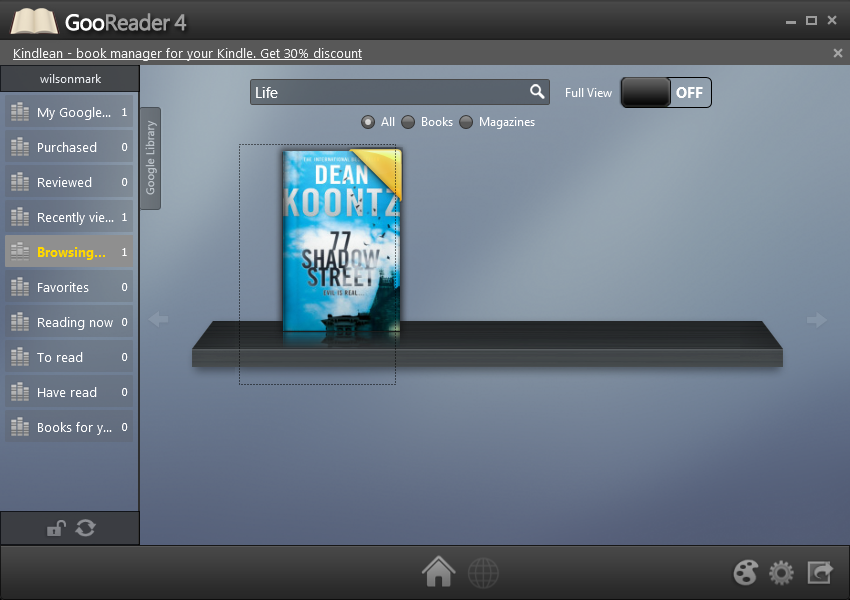
Use GooReader to access Google Books online and offline

Google Books is a great service that enables you to buy a wide range of ebooks online as well as reading thousands of free books, magazines and articles. While the convenience of being able to read books in your web browser is to be welcomed, it is also a little on the awkward side. This is something that GooReader aims to address by making it possible to read books both online and offline as well as providing you with a dedicated app for reading.

GooReader synchronizes with your Google account so you do not need to worry about having to re-download the same titles, and if you have a large number of books in your collection, you’ll appreciate the ease with which titles can be organized. You have the option of arranging your books in libraries and bookshelves and nothing more than drag and drop is need to group books together in whatever way works best for you.

The fact that your library can be saved to your hard drive means that it is ideal for those occasions when you are going to be without an internet connection. When travelling you cannot be certain of being able to get online whenever you like, so it is good to be able to plan ahead and ensure that you will be able to access you book collection.

There is also a paid for version of the app available, but this differs only very slightly to the free version. If you are willing to part with $19.95, you can free yourself from the advertisements that are found in the free version as well as gaining the option of saving Google Books as PDF files. Aside from these two minor differences, the two versions of the application are identical, so unless the PDF saving option is particularly important to you, there is little point in parting with any cash.

Verdict:

An improvement on browser based reading, the free version of GooReader should be enough for most people.

Your Comments & Opinion
 
Related Download Articles
 
Amazon Kindle for PC

Amazon Kindle for PC 1.9.3

Freeware

Read ebooks on your computer whether you have a Kindle or not

Google Books Downloader

Google Books Downloader 2.0

Freeware

Save Google books as PDF, JPEG or PNG files

Kindle for Mac

Kindle for Mac 1.2.3

Freeware

Read ebooks on your computer whether you have a Kindle or not

iBooks

iBooks for iPhone 1.1.2

Freeware

Buy and read ebooks on your iPhone or iPad

Other Download Articles From This Category
Comodo Dragon 19

Comodo Dragon 19.0.3

Freeware

Cut-down version of Google Chrome with some security extras

PeaZip 4.5.1 [64-bit]

PeaZip 4.5.1 [64-bit]

Freeware

Open, edit and create just about any archive using this powerful manager

PeaZip 4.5.1 [32-bit]

PeaZip 4.5.1 [32-bit]

Freeware

Open, edit and create just about any archive using this powerful manager

eBay for iPad

eBay for iPad 2.0.0

Freeware

Buy and sell on the famous auction site from your iPad

From Softwarecrew

Please wait while my feed loads

See more posts...


Spotlight: Free Full Software

Giveaway: WinISO Standard 6.1.0

Free Full Commercial Software

WinISO is a very comprehensive tool which provides everything you need to create, edit and convert disc images.

If you've an image file already, for instance (ISO, CUE/ BIN, NRG, MDF, CCD, IMG and DVD formats are supported) then you can open it in a click or two, browse the image contents, and extract the files you need with a quick drag and drop.

It's just as easy to create new ISO9660, UDF, even HFS+ images. Just choose the option you need, then either manually build up your preferred file and folder structure; drag and drop your files and folders from Explorer onto the program; or create an image directly from a CD, DVD or Blu-ray disc.

Of course you can edit images, too. Is an ISO file too large for your needs, say? Open it up, locate and remove any surplus files to free up a little space.

WinISO program has full support for reading and creating bootable image files. A simple conversion tool makes it easy to convert disc images into the format you need. And the program can even mount ISO files as Explorer files, or burn images to disc when you're ready to save them.

Please note, this trial version of WinISO Standard will not save files greater than 500MB in size.

Giveaway: on Wednesday, we're giving you the full current version of WinISO Standard 6 worth $29.95. The download link here will take you to Downloadcrew Giveaway.

[...]
Time Remaining: