From Twitter

Please wait while my tweets load

If you can't wait - jump to Twitter

See more tweets...

RSS Feeds

Receive a regular RSS feed from our latest, most popular and recommended downloads

Latest downloads feed

Get a regular RSS from our most latest downloads

Most popular downloads feed

Get a regular RSS from our most popular downloads

Recommended downloads feed

Get a regular RSS from our recommended downloads

Newsletter

Subscribe to either one of our two newsletters for regular updates and information

Downloads newsletter

This is a weekly newsletter with download news, updates and other information

This is a monthly newsletter with software store information, offers and deals

Mobile Mouse Lite for iPhone 2.6.2

Control your PC remotely via your iPhone or iPod touch

by Nick Peers

Our Rating:
Your Rating:
Login to rate
Based on 0 ratings
License: Freeware
Operating Systems: iPhone
Requirements:


Languages: English
Software Cost: Free
Date Updated: 07 February 2012
Watchlist: Add download to my watchlist
Downloads To Date: 126
Developer: RPA Technology
RSS News Feed:
Twitter Feed: http://twitter.com/mobile_mouse
Facebook: http://www.facebook.com/pages/Mobile-Air-Mouse/231172629269
Buy TuneUp Utilities 2012 for only $18.99, with lifetime license, saving 62% from MSRP, only from store.downloadcrew.com
Mobile Mouse Server on iPhone
Mobile Mouse Lite lets you use your phone as a keyboard and mouse for your computer

These days we spend less and less time computing at our desks. The problem is, mice and keyboards are usually designed for use in a permanent location, and become awkward to use when you find yourself cradling them on the sofa or while sat on the train.

Things get worse when you decide to hook up your computer to your big-screen TV for whatever reason. There you are, scrabbling about on the floor when you’d rather be curled up on the sofa. You could buy one a dedicated remote for your computer, or you could press your trusty smartphone or tablet into service instead.

Mobile Mouse allows you to turn your iPhone, iPad or Android mobile into a fully functioning wireless mouse, touchpad and remote for your computer, enabling you to tuck the computer out of the way while you navigate using your mobile device’s touchscreen. All you need to do is ensure both are on the same wi-fi network.

First, you need to download and install the free Mobile Mouse Server software on your PC or Mac. Once done, install the app and off you go: you’ll see a nag screen selling the virtues of the Pro version, but click Later to start using Mobile Mouse Lite.

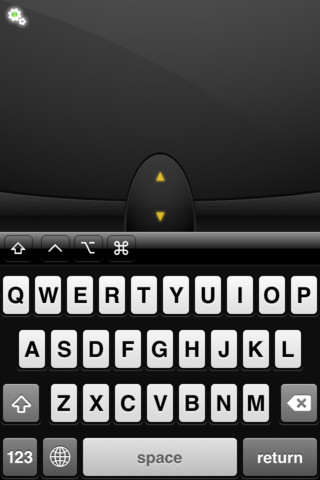
You’ll see your mobile screen is split into two, with a virtual keyboard at the bottom, and your touchpad at the top, complete with mouse buttons and scrolling functions – just shake your phone to hide the keyboard from view if you find it a little cramped, or hold your phone horizontally, at which point the screen changes to a basic touchpad.

You’ll also see a Settings button, which is where you manage connections to all the computers running the server software, allowing you to use your mobile across all the PCs and Macs you own.

As far as Mobile Mouse Lite goes, that’s it – it’s an extremely capable substitute for your mouse and keyboard. If you’d like to go one step further – and banish those annoying nag screens – upgrade to the Pro version for $1.99 for the following extras: accelerometer-based mouse controller, application switcher (works just like the dock in OS X), file browser, advanced, and programmable multi-touch gestures (including all supported in Lion).

The Pro version also includes media remote functions, with many popular apps already set up, and others easily configurable through the server software. You’ll even find remotes from web browsing and presentation, plus support for the numeric keypad, programmable hotkeys and the ability to both sleep and wake your computer direct from the app.

Verdict:

The Lite version works well as a basic mouse and keyboard substitute, but upgrading to the Pro version opens up a wealth of new possibilities – and removes the annoying nag screens.

Your Comments & Opinion
 
Related Download Articles
 
Mobile Mouse Lite on Android

Mobile Mouse Lite for Android 1.0

Freeware

Control your PC remotely via your Android mobile or tablet

Mobile Mouse Server on Windows

Mobile Mouse Server 2.6.4

Freeware

Turn your mobile device into a wireless mouse, keyboard and remote for your computer 

Mobile Mouse on iPad

Mobile Mouse for iPad

No Trial Available. Purchase Only

Control your PC or Mac remotely via your iPad

Remote Mouse Server in Windows

Remote Mouse Server 1.1.0.1

Trial Software

Turn your Android device into a wireless mouse and keyboard for your PC or Mac 

Other Download Articles From This Category
HyperSnap

HyperSnap 7.16.01

Trial Software

Take and edit screen grabs from just about any Windows application

SUMo

SUMo 3.1.1

Freeware

Quickly discover which of your favourite programs have updates available

Toolwiz Care 2.0

Toolwiz Care 2.0.0.2600

Free, for personal-use only

Clean and optimise your system with this powerful suite

PNotes

PNotes 9.0.107

Freeware

Get yourself organised by recording reminders for all your most important tasks on virtual sticky notes

From Softwarecrew

Please wait while my feed loads

See more posts...

Our Price: $9.99
RRP: $39.99
Saving 75%
Buy Now More Info
Offer Ends In:
 

Spotlight: Free Full Software

Giveaway: WinISO Standard 6.1.0

Free Full Commercial Software

WinISO is a very comprehensive tool which provides everything you need to create, edit and convert disc images.

If you've an image file already, for instance (ISO, CUE/ BIN, NRG, MDF, CCD, IMG and DVD formats are supported) then you can open it in a click or two, browse the image contents, and extract the files you need with a quick drag and drop.

It's just as easy to create new ISO9660, UDF, even HFS+ images. Just choose the option you need, then either manually build up your preferred file and folder structure; drag and drop your files and folders from Explorer onto the program; or create an image directly from a CD, DVD or Blu-ray disc.

Of course you can edit images, too. Is an ISO file too large for your needs, say? Open it up, locate and remove any surplus files to free up a little space.

WinISO program has full support for reading and creating bootable image files. A simple conversion tool makes it easy to convert disc images into the format you need. And the program can even mount ISO files as Explorer files, or burn images to disc when you're ready to save them.

Please note, this trial version of WinISO Standard will not save files greater than 500MB in size.

Giveaway: on Wednesday, we're giving you the full current version of WinISO Standard 6 worth $29.95. The download link here will take you to Downloadcrew Giveaway.

[...]
Time Remaining: