From Twitter

Please wait while my tweets load

If you can't wait - jump to Twitter

See more tweets...

RSS Feed

Please wait while my feed loads

See more posts...

Newsletter

Subscribe to either one of our two newsletters for regular updates and information

Downloads newsletter

This is a weekly newsletter with download news, updates and other information

This is a monthly newsletter with software store information, offers and deals

NewFileTime 1.64

Easily change the timestamps of any file and folder

by Mike Williams

Our Rating:
Your Rating:
Login to rate
Based on 0 ratings
License: Freeware
Operating Systems: Windows 2000, Windows 7 (32 bit), Windows 7 (64 bit), Windows Server, Windows Vista (32 bit), Windows Vista (64 bit), Windows XP
Requirements:


Languages: English, Chinese (Traditional), Czech, Dutch, French, German, Italian, Japanese, Portuguese (Brazil), Spanish
Software Cost: Free
Date Updated: 12 March 2012
Watchlist: Add download to my watchlist
Downloads To Date: 298
Developer: SoftwareOK
RSS News Feed: http://www.softwareok.com/rss/news_en.xml
Buy the new TuneUp Utilities 2013 for only $16.95, with lifetime license, saving 58% from MSRP, only from store.downloadcrew.com
NewFileTime 1.64
Easily change the timestamps of any file and folder

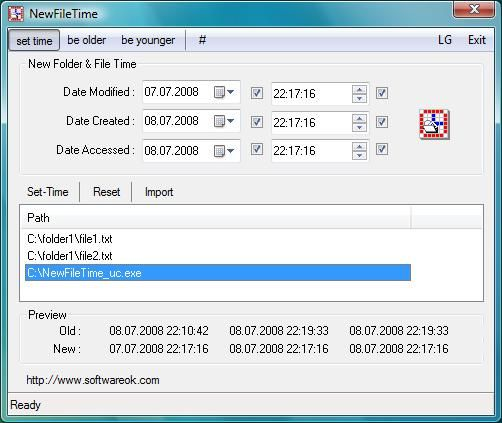
NewFileTime is a tiny and portable tool which can help you change the created, last modified and last accessed dates of your chosen files and folders.

Selecting particular files and folders is as easy as dragging and dropping them in from Explorer. (Although there's also an "Import" option, if you need it, which allows you to browse the file system as necessary.)

By default NewFileTime opens with its "Set time" option selected, and the created, last modified and accessed time all set to the program's launch time. If you're happy with that, click "Set-Time" and the dates will be changed right away.

There are also options to "be older" and "be younger", which will modify the date by a specified number of days.And there's a menu where, again, you can set the new date and time in a couple of clicks.

NewFileTime is a little quirky, in places. Calling the Browse function "Import", for instance, means most people won't immediately be sure what it is. And why do you have to click a # symbol to launch a menu?

There are plenty of features here, though - far more than we have any right to expect from a 56KB application. And it doesn't take that long to figure out how things work, so if you need to tweak your file or folder times occasionally then NewFileTime could be ideal.

Verdict:

NewFileTime pays little attention to interface conventions, and as a result can initially be a little confusing. Once you've figured out the basics, though, the program makes it quick and easy to modify file and folder timestamps, and its small size and portability are a welcome bonus.

Your Comments & Opinion
 
Related Download Articles
 
SKTimeStamp 1.3.3 (32-bit)

SKTimeStamp 1.3.3 (32-bit)

Freeware

Change the "last modified" and other dates of any file from its Explorer properties dialog

SKTimeStamp 1.3.3 (64-bit)

SKTimeStamp 1.3.3 (64-bit)

Freeware

Change the "last modified" and other dates of any file from its Explorer properties dialog

eToolz 3.4.8.0

eToolz 3.4.8.0

Freeware

Run Ping, Traceroute, Whois and more with this portable collection of network tools

GetWindowText 1.46

GetWindowText 1.46

Freeware

Easily extract the text from directory trees, list boxes - all kinds of windows and controls

Other Download Articles From This Category
Process Tamer 2.11.01

Process Tamer 2.11.01

Freeware

Optimise CPU usage by automatically adjusting process priorities

PaperScan Free 1.8.0.8

PaperScan Free 1.8.0.8

Freeware

Clean up your scanned documents with this easy-to-use tool

WinISO Standard 6.3.0

WinISO Standard 6.3.0

Trial Software

Create, open, edit, convert and otherwise work with CD, DVD and Blu-ray disc images

Astra32

Astra32 3.04

Function Limited Demo

Get the low-down on every aspect of your PCs hardware and software with this in-depth system information tool

From Softwarecrew

Please wait while my feed loads

See more posts...

Our Price: $29.99
RRP: $49.99
Saving 40%
Buy Now More Info
Offer Ends In:
 

Spotlight: Free Full Software

Ashampoo Burning Studio 2013 (v11.0.6)

Free Full Commercial Software

Ashampoo Burning Studio 2013 is a compact, simple, but surprisingly feature-packed disc burning suite.

The program makes it easy to create simple data discs and audio CDs, for instance: just drag and drop your files onto the list area and you'll be burning the finished disc in a couple of clicks.

That's just the start, though. Burning Studio 2013 can also create data discs with customised, interactive multi-page menus, perfect if you'd like a more professional way to share and present the disc contents.

A built-in backup tool allows you to create backups which may be encrypted, compressed, and span several CDs, DVDs and Blu-rays.

And there are modules to create VCD or SVCD video projects; burn video DVDs or Blu-ray discs from prepared folders; create, browse or burn disc images (ISO, CUE/ BIN and Ashdisc formats are supported); copy discs, erase them, design and print disc covers, labels and booklets, and more.

The focus throughout is on ease of use, though, and so Ashampoo Burning Studio 2013 remains very straightforward, whatever you're doing. Most disc projects are created via the same simple interface, and for the most part all you have to do is drag and drop the necessary files. But experts will find more advanced options are only a click away, and if you need to then you can set ISO and UDF version, enable Joliet, make a disc bootable and more.

Note the download here will take you to the Downloadcrew Software Store where you can download Burning Studio 2013.

[...]
Value:
Free
Rating: