


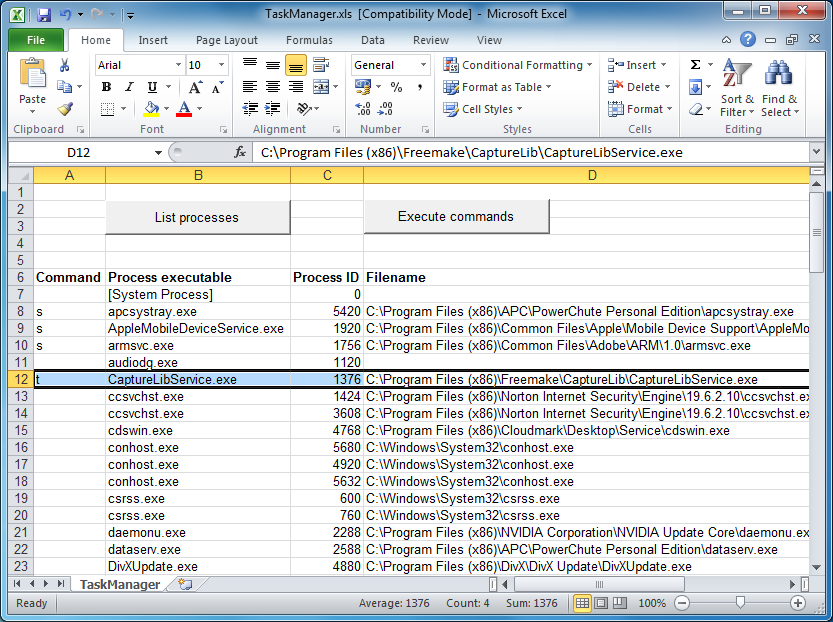
TaskManager.xls is, just as its name suggests, a basic version of Task Manager implemented in an Excel spreadsheet.
Why? Malware will sometimes block Task Manager and similar tools from running, to try and prevent you from finding out what's going on or closing it down. But as long as you can run TaskManager.xls and its scripts, you'll have at least a chance to check running processes and close down or suspend anything that you don't need.
Open the spreadsheet and you should see a list of running processes along with their details (name, file name, process ID, time of launch, user account, memory use and - on 64-bit systems - whether it's 32 or 64-bit). This doesn't update dynamically, but clicking "List Processes" when required will refresh the display.
If you're sure you've identified a malicious process then you can either terminate or suspend it by entering a t or s in the Command column at its left. If there are several dubious processes then just enter multiple commands, clicking "Execute Commands" when you're happy to close or suspend them all at once. (Use the R command later to resume a process if you're sure it's safe.)
Please note, TaskManager.xls is written in VBA. Under normal circumstances it'll work just fine, but if your security software blocks Office macros (or you've just disabled them) then you'll have problems.
Verdict:
It's not the most feature-packed Task Manager alternative around, but TaskManager.xls is an interesting idea and does (just about) have enough power to be useful, if the regular tools don't work for some reason.
Your Comments & Opinion
Record network connections and launched programs
Identify potentially risky processes running on your PC, right now
Find out precisely what's running on your PC with this portable tool
View and take control of the programs running on your PC
Get easier access to protected Windows processes
Use Office on your iPad with this cloud-based productivity tool
A free spreadsheet tool that’s a great alternative to Excel
Free up valuable hard drive space with the capable cleanup tool
A notepad/ to-do tool with cloud sync
A versatile journaling and notebook tool to pop on your USB drive
Monitor file and folder changes on your hard drive in real time
Monitor file and folder changes on your hard drive in real time