From Twitter

Please wait while my tweets load

If you can't wait - jump to Twitter

See more tweets...

RSS Feed

Please wait while my feed loads

See more posts...

Newsletter

Subscribe to either one of our two newsletters for regular updates and information

Downloads newsletter

This is a weekly newsletter with download news, updates and other information

This is a monthly newsletter with software store information, offers and deals

EmailTray for Android 2.6

Take control of your inbox by prioritizing messages

by Mark Wilson

Our Rating:
Your Rating:
Login to rate
Based on 0 ratings
License: Freeware
Operating Systems: Android
Requirements:


Languages: English
Software Cost: Free
Date Updated: 31 May 2012
Watchlist: Add download to my watchlist
Downloads To Date: 61
Developer: Web CEO Ltd.
RSS News Feed: http://www.emailtray.com/blog/
Buy the new TuneUp Utilities 2013 for only $16.95, with lifetime license, saving 58% from MSRP, only from store.downloadcrew.com
EmailTray
Take control of your inboxes with EmailTray

It’s very easy to get overwhelmed by your inbox, but this is something that EmailTray tries to address. While email is an indispensible tool for every day communication, it can also be a tremendous distraction. Even if you are not receiving notifications of the arrival of new emails, it is possible to spend too much time checking your inbox to see if new messages have arrived. This is time that could be put to better use, particularly if you discover that the only email to have arrived is not all that important.

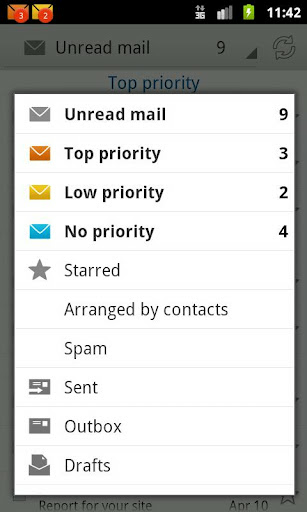
EmailTray is a handy tool that enables you to take control of your inbox and ensure that you are only informed about the most important messages you receive. The program is capable of handling multiple email accounts – any POP3 or IMAP account is supported – so you can view all of your communication in one place. But it is the prioritizing feature that is the most intriguing. EmailTray analysing the emails you receive and, based on how you have responded to people in the past, who an email is received from and other criteria, messages are assigned a priority.

Your emails are then filtered into one of several sections and you can opt to only be notified about those emails that are deemed to have the highest priority. You can also define your own rules so that messages from a particular person, that contain a keyword or match other criteria will be automatically assigned a particular priority level, colored or flagged up for attention. With support for email backups, contact information pulled in from social network profiles, this is a great way to manage your inboxes.

The Android version of the app works in very much the same way as the desktop version of the software. As well as automatically filtering emails and spam into suitable inboxes, there are a variety of ways in which you can be notified about the arrival of mail – sound, LED and vibration. Home screen widgets are available that enable you to keep an eye on the contents of your various priority inboxes and there is the added bonus that password protection is included free of charge.

Verdict:

EmailTray takes a little getting used to, but once configured and trained could help save you a great deal of time and stress.

Your Comments & Opinion
 
Related Download Articles
 
Facebook Home

Facebook Home 1.0

Freeware

An Android launcher that places Facebook right at the heart of your device

DesktopNotifier

DeskNotifier for Android 1.1.0

Freeware

Receive notifications from your Android device on your desktop

DesktopNotifier

DeskNotifier 1.1.1

Freeware

Receive notifications from your Android device on your desktop

EmailTray

EmailTray 4.0

Freeware

Take control of your inbox by prioritizing messages

Other Download Articles From This Category
ReminderFox 2.1

ReminderFox 2.1

Freeware

An effective Firefox add-on to keep you on top of your tasks and todos

Xmarks for Firefox

Xmarks for Firefox 4.2.1

Freeware

Keep your internet bookmarks and passwords synchronised between multiple computers

Chrome 28 Dev

Google Chrome 28.0.1500.20 Dev

Freeware

The latest dev build of Chrome is based on the latest Chromium core

Google Chrome 27

Google Chrome 27 FINAL

Freeware

The latest stable Chrome includes a web site loading optimization and other improvements

From Softwarecrew

Please wait while my feed loads

See more posts...

Our Price: $39.95
RRP: $129.95
Saving 69%
Buy Now More Info
Offer Ends In:
 

Spotlight: Free Full Software

Ashampoo Burning Studio 2013 (v11.0.6)

Free Full Commercial Software

Ashampoo Burning Studio 2013 is a compact, simple, but surprisingly feature-packed disc burning suite.

The program makes it easy to create simple data discs and audio CDs, for instance: just drag and drop your files onto the list area and you'll be burning the finished disc in a couple of clicks.

That's just the start, though. Burning Studio 2013 can also create data discs with customised, interactive multi-page menus, perfect if you'd like a more professional way to share and present the disc contents.

A built-in backup tool allows you to create backups which may be encrypted, compressed, and span several CDs, DVDs and Blu-rays.

And there are modules to create VCD or SVCD video projects; burn video DVDs or Blu-ray discs from prepared folders; create, browse or burn disc images (ISO, CUE/ BIN and Ashdisc formats are supported); copy discs, erase them, design and print disc covers, labels and booklets, and more.

The focus throughout is on ease of use, though, and so Ashampoo Burning Studio 2013 remains very straightforward, whatever you're doing. Most disc projects are created via the same simple interface, and for the most part all you have to do is drag and drop the necessary files. But experts will find more advanced options are only a click away, and if you need to then you can set ISO and UDF version, enable Joliet, make a disc bootable and more.

Note the download here will take you to the Downloadcrew Software Store where you can download Burning Studio 2013.

[...]
Value:
Free
Rating: