From Twitter

Please wait while my tweets load

If you can't wait - jump to Twitter

See more tweets...

RSS Feed

Please wait while my feed loads

See more posts...

Newsletter

Subscribe to either one of our two newsletters for regular updates and information

Downloads newsletter

This is a weekly newsletter with download news, updates and other information

This is a monthly newsletter with software store information, offers and deals

Process Monitor 3.01

Find out exactly what the programs running on your PC are doing

by Mike Williams

Our Rating:
Your Rating:
Login to rate
Based on 0 ratings
License: Freeware
Operating Systems: Windows 7 (32 bit), Windows 7 (64 bit), Windows Server, Windows Vista (32 bit), Windows Vista (64 bit), Windows XP
Requirements:


Languages: English
Software Cost: Free
Date Updated: 17 April 2012
Watchlist: Add download to my watchlist
Downloads To Date: 2105
Developer: Microsoft
RSS News Feed: http://blogs.technet.com/sysinternals/rss.xml
Twitter Feed: http://twitter.com/sysinternals
Buy TuneUp Utilities 2012 for only $18.99, with lifetime license, saving 62% from MSRP, only from store.downloadcrew.com
Process Monitor
Find out what the programs on your PC are doing

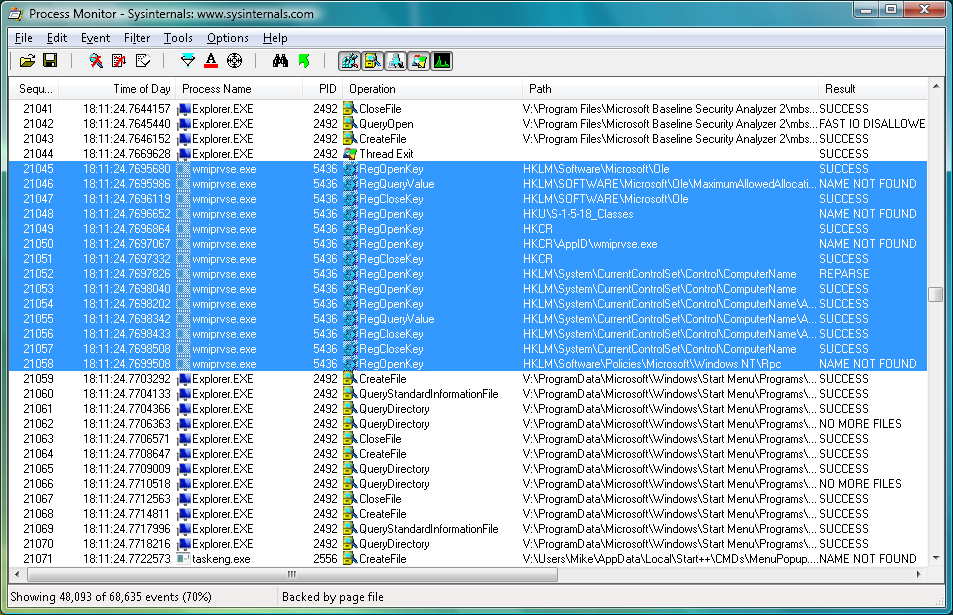
Process Monitor is an incredibly useful tool that will report on just about everything your PC applications are doing: the files they're accessing, Registry keys they're viewing, processes they're launching, and much more.

At its simplest, you can use the program simply to figure out why your hard drive is thrashing, even when you're not at the PC. Just launch Process Monitor, click File > Capture Events (if it's not already listing PC activity), and watch the process names listed on the left hand side. These will tell you which processes are opening and closing files, checking the Registry and so on. If you spot some unnecessary programs, perhaps an application running in the system tray, then removing it should cut any associated activity and speed up the rest of your PC.

Process Monitor is even better when it comes to troubleshooting misbehaving applications. Suppose you're trying to run a program called app.exe, for instance, only it crashes immediately, and you don't know why. What's going on? Run Process Monitor first and it can show you exactly which files and Registry keys that app.exe is looking for. If there's a missing file then you'll see it here; you could also explore the Registry keys it's viewing, just to confirm that any settings are configured correctly.

And if you're a geek who just likes to explore, then Process Monitor can give you hours of fun. Windows applets have many undocumented Registry settings, for instance, offering new ways to customise them - Process Monitor can help you spot these, and many other Windows secrets.

New v3.0 features include:

- Adds bookmark support so that you can flag specific lines in a trace for easy reference later.
- Shortcut keys enable you to move quickly between bookmarks and you can even add bookmarks to existing trace files. 
- Convert a highlight filter to an include filter and shortcut keys move between highlighted lines.
- Process create events add the complete contents of the new process environment block as well as the starting current directory
- Records process environment variables and current working directory for process create events

Verdict:

Process Monitor can help you fix many PC problems that simply couldn't be solved in any other way. An essential component in every troubleshooting toolkit

Your Comments & Opinion
 
Related Download Articles
 
System Explorer Portable

System Explorer Portable 3.8.8

Freeware

View details of running tasks and programs and monitor startup apps and browser add-ons using System Explorer.

PrcInfo 5.21

PrcInfo 5.21

Freeware

Explore what's running on your PC with this small Task Manager replacement

TaskManager.xls 0.1.2

TaskManager.xls 0.1.2

Freeware

A simple Task Manager - in an Excel spreadsheet

Device Remover 0.9 (beta)

Device Remover 0.9 (beta)

Freeware

Discover exactly what's running on your PC with this extremely powerful monitoring tool

Other Download Articles From This Category
Windows Error Lookup Tool

Windows Error Lookup Tool Portable 3.0.5

Freeware

Instantly decode cryptic Windows error codes with this handy tool

PNotes Portable

PNotes Portable 9.0.107

Freeware

Get yourself organised by recording reminders for all your most important tasks on virtual sticky notes

RedCrab - The Calculator 4.14

RedCrab - The Calculator 4.14

Freeware

Solve complex equations in seconds with this powerful calculator

Maxthon Portable

Maxthon Portable 3.3.8.2000

Freeware

Maxthon 3 delivers IE's compatibility and Chrome's speed in one powerful browser

From Softwarecrew

Please wait while my feed loads

See more posts...

Our Price: $69.95
RRP: $99.95
Saving 30%
Buy Now More Info
Offer Ends In:
 

Spotlight: Free Full Software

Giveaway: WinISO Standard 6.1.0

Free Full Commercial Software

WinISO is a very comprehensive tool which provides everything you need to create, edit and convert disc images.

If you've an image file already, for instance (ISO, CUE/ BIN, NRG, MDF, CCD, IMG and DVD formats are supported) then you can open it in a click or two, browse the image contents, and extract the files you need with a quick drag and drop.

It's just as easy to create new ISO9660, UDF, even HFS+ images. Just choose the option you need, then either manually build up your preferred file and folder structure; drag and drop your files and folders from Explorer onto the program; or create an image directly from a CD, DVD or Blu-ray disc.

Of course you can edit images, too. Is an ISO file too large for your needs, say? Open it up, locate and remove any surplus files to free up a little space.

WinISO program has full support for reading and creating bootable image files. A simple conversion tool makes it easy to convert disc images into the format you need. And the program can even mount ISO files as Explorer files, or burn images to disc when you're ready to save them.

Please note, this trial version of WinISO Standard will not save files greater than 500MB in size.

Giveaway: on Wednesday, we're giving you the full current version of WinISO Standard 6 worth $29.95. The download link here will take you to Downloadcrew Giveaway.

[...]
Time Remaining: