From Twitter

Please wait while my tweets load

If you can't wait - jump to Twitter

See more tweets...

RSS Feed

Please wait while my feed loads

See more posts...

Newsletter

Subscribe to either one of our two newsletters for regular updates and information

Downloads newsletter

This is a weekly newsletter with download news, updates and other information

This is a monthly newsletter with software store information, offers and deals

Floola 2012

Manage your iPod or Motorola phone - without iTunes

by Mike Williams

Our Rating:
Your Rating:
Login to rate
Based on 0 ratings
License: Freeware
Operating Systems: Linux, Mac OS X, Windows 2000, Windows 7 (32 bit), Windows 7 (64 bit), Windows Vista (32 bit), Windows Vista (64 bit), Windows XP
Requirements:


Languages: English
Software Cost: Free
Date Updated: 02 January 2012
Watchlist: Add download to my watchlist
Downloads To Date: 626
Developer: Tomas Camin
RSS News Feed: http://twitter.com/statuses/user_timeline/39025552.rss
Twitter Feed: http://twitter.com/Floola
Facebook: http://www.facebook.com/pages/Floola/44926920408
Buy TuneUp Utilities 2012 for only $18.99, with lifetime license, saving 62% from MSRP, only from store.downloadcrew.com
Floola 2012
Manage your iPod - without iTunes

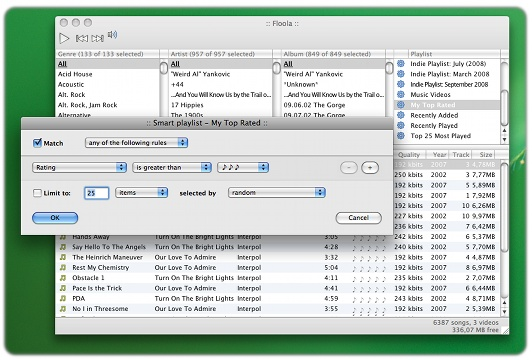
Floola is a free tool that makes it easy to manage your iPod, or Motorola mobile phone (any models that support iTunes, except the iPod touch and iPhone).

If you don't like iTunes then Floola is a faster, more lightweight alternative. You will have to use iTunes at least once to set up a new iPod, and upload at least one song, but after that Floola will take care of everything else: songs, videos, podcasts, photos and more.

The program includes a host of convenient features. It's able to convert incompatible audio or video files to formats supported by your device, for instance. Options to search for lost and duplicate songs will come in useful with large music collections. Floola lets you synchronise your schedule with your Google calendar; export an HTML report listing your iPod files; and there's even a "Repair" option to fix several iPod issues.

And most convenient of all, Floola is portable. If you save the program to your iPod then you can launch it from any PC, right away. And we do mean any: it runs on any version of Windows from 98 upwards.

Verdict:

Floola's interface is a little strange in places, but it's worth persevering with the program - it's packed with useful functions, and is on its way to being a complete iTunes alternative

Your Comments & Opinion
 
Related Download Articles
 
Phone Disk

Phone Disk 1.2.1.1

Trial Software

Easily use your iOS device as extra storage space for your PC or Mac and browse its files

Phone to PC

Phone to PC 4.1.4.9

Trial Software

Forego iTunes and use this handy alternative to manage your iPhone, iPod or iPad

iPhone Backup Extractor Free

iPhone Backup Extractor Free 3.3.5

Freeware

Extract the data you need from your iOS backups.

SuperSync

SuperSync 4.0

Trial Software

Manage and merge multiple iTunes libraries

Other Download Articles From This Category
Windows Error Lookup Tool

Windows Error Lookup Tool Portable 3.0.5

Freeware

Instantly decode cryptic Windows error codes with this handy tool

PNotes Portable

PNotes Portable 9.0.107

Freeware

Get yourself organised by recording reminders for all your most important tasks on virtual sticky notes

RedCrab - The Calculator 4.14

RedCrab - The Calculator 4.14

Freeware

Solve complex equations in seconds with this powerful calculator

Maxthon Portable

Maxthon Portable 3.3.8.2000

Freeware

Maxthon 3 delivers IE's compatibility and Chrome's speed in one powerful browser

From Softwarecrew

Please wait while my feed loads

See more posts...


Spotlight: Free Full Software

Giveaway: WinISO Standard 6.1.0

Free Full Commercial Software

WinISO is a very comprehensive tool which provides everything you need to create, edit and convert disc images.

If you've an image file already, for instance (ISO, CUE/ BIN, NRG, MDF, CCD, IMG and DVD formats are supported) then you can open it in a click or two, browse the image contents, and extract the files you need with a quick drag and drop.

It's just as easy to create new ISO9660, UDF, even HFS+ images. Just choose the option you need, then either manually build up your preferred file and folder structure; drag and drop your files and folders from Explorer onto the program; or create an image directly from a CD, DVD or Blu-ray disc.

Of course you can edit images, too. Is an ISO file too large for your needs, say? Open it up, locate and remove any surplus files to free up a little space.

WinISO program has full support for reading and creating bootable image files. A simple conversion tool makes it easy to convert disc images into the format you need. And the program can even mount ISO files as Explorer files, or burn images to disc when you're ready to save them.

Please note, this trial version of WinISO Standard will not save files greater than 500MB in size.

Giveaway: on Wednesday, we're giving you the full current version of WinISO Standard 6 worth $29.95. The download link here will take you to Downloadcrew Giveaway.

[...]
Time Remaining: