


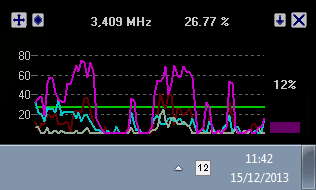


CPUMon is a simple desktop gadget which can plot CPU usage and display free and used RAM in real time.
One highlight of the program is the efforts it makes to stay out of your way. It's tiny, transparent, and even passes your clicks through to the application underneath.
Although by default CPUMon is free floating, it can be set to fixed positions and locked to prevent changes.
Visuals tweaks include control over transparency, alpha blending, colours and more.
Verdict:
It's hard to get excited about PC performance monitors, especially as Windows has an excellent one of its own (Ctrl+Shift+Esc and click Performance). But CPUMon's transparency and click-through window mean it does better than most at staying out of your way. Take a look.
Your Comments & Opinion
Push your PC to its limits to see what it can handle
Get an in-depth technical report on your core PC hardware
Get more control over CPU speed/ power use
Max out your CPU on demand
CPUBalance
Monitor the temperature of your processor
Take control of your motherboard with this advanced tweaking tool
Clear out redundant Registry entries and defragment your Registry files to speed up your PC – but be careful
Convert and export databases
Update all your drivers with a click
Monitor your PC's temperature, voltages, CPU frequency and more with this powerful stability checker
Comprehensive suite of PC speedup, maintenance and management tools