From Twitter

Please wait while my tweets load

If you can't wait - jump to Twitter

See more tweets...

RSS Feeds

Receive a regular RSS feed from our latest, most popular and recommended downloads

Latest downloads feed

Get a regular RSS from our most latest downloads

Most popular downloads feed

Get a regular RSS from our most popular downloads

Recommended downloads feed

Get a regular RSS from our recommended downloads

Newsletter

Subscribe to either one of our two newsletters for regular updates and information

Downloads newsletter

This is a weekly newsletter with download news, updates and other information

This is a monthly newsletter with software store information, offers and deals

FreeFileSync 5.15

Keep the contents of folders synchronised for backup purposes

by Mark Wilson

Our Rating:
Your Rating:
Login to rate
Based on 0 ratings
License: Freeware
Operating Systems: Windows 7 (32 bit), Windows 7 (64 bit), Windows 8, Windows Vista (32 bit), Windows Vista (64 bit), Windows XP
Requirements:
Languages: English
Software Cost: Free
Date Updated: 02 May 2013
Watchlist: Add download to my watchlist
Downloads To Date: 1096
Developer: FreeFile Sync Project
RSS News Feed:
Buy the new TuneUp Utilities 2013 for only $16.95, with lifetime license, saving 58% from MSRP, only from store.downloadcrew.com
FreeFileSync
Keep your important files synchronised with FreeFileSync

One of the most common reasons for wanting to keep the contents of two folders synchronised is to ensure that a backup copy of important files is also available. However, there are numerous other uses for synchronisation including using network storage to keep data synchronised between multiple computers.

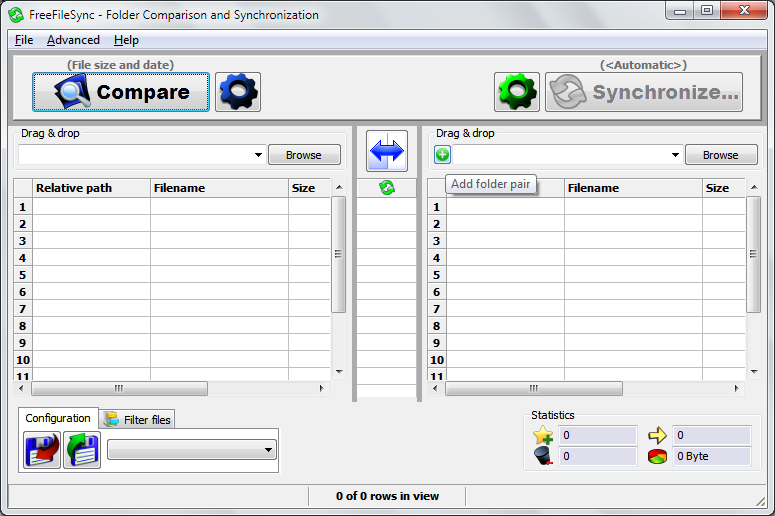
File syncing tools have a tendency to be very complicated affairs, but this is not the case with FreeFileSync. As the name would suggest, the program is available free of charge and it makes light work of ensuring that you always have copies of the latest version of the files you are working with in the folder you need them.

A simple, unclutter interface means that setting up folder pairs is quick and painless and there are a range of file synchronisation options available. Files can be compared using the date of last access, or by performing a bit by bit comparison. There is no limit on the number of files that can be included in a synchronisation job so the program is suitable for even the most demanding of user.

Batch jobs can be created to help automate the process of synchronising a large number of folder pairs, and the option to move files to the Recycle Bin rather than simply deleting them, means that a safety net is always available. With fast operation and fast, simple setup, FreeFileSync enables you to synchronise files free of fuss.

Verdict:

A deceptively simple file synchronisation tool which is packed with features.

Your Comments & Opinion
 
Related Download Articles
 
FreeFileSync Portable

FreeFileSync Portable 5.14

Freeware

Keep the contents of folders synchronised for backup purposes

Bamboo File Sync and Backup

Bamboo File Sync and Backup 3.2

Freeware

Synchronise files and folders between computers so you're always working with the most recent versions

Syncless

Syncless 2.1

Freeware

Synchronise files based on their tags rather than their location

SyncTwoFolders

SyncTwoFolders 1.6.6

Freeware

Keep the contents of two folders synchronised with ease

Other Download Articles From This Category
Registry Key Jumper 1.0

Registry Key Jumper 1.0

Freeware

A quick and easy way to view any Registry key

Process Tamer 2.11.01

Process Tamer 2.11.01

Freeware

Optimise CPU usage by automatically adjusting process priorities

PaperScan Free 1.8.0.8

PaperScan Free 1.8.0.8

Freeware

Clean up your scanned documents with this easy-to-use tool

WinISO Standard 6.3.0

WinISO Standard 6.3.0

Trial Software

Create, open, edit, convert and otherwise work with CD, DVD and Blu-ray disc images

From Softwarecrew

Please wait while my feed loads

See more posts...

Our Price: $12.99
RRP: $39.99
Saving 68%
Buy Now More Info
Offer Ends In:
 

Spotlight: Free Full Software

Ashampoo Burning Studio 2013 (v11.0.6)

Free Full Commercial Software

Ashampoo Burning Studio 2013 is a compact, simple, but surprisingly feature-packed disc burning suite.

The program makes it easy to create simple data discs and audio CDs, for instance: just drag and drop your files onto the list area and you'll be burning the finished disc in a couple of clicks.

That's just the start, though. Burning Studio 2013 can also create data discs with customised, interactive multi-page menus, perfect if you'd like a more professional way to share and present the disc contents.

A built-in backup tool allows you to create backups which may be encrypted, compressed, and span several CDs, DVDs and Blu-rays.

And there are modules to create VCD or SVCD video projects; burn video DVDs or Blu-ray discs from prepared folders; create, browse or burn disc images (ISO, CUE/ BIN and Ashdisc formats are supported); copy discs, erase them, design and print disc covers, labels and booklets, and more.

The focus throughout is on ease of use, though, and so Ashampoo Burning Studio 2013 remains very straightforward, whatever you're doing. Most disc projects are created via the same simple interface, and for the most part all you have to do is drag and drop the necessary files. But experts will find more advanced options are only a click away, and if you need to then you can set ISO and UDF version, enable Joliet, make a disc bootable and more.

Note the download here will take you to the Downloadcrew Software Store where you can download Burning Studio 2013.

[...]
Value:
Free
Rating: