From Twitter

Please wait while my tweets load

If you can't wait - jump to Twitter

See more tweets...

RSS Feeds

Receive a regular RSS feed from our latest, most popular and recommended downloads

Latest downloads feed

Get a regular RSS from our most latest downloads

Most popular downloads feed

Get a regular RSS from our most popular downloads

Recommended downloads feed

Get a regular RSS from our recommended downloads

Newsletter

Subscribe to either one of our two newsletters for regular updates and information

Downloads newsletter

This is a weekly newsletter with download news, updates and other information

This is a monthly newsletter with software store information, offers and deals

SuperSync 4.0

Manage and merge multiple iTunes libraries

by Mark Wilson

Our Rating:
Your Rating:
Login to rate
Based on 0 ratings
License: Trial Software
Operating Systems: Mac OS X, Windows 7 (32 bit), Windows 7 (64 bit), Windows Vista (32 bit), Windows Vista (64 bit), Windows XP
Requirements:
Languages: English
Software Cost: $25.00 (Windows) $25.00 (Mac)
Date Updated: 03 March 2011
Watchlist: Add download to my watchlist
Downloads To Date: 1279
Developer: SuperSync
RSS News Feed:
Buy the new TuneUp Utilities 2013 for only $16.95, with lifetime license, saving 58% from MSRP, only from store.downloadcrew.com
SuperSync
Manage and synchronise multiple iTunes libraries with SuperSync

If you are working with a single computer, it is fairly easy to keep your iPhone, iPod or iPad updated with the latest content from your iTunes library. However, many people work with more than one computer and this is when things start to get a little trickier. Thankfully, SuperSync is on hand to help make things easier.

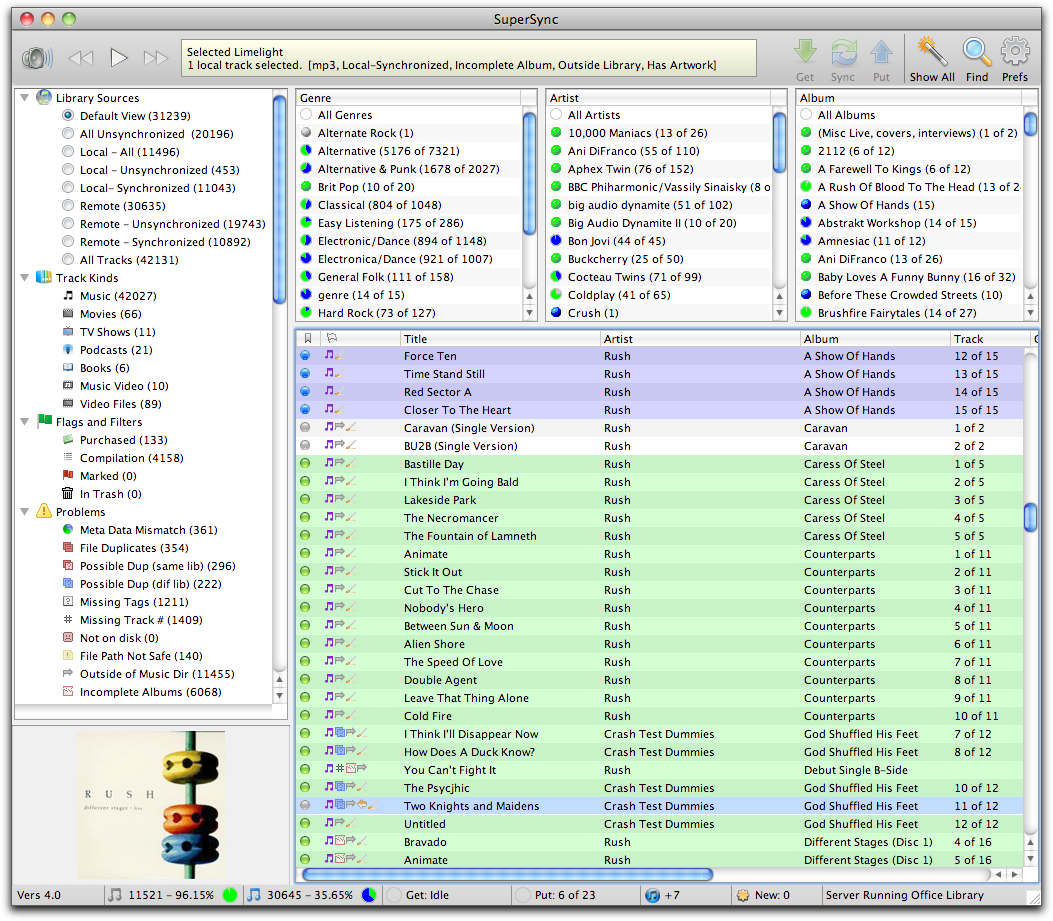
The app makes it possible to view, browse, compare and merge multiple iTunes libraries so you can synchronise your movies, music and playlists from all of the computers you use. Files can be easily moved from one computer to another, and should you decide you do not want to sync an entire library, you can opt to work with just a subset.

SuperSync auomatically cleans up your library to remove any broken links and provides a backup option so you can safeguard your valuable files. The app helps to overcome the problem of duplicate tracks that all too often arises when attempting to manually manage iTunes libraries

There is also a SuperSync music server feature that enables you to upload your music to the internet so it can be accessed from any computer with a web connection. The demo version of the app enables to work with up to 25 files. While this is not going to be enough for most people, it gives an excellent overview of what the software is capable of.

Verdict:

A feature-packed app that goes far beyond the superb iTunes library merging option it offers – a great tool for idevice owners.

Your Comments & Opinion
 
Related Download Articles
 
Phone to PC

Phone to PC 4.1.4.9

Trial Software

Forego iTunes and use this handy alternative to manage your iPhone, iPod or iPad

iPhone Backup Extractor Free

iPhone Backup Extractor Free 3.3.5

Freeware

Extract the data you need from your iOS backups.

iPhone Backup Extractor

iPhone Backup Extractor 3.0.0

Trial Software

Extract the data you need from your iOS backups.

TuneAid 3.73

TuneAid 3.73

Trial Software

Back up your iPod, iPhone or iPad music library to the folder of your choice

Other Download Articles From This Category
VLC Beta (NEON version)

VLC (NEON version) 0.1.1

Freeware

The popular media playing tools gets an Android release

Data Crow 3.10.1

Data Crow 3.10.1

Open Source

Catalogue books, software, movies, music and more with this comprehensive media organiser

MakeMKV

MakeMKV 1.8.3

Freeware

Convert your DVDs and Blu-rays into MKV files

Apple QuickTime 7.7.4

Apple QuickTime 7.7.4

Freeware

High quality video player which can be used for online and offline viewing

From Softwarecrew

Please wait while my feed loads

See more posts...


Spotlight: Free Full Software

Ashampoo Burning Studio 2013 (v11.0.6)

Free Full Commercial Software

Ashampoo Burning Studio 2013 is a compact, simple, but surprisingly feature-packed disc burning suite.

The program makes it easy to create simple data discs and audio CDs, for instance: just drag and drop your files onto the list area and you'll be burning the finished disc in a couple of clicks.

That's just the start, though. Burning Studio 2013 can also create data discs with customised, interactive multi-page menus, perfect if you'd like a more professional way to share and present the disc contents.

A built-in backup tool allows you to create backups which may be encrypted, compressed, and span several CDs, DVDs and Blu-rays.

And there are modules to create VCD or SVCD video projects; burn video DVDs or Blu-ray discs from prepared folders; create, browse or burn disc images (ISO, CUE/ BIN and Ashdisc formats are supported); copy discs, erase them, design and print disc covers, labels and booklets, and more.

The focus throughout is on ease of use, though, and so Ashampoo Burning Studio 2013 remains very straightforward, whatever you're doing. Most disc projects are created via the same simple interface, and for the most part all you have to do is drag and drop the necessary files. But experts will find more advanced options are only a click away, and if you need to then you can set ISO and UDF version, enable Joliet, make a disc bootable and more.

Note the download here will take you to the Downloadcrew Software Store where you can download Burning Studio 2013.

[...]
Value:
Free
Rating: