From Twitter

Please wait while my tweets load

If you can't wait - jump to Twitter

See more tweets...

RSS Feeds

Receive a regular RSS feed from our latest, most popular and recommended downloads

Latest downloads feed

Get a regular RSS from our most latest downloads

Most popular downloads feed

Get a regular RSS from our most popular downloads

Recommended downloads feed

Get a regular RSS from our recommended downloads

Newsletter

Subscribe to either one of our two newsletters for regular updates and information

Downloads newsletter

This is a weekly newsletter with download news, updates and other information

This is a monthly newsletter with software store information, offers and deals

TRIM Support Enabler 2.0

Enable TRIM support for your solid-state drive in Mac OS X Snow Leopard or Lion

by Nick Peers

Our Rating:
Your Rating:
Login to rate
Based on 1 ratings
License: Freeware
Operating Systems: Mac OS X
Requirements:

Mac OS X 10.6.7 (Snow Leopard), SSD drive with support for TRIM 

Languages: English
Software Cost: Free
Date Updated: 24 January 2012
Watchlist: Add download to my watchlist
Downloads To Date: 7375
Developer: Cindori
RSS News Feed:
Buy TuneUp Utilities 2012 for only $18.99, with lifetime license, saving 62% from MSRP, only from store.downloadcrew.com
System Profiler showing TRIM support
Quickly turn TRIM support on or off using the Enabler

There’s no doubting that Solid State Storage (SSD) is the future – SSD hard drives are up to five times as fast as the traditional hard disk in most people’s computers, and with prices finally falling to a level where it’s a practical purpose, more and more people will consider

While SSDs are no longer affected by disk fragmentation thanks to the fact all parts of the drive are accessible virtually instantaneously, their write performance can still degrade over time. This is down to the way data is stored on the drive, which is affected by the way the OS traditionally deletes data from the drive. This problem has been mitigated by a special command called TRIM that helps prevent this degradation from occurring by physically wiping the space marked as deleted by the OS before it's written to again, which keeps performance at an optimum level.

Unfortunately TRIM is only supported in newer builds of Windows, while the latest revision of Apple Mac OS X Snow Leopard (10.6.7) and Lion (10.6.8) supports TRIM, but only on Apple-manufactured drives. However, the Mac community has discovered a way to get Snow Leopard/Lion to support TRIM on all SSDs. It’s quite a complicated procedure to follow, which is where TRIM Support Enabler comes in: this tiny utility will do all the hard work of enabling TRIM support on most SSDs for you via a single click and reboot.

It’s a doddle to use, and should work on any SSD that supports TRIM – we tested it on our Mac Mini running a Kingston 64GB SSD and it worked first time. Once rebooted, verify it's working via the System Profiler tool - select your SSD, and you should see if it's enabled or not.

Note that TRIM support is disabled by updating Mac OS X, so you’ll need to reapply the patch again. Make sure you back up your SSD before applying the patch, just in case – use Carbon Copy Cloner for this task.

This is brand new TRIM Support Enabler 2, which is designed to support Lion. Other new features include:

-Rewritten from AppleScript to 100% Objective-C
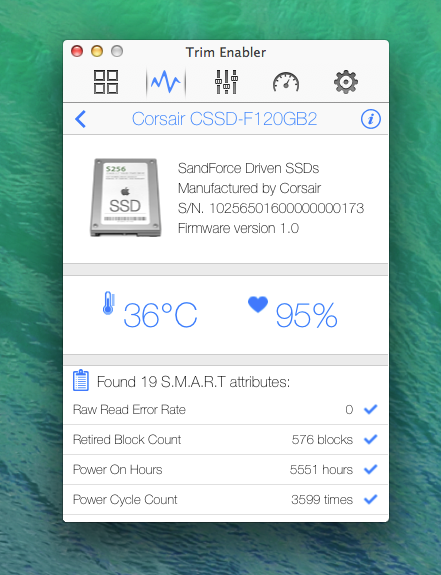
-Features new S.M.A.R.T tool to learn about your drive’s health
-New icon, courtesy of vegrafik
-No longer installs an old driver, instead patches your current
-Added automatic updates

Verdict:

An essential tool for any Snow Leopard user running a SSD - but back up first, just in case. 

Your Comments & Opinion
 
Related Download Articles
 
Intel SSD Toolbox 3

Intel SSD Toolbox 3.0.3

Freeware

Examine, test and speed up your Intel SSD with this useful toolkit

O&O Defrag 15.5 Professional Edition (64-bit)

O&O Defrag 15.5.323 (64-bit)

Trial Software

Improve your PC's performance with this very configurable defrag tool

SSD Life 2.1.29

SSD Life Free 2.1.38

Freeware

Get an estimate of your solid state drive's life expectancy with this free utility

Intel Data Migration Software

Intel Data Migration Software 1.1

Freeware

Set up your Intel SSD in minutes with this simple disk cloning tool

Other Download Articles From This Category
SUMo

SUMo 3.1.0.154

Freeware

Quickly discover which of your favourite programs have updates available

Toolwiz FlipBook 1.4.0.0

Toolwiz FlipBook 1.4.0.0

Freeware

Easily turn any text file into a stand-alone 3D ebook

Auslogics Disk Defrag 3.4.3.0

Auslogics Disk Defrag 3.4.3.0

Free, for personal-use only

Keep your hard drive in top condition with this powerful disk defragmentation tool

Auslogics BoostSpeed 5.3.0.0

Auslogics BoostSpeed 5.3.0.0

Trial Software

Clean, optimise, tune and tweak your PC to deliver its best possible performance

From Softwarecrew

Please wait while my feed loads

See more posts...

Our Price: $69.95
RRP: $99.95
Saving 30%
Buy Now More Info
Offer Ends In:
 

Spotlight: Free Full Software

Giveaway: WinISO Standard 6.1.0

Free Full Commercial Software

WinISO is a very comprehensive tool which provides everything you need to create, edit and convert disc images.

If you've an image file already, for instance (ISO, CUE/ BIN, NRG, MDF, CCD, IMG and DVD formats are supported) then you can open it in a click or two, browse the image contents, and extract the files you need with a quick drag and drop.

It's just as easy to create new ISO9660, UDF, even HFS+ images. Just choose the option you need, then either manually build up your preferred file and folder structure; drag and drop your files and folders from Explorer onto the program; or create an image directly from a CD, DVD or Blu-ray disc.

Of course you can edit images, too. Is an ISO file too large for your needs, say? Open it up, locate and remove any surplus files to free up a little space.

WinISO program has full support for reading and creating bootable image files. A simple conversion tool makes it easy to convert disc images into the format you need. And the program can even mount ISO files as Explorer files, or burn images to disc when you're ready to save them.

Please note, this trial version of WinISO Standard will not save files greater than 500MB in size.

Giveaway: on Wednesday, we're giving you the full current version of WinISO Standard 6 worth $29.95. The download link here will take you to Downloadcrew Giveaway.

[...]
Time Remaining: