


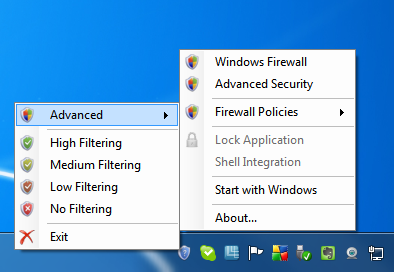
Windows 7 and Vista include a surprisingly powerful firewall tool that helps to secure your internet connection. Configuring the firewall can be tricky, and if you have gone to the trouble of configuring different firewall profiles, it can seem an unnecessarily lengthy process to switch between them. This is something that Windows Firewall Control aims to rectify.
The program sits in the notification area of the Windows taskbar and provides easy access to the most frequently used options of the Windows Firewall. In just a couple of clicks you can switch between firewall profiles or even disable the firewall altogether – a handy option if you are having trouble granting a particular program access to the internet.
Windows Firewall Control can be configured to start automatically with Windows and it is then incredibly simple to flick between using High, Medium, Low, or No Filtering modes. This is a great alternative to navigating through the various firewall related screen that can be found in the Control Panel.
Working in free mode, the program is very powerful, but opt to register for $10 and there are a number of additional options available to you. Registration unlocks the option to import and export settings so they can be easily restored as well as the ability to lock down the program with an administrator password. There is also the very handy ability to right click on any executable file in Windows and use the context menu to create a firewall rule for the selected program.
Verdict:
Whether used in free or registered mode, Windows Firewall Control is a valuable security tools that makes it easy to configure your internet protection.
Your Comments & Opinion
A secure web browser based on a Mozilla core
Combined AVAST and AVG technology for one powerful free security tool
One of the most popular free security suites receives a major update
AVGs mid-range security suite for all your devices
Avast's premium security suite is more powerful than ever
Completely remove all traces of AVG Antivirus to overcome installation problems