From Twitter

Please wait while my tweets load

If you can't wait - jump to Twitter

See more tweets...

RSS Feed

Please wait while my feed loads

See more posts...

Newsletter

Subscribe to either one of our two newsletters for regular updates and information

Downloads newsletter

This is a weekly newsletter with download news, updates and other information

This is a monthly newsletter with software store information, offers and deals

HandBrake 0.9.6

Easily convert just about any videos into iPod-friendly MP4 files

by Mike Williams

Our Rating:
Your Rating:
Login to rate
Based on 0 ratings
License: Open Source
Operating Systems: Linux, Mac OS X, Windows 7 (32 bit), Windows 7 (64 bit), Windows Vista (64 bit), Windows XP
Requirements:


Languages: English
Software Cost: Free
Date Updated: 28 February 2012
Watchlist: Add download to my watchlist
Downloads To Date: 1872
Developer: HandBrake Project
RSS News Feed: http://handbrake.fr/rss.php
Buy TuneUp Utilities 2012 for only $18.99, with lifetime license, saving 62% from MSRP, only from store.downloadcrew.com
HandBrake 0.9.6
Convert videos to MP4/ MKV format

It's a fundamental law of computing: multimedia files are never in the format you need. And so while in theory something like an iPod Touch is great for watching videos, in practice they'll need to be in something like M4V, MP4 or MOV formats, and getting your files converted can be a problem. But that's where HandBrake comes in.

The program accepts video data in just about any source format, including DVDs (as long as they're unencrypted: commercial DVDs can't be imported unless you install extra libraries).

You can then choose your output format (MP4 or MKV), and apply whatever additional tweaks you might need. Videos can be resized or cropped, for instance, filtered in various ways (deinterlace, denoise, deblock, more), you're able to choose the destination frame rate, or even set a target size for the converted file so you can be sure it'll fit on your target device.

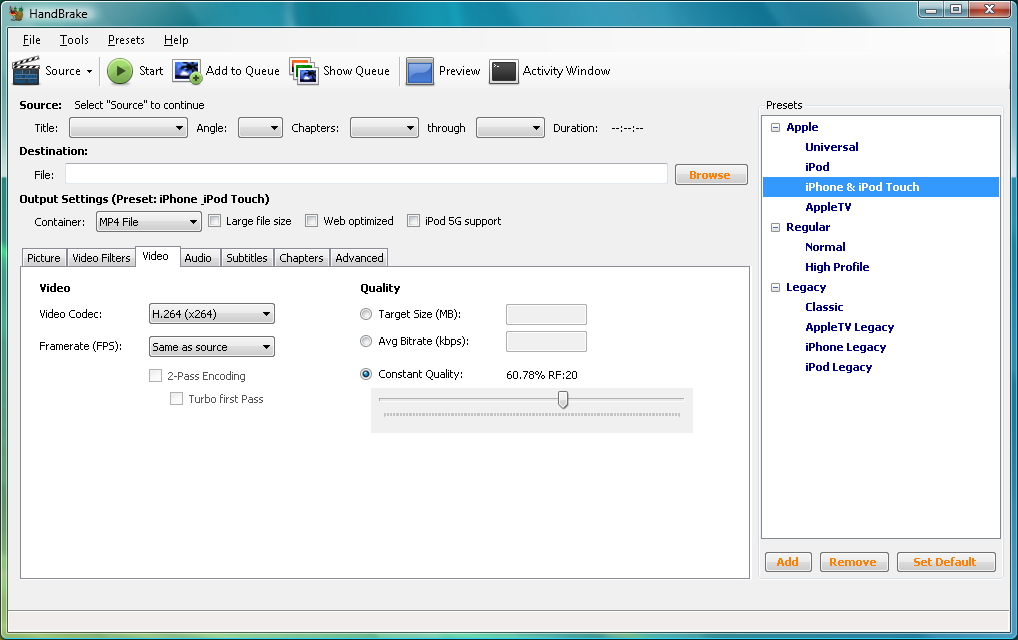
If you prefer a simple life, though, you can just choose one of the conversion presets like iPod, iPhone and iPod Touch or AppleTV. HandBrake will automatically set all its other options, and all you have to do is click Start and wait for your new video or audio file to arrive.

HandBrake 0.9.6 contains a number of improvements. View the 0.9.6 Release Notes for more information.

Verdict:

An effective way to convert videos, especially for Apple devices - and much easier to use than most of the transcoding competition

Your Comments & Opinion
 
Related Download Articles
 
K-Lite Codec Pack Full

K-Lite Codec Pack Full 8.8.0

Freeware

All the codecs you need to play virtually any video or audio you may encounter

VLC Media Player 2.0.1

VLC Media Player 2.0.1 FINAL

Open Source

Play just about any video or audio format using this versatile media player

MediaCoder iPod/iPhone/iPad Edition 0.7 (64-bit)

MediaCoder iPod/iPhone/iPad Edition 0.7 (64-bit)

Freeware

Convert just about any media file into a format you can play on portable Apple devices

MediaCoder iPod/iPhone/iPad Edition 0.7 (32-bit)

MediaCoder iPod/iPhone/iPad Edition 0.7 (32-bit)

Freeware

Convert just about any media file into a format you can play on portable Apple devices

Other Download Articles From This Category
PicPick

PicPick 3.1.5

Shareware

Capture, edit and upload images in a flash with this powerful screen capture program

jAlbum 10.7.2

jAlbum 10.7.2

Free, for personal-use only

Create stylish web albums from your favourite digital photos

Apple QuickTime 7.7.2

Apple QuickTime 7.7.2

Freeware

High quality video player which can be used for online and offline viewing

K-Lite Codec Pack Standard

K-Lite Codec Pack Standard 8.8.0

Freeware

All the codecs you need to play virtually any video or audio you may encounter

From Softwarecrew

Please wait while my feed loads

See more posts...

Our Price: $14.95
RRP: $29.95
Saving 50%
Buy Now More Info
Offer Ends In:
 

Spotlight: Free Full Software

Giveaway: WinISO Standard 6.1.0

Free Full Commercial Software

WinISO is a very comprehensive tool which provides everything you need to create, edit and convert disc images.

If you've an image file already, for instance (ISO, CUE/ BIN, NRG, MDF, CCD, IMG and DVD formats are supported) then you can open it in a click or two, browse the image contents, and extract the files you need with a quick drag and drop.

It's just as easy to create new ISO9660, UDF, even HFS+ images. Just choose the option you need, then either manually build up your preferred file and folder structure; drag and drop your files and folders from Explorer onto the program; or create an image directly from a CD, DVD or Blu-ray disc.

Of course you can edit images, too. Is an ISO file too large for your needs, say? Open it up, locate and remove any surplus files to free up a little space.

WinISO program has full support for reading and creating bootable image files. A simple conversion tool makes it easy to convert disc images into the format you need. And the program can even mount ISO files as Explorer files, or burn images to disc when you're ready to save them.

Please note, this trial version of WinISO Standard will not save files greater than 500MB in size.

Giveaway: on Wednesday, we're giving you the full current version of WinISO Standard 6 worth $29.95. The download link here will take you to Downloadcrew Giveaway.

[...]
Time Remaining: