From Twitter

Please wait while my tweets load

If you can't wait - jump to Twitter

See more tweets...

RSS Feed

Please wait while my feed loads

See more posts...

Newsletter

Subscribe to either one of our two newsletters for regular updates and information

Downloads newsletter

This is a weekly newsletter with download news, updates and other information

This is a monthly newsletter with software store information, offers and deals

MAGIX Audio Cleaning Lab 16 deluxe

Capture audio from LPs, tapes and other sources before cleaning up the sound

by Mark Wilson

Our Rating:
Your Rating:
Login to rate
Based on 0 ratings
License: Trial Software
Operating Systems: Windows 7 (32 bit), Windows 7 (64 bit), Windows Vista (32 bit), Windows Vista (64 bit), Windows XP
Requirements:


Languages: English
Software Cost: Free
Date Updated: 18 February 2010
Watchlist: Add download to my watchlist
Downloads To Date: 1962
Developer: MAGIX
RSS News Feed: http://www.magix.com/index.php?id=6813
Twitter Feed: http://twitter.com/magix
Buy the new TuneUp Utilities 2013 for only $16.95, with lifetime license, saving 58% from MSRP, only from store.downloadcrew.com
MAGIX Audio Cleaning Lab 16 deluxe
Capture and clean up audio with MAGIX Audio Cleaning Lab deluxe

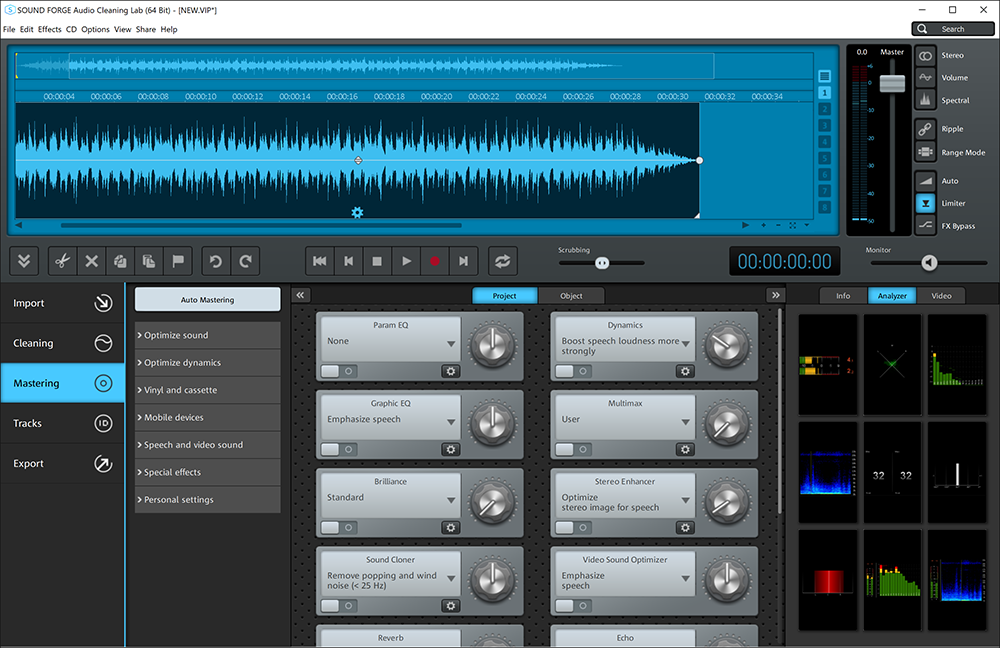
MAGIX Audio Cleaning Lab Deluxe can be used to record any sound you can hear on your computer - from internet radio to LPs and tapes which have been connected to the sound card. When recording older material, particularly when it has been stored on vinyl or cassette, it is likely that the sound quality has deteriorated over time. Using this program you can remove any unwanted extraneous noise such as clicks, pops and hisses and generally improve the overall audio experience working with an easy to use interface.

You can also remove unwanted sections from a recording, increase the volume of quiet tracks and split longer recording up into multiple sections - in fact, Audio Cleaning Labs Deluxe can take care of much of this for you automatically. A great level of control is available through the use of a graphic equaliser that can be used to balance out tone, while additional options are available to improve the quality of video sound, reduce the volume of background music on vocal tracks and much more besides.

If you've been looking for a way to digitise your music collection, MAGIX Audio Cleaning Labs Deluxe may just be the tool you have been looking for. In a few simple steps you can record music to your computer, enhance its sound and then save the results as high quality MP3s that can be played back on a variety of devices.

Verdict:

Professional quality audio clean up results from an instantly accessible program

Your Comments & Opinion
 
Related Download Articles
 
MAGIX Audio Cleaning Lab 2013

MAGIX Audio Cleaning Lab 2013

Trial Software

Enhance your old recordings by removing clicks, crackles, noise and more

MAGIX MP3 deluxe MX (v18)

MAGIX MP3 deluxe MX (v18)

Trial Software

A fully-featured music management suite to place you in control of your music collection.

MAGIX Audio Cleaning Lab MX

MAGIX Audio Cleaning Lab MX

Trial Software

The easy way to enhance your audio files like a pro

MAGIX Music Maker MX Premium v18

MAGIX Music Maker MX Premium (v18)

Trial Software

Unleash your creative juices with this feature packed yet accessible music creation studio

Other Download Articles From This Category
K-Lite Codec Pack Update 9.9.4

K-Lite Codec Pack 9.9.4 Update

Freeware

Update K-Lite Codec Pack (any version) to the latest build

Your Tube for Windows 8

Your Tube for Windows 8 v1.0.0.6

Freeware

Browse through the world's largest video collection in Windows 8

TIFF to PDF 1.0

TIFF to PDF 1.0

Freeware

Easily convert multi-page TIFF images to PDF

7GIF 1.0.6.0

7GIF 1.0.6.0

Freeware

A compact but capable viewer for animated GIFs

From Softwarecrew

Please wait while my feed loads

See more posts...


Spotlight: Free Full Software

Ashampoo Burning Studio 2013 (v11.0.6)

Free Full Commercial Software

Ashampoo Burning Studio 2013 is a compact, simple, but surprisingly feature-packed disc burning suite.

The program makes it easy to create simple data discs and audio CDs, for instance: just drag and drop your files onto the list area and you'll be burning the finished disc in a couple of clicks.

That's just the start, though. Burning Studio 2013 can also create data discs with customised, interactive multi-page menus, perfect if you'd like a more professional way to share and present the disc contents.

A built-in backup tool allows you to create backups which may be encrypted, compressed, and span several CDs, DVDs and Blu-rays.

And there are modules to create VCD or SVCD video projects; burn video DVDs or Blu-ray discs from prepared folders; create, browse or burn disc images (ISO, CUE/ BIN and Ashdisc formats are supported); copy discs, erase them, design and print disc covers, labels and booklets, and more.

The focus throughout is on ease of use, though, and so Ashampoo Burning Studio 2013 remains very straightforward, whatever you're doing. Most disc projects are created via the same simple interface, and for the most part all you have to do is drag and drop the necessary files. But experts will find more advanced options are only a click away, and if you need to then you can set ISO and UDF version, enable Joliet, make a disc bootable and more.

Note the download here will take you to the Downloadcrew Software Store where you can download Burning Studio 2013.

[...]
Value:
Free
Rating: