From Twitter

Please wait while my tweets load

If you can't wait - jump to Twitter

See more tweets...

RSS Feed

Please wait while my feed loads

See more posts...

Newsletter

Subscribe to either one of our two newsletters for regular updates and information

Downloads newsletter

This is a weekly newsletter with download news, updates and other information

This is a monthly newsletter with software store information, offers and deals

Free Audio Converter 5.0.23

Convert just about any audio file into your preferred format

by Mike Williams

Our Rating:
Your Rating:
Login to rate
Based on 1 ratings
License: Freeware
Operating Systems: Windows 7 (32 bit), Windows 7 (64 bit), Windows 8, Windows Vista (32 bit), Windows Vista (64 bit), Windows XP
Requirements:


Languages: English, Arabic, Chinese, Dutch, French, German, Italian, Japanese, Korean, Polish, Portuguese (Brazil), Portuguese (Portugal), Russian, Spanish
Software Cost: Free
Date Updated: 22 March 2013
Watchlist: Add download to my watchlist
Downloads To Date: 1576
Developer: DVDVideoSoft Limited
RSS News Feed: http://twitter.com/statuses/user_timeline/118093487.rss
Twitter Feed: http://twitter.com/DVDVideoSoft
Facebook: http://www.facebook.com/home.php?#!/pages/dvdvideosoftcom/298709471678
Buy the new TuneUp Utilities 2013 for only $16.95, with lifetime license, saving 58% from MSRP, only from store.downloadcrew.com
Free Audio Converter
Convert just about any audio file into your preferred format

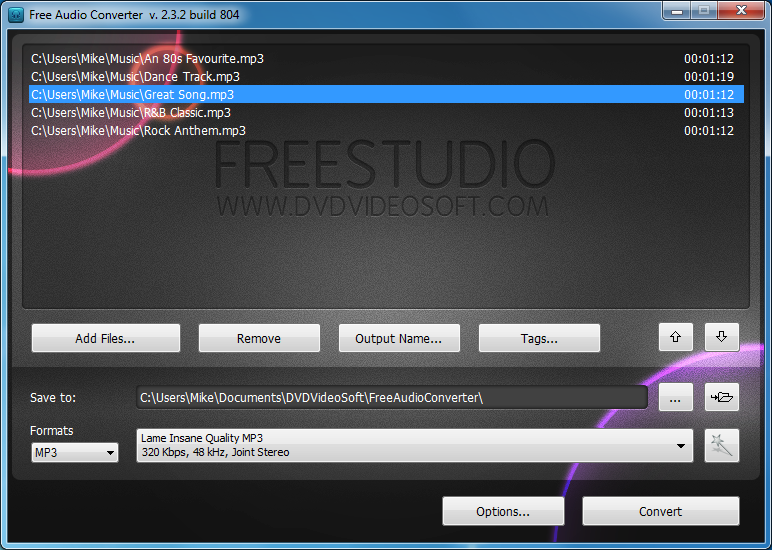
Free Audio Converter is an easy-to-use tool for converting audio files into the format you need.

The program can import all the major file types: AAC, AC3, AIFF, AMR, APE, AU, FLAC, M4A, MKA, MP3, MPC, OGG, RA/ RAM, SPX, TTA, WAV and WMA.

And it's able to write a much smaller selection of formats, but all the most important options are here: AAC, APE, FLAC, M4A, MP3, OGG, WAV and WMA.

Every format has multiple presets to make sure you get the quality you need. Choose MP3, say, and you're able to output anything from 320 Kbps, 48kHz, joint stereo to 32Kbps, 44.1kHz mono files.

But if you still can't find the exact options you need, that's no problem. Free Audio Converter also includes a Preset Editor which can create additional presets, with your preferred sample rate, bitrate and channel settings.

Please note, the installer will by default equip your PC with the Ask toolbar, and change your browser search and home pages to Ask.com. If this isn't what you want then choose the "Custom installation" option during setup, and clear "Include the Ask Toolbar" and "Set Ask.com as my home page".

Verdict:

Free Audio Converter is easy to use, supports a wide range of file formats, and is sufficiently configurable to ensure that you get the precise audio quality settings you need.

Your Comments & Opinion
 
Related Download Articles
 
AVS Audio Converter 7.0

AVS Audio Converter 7.0.3.499

Trial Software

Quickly convert just about any audio file into the format you need

Format Factory

Format Factory 3.0.0

Freeware

Convert video, audio and picture files from one format to another with this versatile free tool

Media Converter

Media Converter 1.1.1

Freeware

Convert video files between formats using drag and drop

FlicFlac 1.0.48.5

FlicFlac 1.0.48.5

Freeware

Easily convert audio files between the WAV, MP3, FLAC, OGG and APE formats

Other Download Articles From This Category
Skitch for Desktop 2.0.1.5

Skitch for Desktop 2.1.0.16

Freeware

Add notes and annotation to the photos stored on your desktop computer

Apple iTunes 11.0.3 (64-bit)

Apple iTunes 11.0.3 (64-bit)

Freeware

Download, manage and playback music from your computer

Apple iTunes 11.0.3

Apple iTunes 11.0.3

Freeware

Download, manage and playback music from your computer

VLC Beta (NEON version)

VLC (NEON version) 0.1.0

Freeware

The popular media playing tools gets an Android release

From Softwarecrew

Please wait while my feed loads

See more posts...


Spotlight: Free Full Software

Ashampoo Burning Studio 2013 (v11.0.6)

Free Full Commercial Software

Ashampoo Burning Studio 2013 is a compact, simple, but surprisingly feature-packed disc burning suite.

The program makes it easy to create simple data discs and audio CDs, for instance: just drag and drop your files onto the list area and you'll be burning the finished disc in a couple of clicks.

That's just the start, though. Burning Studio 2013 can also create data discs with customised, interactive multi-page menus, perfect if you'd like a more professional way to share and present the disc contents.

A built-in backup tool allows you to create backups which may be encrypted, compressed, and span several CDs, DVDs and Blu-rays.

And there are modules to create VCD or SVCD video projects; burn video DVDs or Blu-ray discs from prepared folders; create, browse or burn disc images (ISO, CUE/ BIN and Ashdisc formats are supported); copy discs, erase them, design and print disc covers, labels and booklets, and more.

The focus throughout is on ease of use, though, and so Ashampoo Burning Studio 2013 remains very straightforward, whatever you're doing. Most disc projects are created via the same simple interface, and for the most part all you have to do is drag and drop the necessary files. But experts will find more advanced options are only a click away, and if you need to then you can set ISO and UDF version, enable Joliet, make a disc bootable and more.

Note the download here will take you to the Downloadcrew Software Store where you can download Burning Studio 2013.

[...]
Value:
Free
Rating: