From Twitter

Please wait while my tweets load

If you can't wait - jump to Twitter

See more tweets...

RSS Feed

Please wait while my feed loads

See more posts...

Newsletter

Subscribe to either one of our two newsletters for regular updates and information

Downloads newsletter

This is a weekly newsletter with download news, updates and other information

This is a monthly newsletter with software store information, offers and deals

Windows 8 Transformation Pack 7.0

Give your PC a Windows 8-themed makeover 

by Nick Peers

Our Rating:
Your Rating:
Login to rate
Based on 6 ratings
License: Freeware
Operating Systems: Windows 7 (32 bit), Windows 7 (64 bit), Windows Server, Windows Vista (32 bit), Windows Vista (64 bit), Windows XP
Requirements:

.NET Framework 4.0; Windows XP x64 and Server also require .NET Framework 2.0 or later 

Languages: English
Software Cost: Free
Date Updated: 21 March 2013
Watchlist: Add download to my watchlist
Downloads To Date: 401116
Developer: WindowsX
RSS News Feed: http://www.windowsxlive.net/rss-product
Twitter Feed: http://twitter.com/#!/windowsx
Buy the new TuneUp Utilities 2013 for only $16.95, with lifetime license, saving 58% from MSRP, only from store.downloadcrew.com
Windows 8 Transformation Pack 7.0
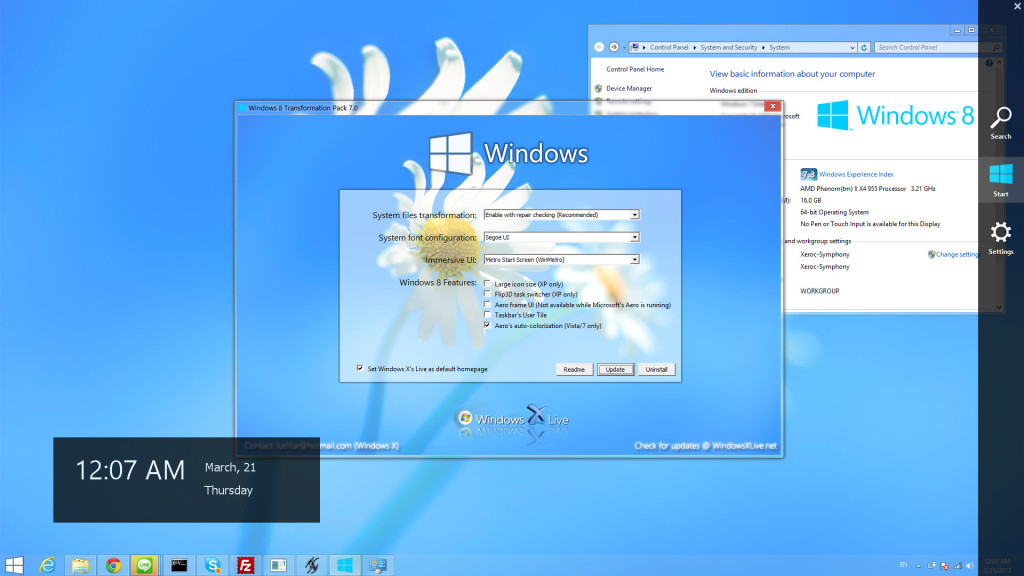
Windows XP sports the Windows 8 look

Every new version of Windows involves adapting to change, and Windows 8 will be no different, promising a radical new look as it attempts to bestride tablets and phones as well as your laptop or desktop. If all you want to do is preview the new look and some of the tools on your Windows 7-powered PC, try the Windows 8 UX Pack.

If you’d like to emulate the look on an earlier version of Windows, you’ll need this Windows 8 Transformation Pack tool instead. It takes the UX Pack and adds in a number of extra elements that emulate key aspects of Windows 8 already built into Windows 7 such as the translucent Windows Aero interface. Basically, if you want to get the Windows 8 look in Vista, XP or Windows Server, you need this instead.

Installation is simple enough: extract the setup file from the zip archive, then double-click it to get started. If you’ve installed the pre-requisites (.NET Framework 4.0, plus .NET Framework 2.0-3.5 if you’re running Windows Server or the 64-bit version of XP) you can select what to install and then click Install to see if the program will be able to supply you with the features you desire.

Be patient, it can take a while to apply everything, and it occasionally appears stuck, but persevere and if all works you’ll be prompted to reboot at which point you’ll be able to get a feel for Windows 8.

For Vista and Windows 7 users, the changes will be largely superficial, with access to the Metro-like user interface and various gadgets the big attraction. XP users will notice the most radical changes, with a completely revamped interface to contend with. You may encounter glitches – if these prove too troublesome, or you decide the new look and feel isn’t for you, just re-run the setup tool to remove it from your system. 

Windows 8 Transformation Pack v7.0 additions and new features:

-Added WinMetro as alternative Metro Start Screen
-Changed default Immersive UI to Metro Start Screen (WinMetro)
-Improved sounds scheme files handling method
-Updated Font installation code based on recent patch
-Updated Glass UI theme configuration based on hacked Aero Glass in Windows 8
-Updated Windows 8 Media sound scheme files and resources
-Updated Windows 8 visual style for Windows 7 by Rammist

Verdict:

A surprisingly elegant and effective way to give your ageing version of Windows a major makeover, but you may encounter the odd glitch. And make sure you back up your PC first. 

Your Comments & Opinion
 

Posted by: neil vaillancourt, 31 March 2012 14:45

wow from the screenshot, that loks horrible

www.downloadcrew.com reply:

Neil, we've just updated the screengrab to reflect the changes in v4.0.

Related Download Articles
 
.NET Framework 4.5

Microsoft .NET Framework 4.5

Freeware

Microsoft's .NET support system gets faster, more powerful, and now supports Windows 7's multi-touch

Windows 8 UX Pack 7.0

Windows 8 UX Pack 7.0

Freeware

Get an advance peek at the Windows 8 interface with this interesting collection of tools, wrapped up in a user interface

8StartButton

8StartButton 1.2.2

Freeware

Restore the Start button in Windows 8

Pulmon 2.0

Pulmon 2.0

Freeware

Quickly and easily get the new Windows 8 Metro look on your PC 

Other Download Articles From This Category
ConsoleHoster 3.8

ConsoleHoster 3.8

Open Source

Run multiple command line windows from a single tabbed interface

USB Drive Letter Manager

USB Drive Letter Manager 4.7.3.0

Free, for personal-use only

Take control over the drive letters assigned to your USB devices

USB Drive Letter Manager 4.7 (64-bit)

USB Drive Letter Manager 4.7.3.0 (64-bit)

Free, for personal-use only

Take control over the drive letters assigned to your USB devices

John's Background Switcher 4.7

John's Background Switcher 4.7.0.22

Freeware

Locate great new desktop backgrounds, and switch them automatically with this powerful free utility

From Softwarecrew

Please wait while my feed loads

See more posts...

Our Price: $16.95
RRP: $49.95
Saving 66%
Buy Now More Info
Offer Ends In:
 

Spotlight: Free Full Software

Ashampoo Burning Studio 2013 (v11.0.6)

Free Full Commercial Software

Ashampoo Burning Studio 2013 is a compact, simple, but surprisingly feature-packed disc burning suite.

The program makes it easy to create simple data discs and audio CDs, for instance: just drag and drop your files onto the list area and you'll be burning the finished disc in a couple of clicks.

That's just the start, though. Burning Studio 2013 can also create data discs with customised, interactive multi-page menus, perfect if you'd like a more professional way to share and present the disc contents.

A built-in backup tool allows you to create backups which may be encrypted, compressed, and span several CDs, DVDs and Blu-rays.

And there are modules to create VCD or SVCD video projects; burn video DVDs or Blu-ray discs from prepared folders; create, browse or burn disc images (ISO, CUE/ BIN and Ashdisc formats are supported); copy discs, erase them, design and print disc covers, labels and booklets, and more.

The focus throughout is on ease of use, though, and so Ashampoo Burning Studio 2013 remains very straightforward, whatever you're doing. Most disc projects are created via the same simple interface, and for the most part all you have to do is drag and drop the necessary files. But experts will find more advanced options are only a click away, and if you need to then you can set ISO and UDF version, enable Joliet, make a disc bootable and more.

Note the download here will take you to the Downloadcrew Software Store where you can download Burning Studio 2013.

[...]
Value:
Free
Rating: