From Twitter

Please wait while my tweets load

If you can't wait - jump to Twitter

See more tweets...

RSS Feeds

Receive a regular RSS feed from our latest, most popular and recommended downloads

Latest downloads feed

Get a regular RSS from our most latest downloads

Most popular downloads feed

Get a regular RSS from our most popular downloads

Recommended downloads feed

Get a regular RSS from our recommended downloads

Newsletter

Subscribe to either one of our two newsletters for regular updates and information

Downloads newsletter

This is a weekly newsletter with download news, updates and other information

This is a monthly newsletter with software store information, offers and deals

BExplorer (Better Explorer) 2.0.0.731

An Explorer replacement that benefits from tabs and more

by Mark Wilson

Our Rating:
Your Rating:
Login to rate
Based on 0 ratings
License: Freeware
Operating Systems: Windows 7 (32 bit), Windows 7 (64 bit), Windows 8, Windows Vista (32 bit), Windows Vista (64 bit)
Requirements:


Languages: English
Software Cost: Free
Date Updated: 25 December 2011
Watchlist: Add download to my watchlist
Downloads To Date: 1141
Developer: Codeplex
RSS News Feed:
Buy TuneUp Utilities 2012 for only $18.99, with lifetime license, saving 62% from MSRP, only from store.downloadcrew.com
BExplorer (Better Explorer)
Replace Windows Explorer with BExplorer (Better Explorer) for advanced options

Explorer is an application that is at the very heart of Windows and it is used for everything from browsing through digital photos, to accessing your music collection or simply copying files from one folder to another. As these are operations that are so central to working with Windows, it is important that the tool you use to interact with your files is as intuitive and feature packed as possible. If you have found that Explorer is a little lacking, BExplorer is a free alternative that you may well prefer.

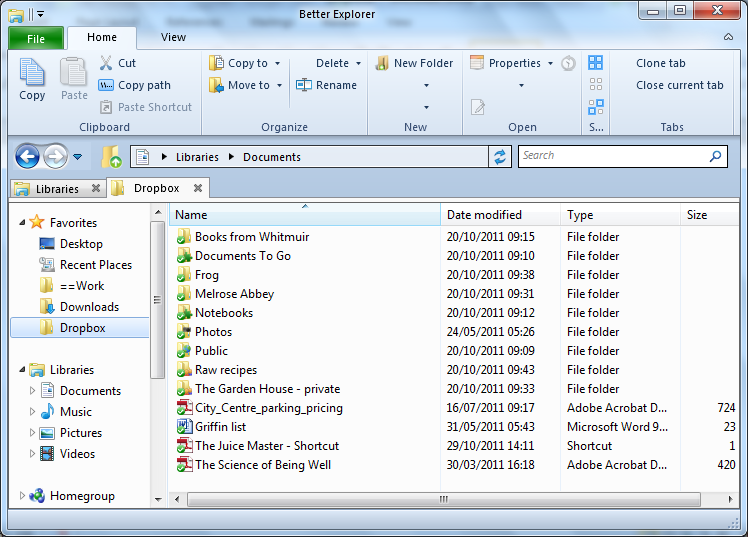
There are plenty of Explorer replacement tools that look completely different to the program you have become used to using, but this is not the case with BExplorer. The app looks largely similar to Windows’ own Explorer, aside from the fact that it features a Windows 8 style ribbon toolbar. This provides access to a number of handy tools and options, but it can be hidden if you find that it gets in the way.

But the most noticeable difference between BExplorer and Windows’ regular tool is that it features a tabbed interface. This provides a great way to work with several folders at the same time without having to clutter up the taskbar with too many buttons and it can help speed up the process of copying files between locations quickly and easily.

The ribbon provide access to a number of handy options such as moving and copying files, as well as the ability to copy the address of a file to the clipboard. A very useful option is the ‘invert selection’ button which makes it very easy to select everything in a folder with the exception of one or two files. BExplorer is still an alpha program at the moment, and it is still a little rough around the edges, with some aspects of the application simply not working.

Verdict:

One to watch, this is a promising Explorer replacement that’s not quite ready for day to day use just yet.

Your Comments & Opinion
 
Related Download Articles
 
Total Commander

Total Commander 7.57

Trial Software

Feature packed Windows Explorer replacement that enables you do more with your files

Explorer++ Portable

Explorer++ Portable v1.3.2 (32-bit)

Freeware

A replacement for Windows Explorer with a powerful tabbed interface

Total Commander 8

Total Commander 8.0b1 (64-bit)

Trial Software

Feature-packed Windows Explorer replacement that enables you do more with your files

TotalFinder

TotalFinder 1.0.1

Shareware

Enhance OS X's Finder with tabs

Other Download Articles From This Category
SUMo

SUMo 3.1.0.154

Freeware

Quickly discover which of your favourite programs have updates available

Toolwiz FlipBook 1.4.0.0

Toolwiz FlipBook 1.4.0.0

Freeware

Easily turn any text file into a stand-alone 3D ebook

Auslogics Disk Defrag 3.4.3.0

Auslogics Disk Defrag 3.4.3.0

Free, for personal-use only

Keep your hard drive in top condition with this powerful disk defragmentation tool

Auslogics BoostSpeed 5.3.0.0

Auslogics BoostSpeed 5.3.0.0

Trial Software

Clean, optimise, tune and tweak your PC to deliver its best possible performance

From Softwarecrew

Please wait while my feed loads

See more posts...


Spotlight: Free Full Software

Giveaway: WinISO Standard 6.1.0

Free Full Commercial Software

WinISO is a very comprehensive tool which provides everything you need to create, edit and convert disc images.

If you've an image file already, for instance (ISO, CUE/ BIN, NRG, MDF, CCD, IMG and DVD formats are supported) then you can open it in a click or two, browse the image contents, and extract the files you need with a quick drag and drop.

It's just as easy to create new ISO9660, UDF, even HFS+ images. Just choose the option you need, then either manually build up your preferred file and folder structure; drag and drop your files and folders from Explorer onto the program; or create an image directly from a CD, DVD or Blu-ray disc.

Of course you can edit images, too. Is an ISO file too large for your needs, say? Open it up, locate and remove any surplus files to free up a little space.

WinISO program has full support for reading and creating bootable image files. A simple conversion tool makes it easy to convert disc images into the format you need. And the program can even mount ISO files as Explorer files, or burn images to disc when you're ready to save them.

Please note, this trial version of WinISO Standard will not save files greater than 500MB in size.

Giveaway: on Wednesday, we're giving you the full current version of WinISO Standard 6 worth $29.95. The download link here will take you to Downloadcrew Giveaway.

[...]
Time Remaining: