From Twitter

Please wait while my tweets load

If you can't wait - jump to Twitter

See more tweets...

RSS Feeds

Receive a regular RSS feed from our latest, most popular and recommended downloads

Latest downloads feed

Get a regular RSS from our most latest downloads

Most popular downloads feed

Get a regular RSS from our most popular downloads

Recommended downloads feed

Get a regular RSS from our recommended downloads

Newsletter

Subscribe to either one of our two newsletters for regular updates and information

Downloads newsletter

This is a weekly newsletter with download news, updates and other information

This is a monthly newsletter with software store information, offers and deals

Game Manager 3

A Media Centre-type application to help organise your games

by Mike Williams

Our Rating:
Your Rating:
Login to rate
Based on 0 ratings
License: Freeware
Operating Systems: Windows 2000, Windows 7 (32 bit), Windows 7 (64 bit), Windows Vista (32 bit), Windows Vista (64 bit), Windows XP
Requirements:

100MB free hard drive space

Languages: English, Catalan, Danish, Dutch, French, German, Italian, Norwegian, Portuguese (Brazil), Portuguese (Portugal), Spanish
Software Cost: Free
Date Updated: 16 January 2012
Watchlist: Add download to my watchlist
Downloads To Date: 545
Developer: Photon Game Manager
RSS News Feed:
Facebook: http://www.facebook.com/pages/Photon-GameManager/126858590746485
Buy TuneUp Utilities 2012 for only $18.99, with lifetime license, saving 62% from MSRP, only from store.downloadcrew.com
Game Manager 3
A Media Centre-type application to help organise your games

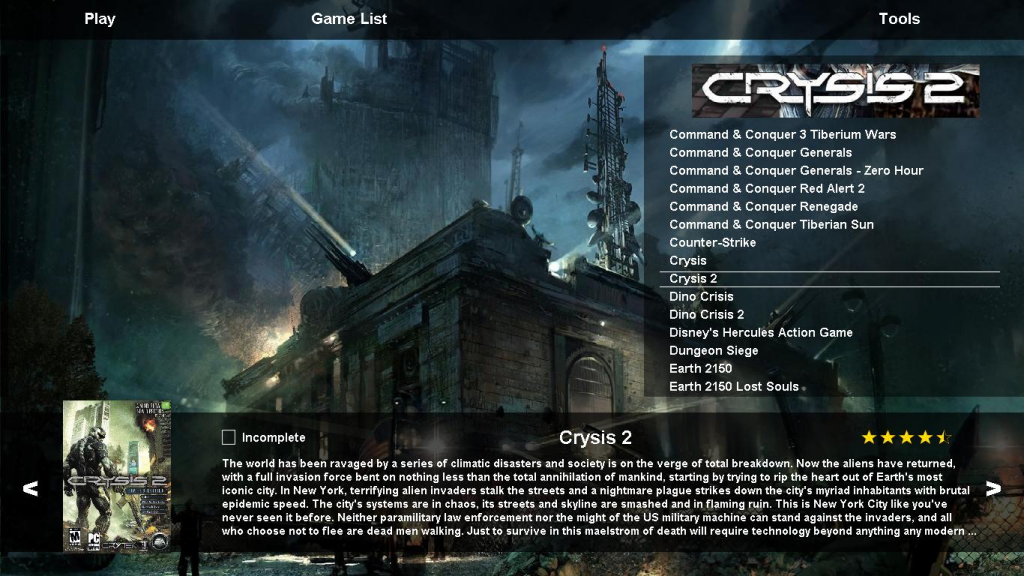
Game Manager is Windows tool with a host of game-related functions.

At its simplest you can use the program just as an attractive launcher. It's able to download screen grabs, box art, banners and more, there are multiple ways to sort, organise and display your game collection via its wide-screen Media Centre-style interface, and you can launch your preferred option in a click or two.

If you use DAEMON Tools or Alcohol 120% to create and mount images of your game discs then Photon Game Manager can simplify the process, by automatically mounting the images when needed, and removing them when you're done.

When you need to record a stand-out game moment, Game Manager can take screen grabs for you, then organise and display these later. (Of course you can do this from most games anyway, but having a single capture tool to work across all your games does make life simpler.)

And the program can also keep your games up-to-date, by downloading and installing official patches as they appear.

This isn't quite as good as it sounds, unfortunately. The initial setup in particular can be difficult; in theory the program can automatically search for your games, or you can add them manually, but neither option is particularly intuitive and even when we thought we'd successfully added something, Game Manager still resolutely refused to display it.

Still, if you can bypass that hurdle then there's plenty of power here, so if you're a keen gamer then it may be worth a (brief) look.

Verdict:

Game Manager 3 looks good and provides access to lots of useful features, if you can get it set up properly, but an awkward setup process means that can be a problem. Give it a try, but don't be surprised if you have problems at first.

Your Comments & Opinion
 
Related Download Articles
 
Other Download Articles From This Category
WinUAE

WinUAE 2.4.1

Freeware

An Amiga emulator for fans of retro computing

Game Downloader 2.8

Game Downloader 2.9

Freeware

Easily find and download free games

IObit Game Booster

IObit Game Booster 3.4

Freeware

Temporarily shut down unnecessary programs to free up RAM for resource-hungry games

Smash Cops

Smash Cops 1.02.02

Freeware

The strong arm of the law smashes its way through the city streets

From Softwarecrew

Please wait while my feed loads

See more posts...

Our Price: $18.99
RRP: $49.95
Saving 62%
Buy Now More Info
Offer Ends In:
 

Spotlight: Free Full Software

Giveaway: WinISO Standard 6.1.0

Free Full Commercial Software

WinISO is a very comprehensive tool which provides everything you need to create, edit and convert disc images.

If you've an image file already, for instance (ISO, CUE/ BIN, NRG, MDF, CCD, IMG and DVD formats are supported) then you can open it in a click or two, browse the image contents, and extract the files you need with a quick drag and drop.

It's just as easy to create new ISO9660, UDF, even HFS+ images. Just choose the option you need, then either manually build up your preferred file and folder structure; drag and drop your files and folders from Explorer onto the program; or create an image directly from a CD, DVD or Blu-ray disc.

Of course you can edit images, too. Is an ISO file too large for your needs, say? Open it up, locate and remove any surplus files to free up a little space.

WinISO program has full support for reading and creating bootable image files. A simple conversion tool makes it easy to convert disc images into the format you need. And the program can even mount ISO files as Explorer files, or burn images to disc when you're ready to save them.

Please note, this trial version of WinISO Standard will not save files greater than 500MB in size.

Giveaway: on Wednesday, we're giving you the full current version of WinISO Standard 6 worth $29.95. The download link here will take you to Downloadcrew Giveaway.

[...]
Time Remaining: