


My Daily Wallpaper is a compact, portable tool which can change your wallpaper automatically, or on demand.
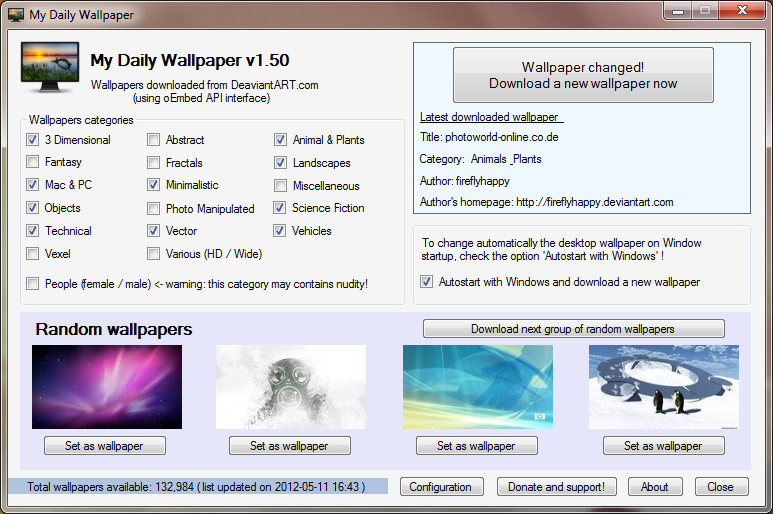
The program accesses its images from DeviantART.com, which means there's plenty of choice (more than 132,000 wallpapers as we write). You won't like them all, of course, but My Daily Wallpaper can be restricted to your favourite image categories: Landscapes, Minimalistic, Animals and Plants, Fractals and so on.
If you like complete control over what's happening then you can use My Daily Wallpaper as a simple browser. Open the program's main window, click the "Download next group of random wallpapers" button, and it'll download and display four sample images from your preferred categories. If you like one, click its "Set as wallpaper" button; if you don't, click "Download" again and check the next four.
Or, if you're happy to let My Daily Wallpaper decide, check the "Autostart with Windows and download a new wallpaper" box. Then, every time you log on, the program will launch, grab a new image and automatically set it as your desktop background. (Although if you don't like the image then you can always download another by choosing the appropriate option from My Daily Wallpaper's system tray icon.)
And that's essentially it, although the program does have a few useful settings on offer, too. Click "Configuration" and you can define your minimum wallpaper resolution, set up proxy options and decide whether you'd like to keep copies of your downloaded images, amongst other items.
Version 7.00:
- new feature: add a local images directory. Now you can use your personal pics as random wallpapers!
- fixed rare bug: cannot use a wallpaper in case the path does not contains two slashes
- fixed some rare crash
- fixed the error reporting engine
- various code fix and bug fix
Verdict:
A simple but likeable and easy-to-use wallpaper changer
Your Comments & Opinion
1. There is an installer that runs when launched that prompts for the installation of the "Full" free version.
2. To register for this full free version you will need to either install one of the 3rd party toolbars bundled with the software or donate.
3. It does allow you the option to "skip" (even though the SKIP button is grayed out, you can still click it) the install of the 3rd party toolbar and change of your browser homepage.
4. This version has tons more categories than seen in the screen shot and the UI is a little different.
I'm assuming that the original review was for an older version of the product. I just wanted everyone to be aware of the changes in the latest version 6.43.
Change your desktop wallpaper at set intervals with this powerful free app
Revitalise your desktop by automatically changing the wallpaper
Locate great new desktop backgrounds, and switch them automatically with this powerful free utility
Get the Bing search box (and wallpaper) on your Windows desktop
Automatically change your desktop wallpaper to spectacular online images
Use Bing/ Spotlight images on the desktop
Browse epub, mobi, fb2, cbr, cbz eBooks
Record, edit and share videos of your desktop
Powerful PDF processing toolkit
A free tune-up utility to maintain the performance of Windows
Analyze, search, back up, clean up, and generally get more from your hard drive with this suite of tools