


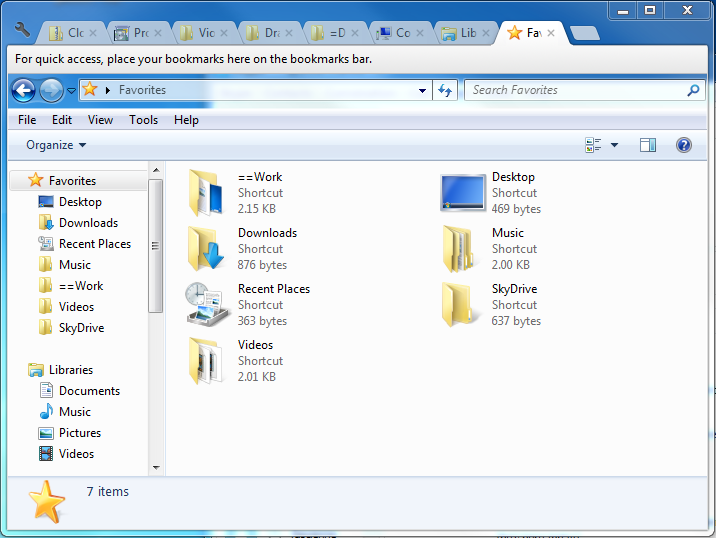
If you find that you are having to work with multiple folders at the same time, you no doubt find it annoying to have to have multiple Explorer windows open. Just as web browsers now all support tabs so that it is possible to view multiple web sites within the same browser window, so Clover enables you to add much the same feature to Explorer – this is an add-on for Windows Explorer rather than a replacement.
There are a number of Explorer replacement tools that can be used to gain access to extra features such as a tabbed interface, but these have one fairly major down side. Most people access Windows Explorer using the Windows key and E keyboard shortcut, and as this is a reserved shortcut, it is not possible to assign it to other program – thus Explorer-replacement tools have to be launched using a different key combo.
This is not the case with Clover. Rather than being a replacement for Explorer, it is actually and add-on. This means that when you launch Explorer – be it by using a Start menu shortcut, a Quick Launch icon or the keyboard shortcut – you still gain access to these extra options. The big news in Clover is the existence of tabs, and these work precisely as you would expect.
Any folder you would normally have open in a separate Explorer window is now housed in its own tab. You can navigate between them in just the same way as in your web browser. The same keyboard shortcuts work with Clover – so you can press Ctrl and T to open a new tab – and there are also extra features such as the ability to create a toolbar filled with links to your most frequently used locations.
Version 3.5.2 brings:
- Fix: XP SP3 does not open properly.
- Fix: WIN10 high score screen bug.
- Fix: Other known bugs.
Verdict:
One of the best enhancements you will find for Explorer. It is simple, elegant and immensely useful.
Your Comments & Opinion
Manage your files and folders with this dual pane tabbed Explorer replacement
A four paned Explorer replacement tool
Change date/time stamps and many more attributes of your files
Keep your files organised without the need to resort to using folders
Open multiple folders in a single window using this tabbed-based Windows Explorer replacement.
Take control of Explorer's toolbar, customising button for different folders
Enhance OS X's Finder with tabs
Ensure your hardware drivers are up to date with this automated tool
Completely uninstall unwanted programs in minutes
Clean up your hard drive and shred sensitive data with this open-source tool
A notepad/ to-do tool with cloud sync
Manage your files and folders with this dual pane tabbed Explorer replacement