


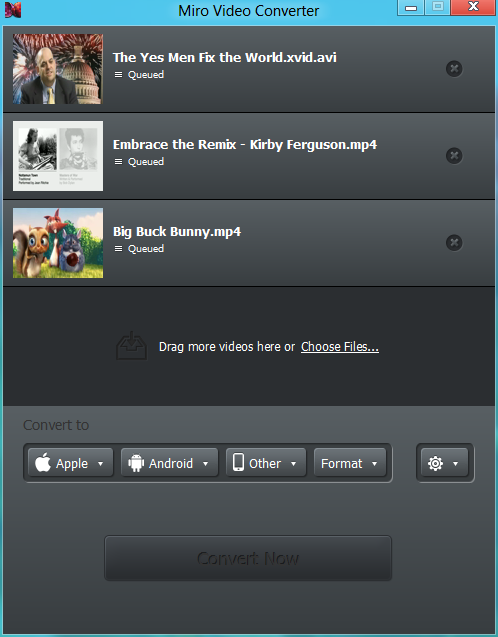
It's a fundamental law of video files that they're never in quite the format you need, especially for playback on mobile devices. Install Miro Video Converter and that needn't be a problem, though - the program provides the easiest possible way to transcode just about any video format to the Theora format, or files suitable to a range of mobile hardware: Android products (Behold II, Cliq/ DEXT, Droid, Eris/ Desire, G1, Hero, Magic/ myTouch, Nexus One), various Apple devices (iPhone, the iPod Classic, Nano and Touch), and the PSP.
To make this happen, all you need do is drag and drop a file onto Video Converter, choose your output format, and click Convert. It's as easy as that.
While simplicity is generally a good thing, Miro Video Converter does take it perhaps a little too far. There are no advanced tweaks here whatsoever, no options to customise bitrate, resolution, audio formats or anything else, so you can't, say, reduce the size of a particular group of videos to guarantee that they'll fit on a nearly full device. You can't even drag multiple videos onto the program in a single operation - it's strictly one at a time.
Miro Video Converter 3.0 is a major upgrade. New features/changes include:
- Batch Processing
- More devices and output formats
- Better control for output size and aspect ratio
- Output of progressive MP4 files for web playback
- Improved WebM output quality with SD and HD options
- Thumbnail generation
- Some additional output options for video developers
- And it’s all wrapped up in an incredible new UI!
Verdict:
While Miro Video Converter is short on features, it's also exceptionally easy to use. And behind the scenes quality libraries like FFmpeg carry out the conversions, so you can sure of good results
Your Comments & Opinion
Easily convert just about any videos into MP4s or MKV
Quickly convert files between all the most popular audio and video formats
A powerful yet easy to use DVD ripping and conversion tool
Access your backed up data on your mobile device
Rip YouTube videos into MP3 format
Stream audio and video to your Android mobile without the need to convert it first
Strip Exif data from your images and videos quickly and easily
View, annotate, edit and process all your images with this compact and versatile graphics tool
View, annotate, edit and process all your images with this compact and versatile graphics tool
Strip Exif data from your images and videos quickly and easily
Strip Exif data from your images and videos quickly and easily