


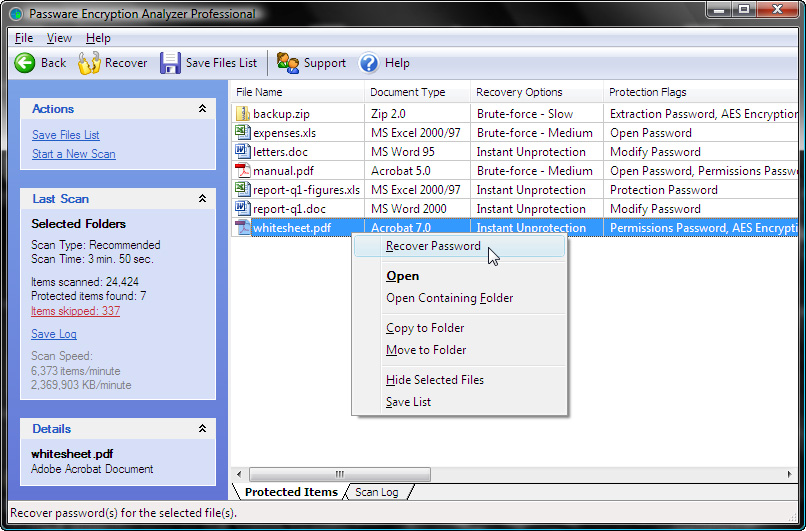
Passware Encryption Analyzer is an interesting tool which will quickly check your PC for encrypted or password-protected files (over 200 file types are supported).
If you use encryption yourself then this can be a useful reminder of where your protected files are located (and might, perhaps, point out files you've forgotten to encrypt).
And Passware Encryption Analyzer can also help you check that PCs you manage are being used as you expect. Are other users of the system trying to hide files by storing them in a password-protected zip file, say? Running the program can help you find out by revealing any encrypted files you didn't know about.
Whatever your reason for running Passware Encryption Analyzer, it won't take long to figure out how the program works: just choose the type of scan, the drives or folders to check, click Scan My Computer and it'll begin to check your system. This can take a while, but password-protected files are listed as they're found so you can get at least some feedback right away.
The finished report can be surprisingly lengthy, in part due to Passware Encryption Analyzer's thoroughness. You may find several PDF files listed, for instance: they'll probably open as normal, but the program is just pointing out that they have some security restrictions imposed (you may not be able to print them, for instance).
The real power here is reserved for the full commercial version of Passware Encryption Analyzer ($295), though, because that allows you to right-click a protected file and recover its password right away (and it can scan and work on network drives, too). You can install a free trial version to see how this works, though - find out more on the Passware site.
Verdict:
An interesting tool, particularly if you need to check a shared PC to make sure none of the other users are hiding content from you
Your Comments & Opinion
Never forget a password again with this password management tool
An easy-to-use encryption tool that makes light work of something that many people are intimidated by
A cross-platform password manager that secures you login credentials and more
Protect everything you type in your browser from keyloggers
Turn any USB flash drive into a key that will lock your PC when you're away
A super secure text editor that offers triple AES encryption
A command line malware remover
A command line malware remover
Keep your inbox free of spam
Protect your confidential data from snoopers
Protect your Windows 10 privacy with this antispy freebie