From Twitter

Please wait while my tweets load

If you can't wait - jump to Twitter

See more tweets...

RSS Feed

Please wait while my feed loads

See more posts...

Newsletter

Subscribe to either one of our two newsletters for regular updates and information

Downloads newsletter

This is a weekly newsletter with download news, updates and other information

This is a monthly newsletter with software store information, offers and deals

Microsoft Malicious Software Removal Tool (64-bit) v4.8

Detect and remove some common malware from your PC

by Mike Williams

Our Rating:
Your Rating:
Login to rate
Based on 1 ratings
License: Freeware
Operating Systems: Windows 7 (64 bit), Windows Vista (64 bit)
Requirements:


Languages: English
Software Cost: Free
Date Updated: 08 May 2012
Watchlist: Add download to my watchlist
Downloads To Date: 1464
Developer: Microsoft
RSS News Feed: http://www.microsoft.com/security/portal/RSS/TopList2RSS.aspx
Twitter Feed: http://twitter.com/msftsecresponse
Buy TuneUp Utilities 2012 for only $18.99, with lifetime license, saving 62% from MSRP, only from store.downloadcrew.com
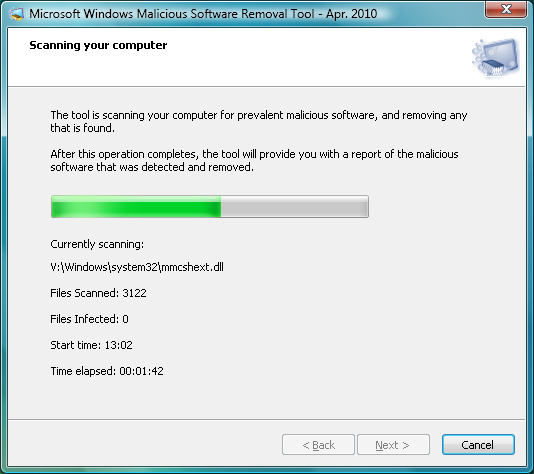
Microsoft Windows Malicious Software Removal Tool
Detect and remove some common malware

The Microsoft Windows Malicious Software Removal Tool is a quick and easy tool to uncover and eliminate malware from your system. Just choose the type of scan you need - quick (takes a few minutes), full (takes ages, usually) or custom (scan only the areas you specify) - then leave the program to check your hard drive for threats, and remove any that it finds.

While useful, this is no substitute for an antivirus package. The Malicious Software Removal Tool has no real-time detection features, for instance, so it can't stop you getting infected in the first place. And it only checks for some of the most common malware (see the full list here), currently around 150 specimens in total) - a good antivirus tool will detect hundreds of thousands of threats.

Still, if you think your PC might be infected by something, but your current antivirus suite hasn't raised the alarm, then you can always try the Malicious Software Removal Tool for a quick second opinion (it won't clash with any existing security tools).

And because the program doesn't require installation, it's ideal for including on a USB flash drive as a part of your portable troubleshooting toolkit. Then, if a friend's PC seems to be having virus troubles, you can pull out the Malicious Software Removal Tool and give their system a speedy health check.

Verdict:

The Microsoft Windows Malicious Software Removal Tool is a useful way to remove some common malware specimens from your PC, but don't forget - it only removes a very small percentage of the threats out there

Your Comments & Opinion
 
Related Download Articles
 
McAfee Labs FakeAlert Stinger 10

McAfee Labs FakeAlert Stinger 10.2.0.361

Freeware

Stand-alone tool designed to quickly detect and remove many "FakeAlert" viruses

Microsoft Windows Malicious Software Removal Tool (32-bit)

Microsoft Malicious Software Removal Tool (32-bit) v4.8

Freeware

Detect and remove some common malware from your PC

Microsoft Standalone System Sweeper 1.0.856 (64-bit)

Microsoft Standalone System Sweeper 1.0.856 (64-bit)

Freeware

Detect even the stealthiest of malware with this free antivirus tool

Microsoft Standalone System Sweeper 1.0.856 (32-bit)

Microsoft Standalone System Sweeper 1.0.856 (32-bit)

Freeware

Detect even the stealthiest of malware with this free antivirus tool

Other Download Articles From This Category
Windows Error Lookup Tool

Windows Error Lookup Tool Portable 3.0.5

Freeware

Instantly decode cryptic Windows error codes with this handy tool

PNotes Portable

PNotes Portable 9.0.107

Freeware

Get yourself organised by recording reminders for all your most important tasks on virtual sticky notes

RedCrab - The Calculator 4.14

RedCrab - The Calculator 4.14

Freeware

Solve complex equations in seconds with this powerful calculator

Maxthon Portable

Maxthon Portable 3.3.8.2000

Freeware

Maxthon 3 delivers IE's compatibility and Chrome's speed in one powerful browser

From Softwarecrew

Please wait while my feed loads

See more posts...

Our Price: $14.95
RRP: $49.95
Saving 70%
Buy Now More Info
Offer Ends In:
 

Spotlight: Free Full Software

Giveaway: WinISO Standard 6.1.0

Free Full Commercial Software

WinISO is a very comprehensive tool which provides everything you need to create, edit and convert disc images.

If you've an image file already, for instance (ISO, CUE/ BIN, NRG, MDF, CCD, IMG and DVD formats are supported) then you can open it in a click or two, browse the image contents, and extract the files you need with a quick drag and drop.

It's just as easy to create new ISO9660, UDF, even HFS+ images. Just choose the option you need, then either manually build up your preferred file and folder structure; drag and drop your files and folders from Explorer onto the program; or create an image directly from a CD, DVD or Blu-ray disc.

Of course you can edit images, too. Is an ISO file too large for your needs, say? Open it up, locate and remove any surplus files to free up a little space.

WinISO program has full support for reading and creating bootable image files. A simple conversion tool makes it easy to convert disc images into the format you need. And the program can even mount ISO files as Explorer files, or burn images to disc when you're ready to save them.

Please note, this trial version of WinISO Standard will not save files greater than 500MB in size.

Giveaway: on Wednesday, we're giving you the full current version of WinISO Standard 6 worth $29.95. The download link here will take you to Downloadcrew Giveaway.

[...]
Time Remaining: